Skip to Main Content
Sam's Club
Sam's Club
All Departments
All Services
Customer reviews for SAMSUNG 85" Class U8000F Series 4K Crystal UHD Smart TV for
SAMSUNG 85" Class U8000F Series 4K Crystal UHD Smart TV
4.5 out of 5 stars
stars
3,309 ratings3,277 reviews
  1. 5 stars71% (2,355)
  2. 4 stars16% (517)
  3. 3 stars7% (218)
  4. 2 stars3% (100)
  5. 1 star4% (119)

Member photos

  • +1031 images
Sort by |
Showing 1,901-1,910 of 3,277 reviews
Nov 16, 2025
Reviewer name: Popcorn
5 out of 5 stars
5 out of 5 stars review

I like being able to link my S25 Ultra to my TV

[This review was collected as part of a promotion.] This is a great TV it works wonderfully, I link all my services to the TV and can seamlessly for the most part do everything on my phone through the TV. I am learning the new technology to be able to make my time and usage of technology more efficient.

Review from Samsung US
Helpful?3CTS2O15ZY1416007408101
Oct 14, 2025
Reviewer name: Texasmb
5 out of 5 stars
5 out of 5 stars review

TV is easy to setup, with great picture & features
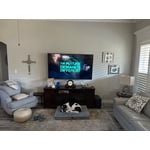
[This review was collected as part of a promotion.] We own 4 TV's 1-75" & 3-50" one in main living area 2 in bedrooms & one on outdoor patio area. All are on streaming with Spectrum & work great, they were easy to setup. They have great picture and very usable features, wouldn't buy anything other than Samsung. Will be replacing one more in my office with an updated one.

Review from Samsung US
Helpful?3CTS2O15ZY1416007408101
Oct 14, 2025
Reviewer name: Jac281968
5 out of 5 stars
5 out of 5 stars review

Perfect TV for a large family room.

[This review was collected as part of a promotion.] I purchased this TV to replace a 75-in that was damaged in a fire. It fits perfectly in my living room and is great for watching sports. It's large size makes it easy to view from the kitchen since we have an open floor plan. I love this TV.

Review from Samsung US
Helpful?3CTS2O15ZY1416007408101
Oct 20, 2025
Reviewer name: LovesickoverSamsung
5 out of 5 stars
5 out of 5 stars review

Amazing Samsung

[This review was collected as part of a promotion.] I love my new Samsung tv, I bought a new one about 3 months ago which wasn't a Samsung my mistake. I will clearly buy one of these forever!! I love you can use the app, I love it doesn't have batteries and you just use solar power! I can hook up about anything I want to it with that app. Personally the best investment I've made. Never another brand always Samsung!! It's a 55 inch and looks picture perfect

Review from Samsung US
Helpful?3CTS2O15ZY1416007408101
Dec 20, 2025
Reviewer name: GREATLowPrice
5 out of 5 stars
5 out of 5 stars review

Great low Price large screen

[This review was collected as part of a promotion.] The pictures are clear, bright and awesome. It was easy to unbox and set up. The Turning on and setting up the tv was also very easy. It guides you along the way to make the remote from my cable box work on the tv. There are so many preinstalled tv apps

Review from Samsung US
Helpful?3CTS2O15ZY1416007408101
Dec 6, 2025
Reviewer name: ILoveSamsung
2 out of 5 stars
2 out of 5 stars review

Disappointed...

[This review was collected as part of a promotion.] The rating for this unit is strictly based on the fact that this model does not include an optical sound connection, so please do not attribute it to quality of the picture. I should note that I love Samsung products and that I purchased a different model to replace this one.

Review from Samsung US
Helpful?3CTS2O15ZY1416007408101
reply from Samsung Advisor

Hi ILoveSamsung, Thank you for sharing your thoughts on the available inputs for the U8000F. If an Optical port is a crucial part of your setup needs, you’ll find that connection starting with our Q8F Series and above. For future purchases, we recommend double-checking the product specs on Samsung's site to ensure the model you choose has the ports you need. You can find this by clicking on “Specs” (just beneath the Product Title), then "See All Specs" for the full list of available inputs and more: https://www.samsung.com/us/tvs/qled-tv/55-class-qled-tv-q7f-sku-qn55q7faafxza/ Should you ever need assistance with your TV, Samsung is here for you. Reach out by calling 1-800-SAMSUNG between 8AM - 12AM EST, any day of the week. You can also chat with us online by visiting the ‘Support’ section of our website. ~ Samsung Advisor

Nov 7, 2025
Reviewer name: TexasBestWelder87
5 out of 5 stars
5 out of 5 stars review

Remarkable Clarity he's TV has.

[This review was collected as part of a promotion.] This television represents a significant upgrade in visual entertainment. Its advanced display technology delivers exceptionally vivid colors and remarkable detail. The smart features integrated seamlessly, providing intuitive access to a vast array of content. Furthermore, the audio performance is surprisingly robust, creating an immersive experience. For discerning viewers, this model sets a new benchmark for home theater quality.

Review from Samsung US
Helpful?3CTS2O15ZY1416007408101
Oct 13, 2025
Reviewer name: Smiley
2 out of 5 stars
2 out of 5 stars review

this product is difficult to use

[This review was collected as part of a promotion.] this tv is used for normal tv viewing this tv is extremely difficult to use .there are no easily handy instructions,. the user interface is difficult to use. i cannot use the tv features because there are no easy to access instructions . no easy access to how to use tv features

Review from Samsung US
Helpful?3CTS2O15ZY1416007408101
reply from Samsung Advisor

Hi Smiley, Thank you for sharing your feedback with us. To help you get the most from your TV, you can download the full e-Manual and more by visiting Samsung’s website, then navigating to: Support > Manual & Software > TVs & Home Theater. From there, you can search for and select your TV model to view or download the available guides. The e-Manual & User Guide are also conveniently built into your TV: Settings > Support > Tips and User Guides. Your TV includes Learn Menu Screen, an accessibility feature that provides audio guidance for on-screen menus. When enabled, your TV will announce the name and function of each menu item as you scroll, without making any changes. This feature is particularly helpful for users who are visually impaired or new to Smart TV menus. To enable, go to: Settings > All Settings > General & Privacy > Accessibility > Learn Menu Screen. To exit, press the Return key twice. If you’d like more assistance with this feature, please reach Samsung Support at 1-800-SAMSUNG, available 8AM – 12AM EST, 7 days a week. LiveChat agents are also available through the ‘Support’ link on our website. ~ Samsung Advisor

Dec 16, 2025
Reviewer name: SamsungLuvinDawg
5 out of 5 stars
5 out of 5 stars review

Love My Samsung

[This review was collected as part of a promotion.] I had this 55 Samsung in the bedroom and I have another brand 65 in the living room. I love this Samsung so much that I'm switched them so the smaller TV is actually in the living room now and the bigger TVs in the bedroom and I rarely watch it. The Samsung TV is amazing I love it and I love my Samsung s25 ultra. Amazing I love Samsung!

Review from Samsung US
Helpful?3CTS2O15ZY1416007408101
Jan 21, 2026
Reviewer name: jlag
4 out of 5 stars
4 out of 5 stars review

Fantastic Picture

I upgraded from a 50” Seiki TV that I received for Christmas a number of years ago. It had the worst sound quality, and I could never get a bright enough picture. With this years Christmas money and purchased a 65” Samsung. The picture quality is amazing, but the sound is not as good as I expected. The primary reason I am giving a 4 star is what I went through to connect my Bose Soundbar. Samsung is one of the companies who has opted to eliminate the Optical connection for an HDMI eArc only connection, and my older Bose soundbar, which sounds awesome, and I have no reason to replace it, does not have an HDMI connection. After trial & error, I found the correct adapter

Review from Samsung US
Helpful?3CTS2O15ZY1416007408101