Skip to Main Content
Sam's Club
Sam's Club
All Departments
All Services
Customer reviews for SAMSUNG 85" Class U8000F Series 4K Crystal UHD Smart TV for
SAMSUNG 85" Class U8000F Series 4K Crystal UHD Smart TV
4.5 out of 5 stars
stars
3,309 ratings3,277 reviews
  1. 5 stars71% (2,355)
  2. 4 stars16% (517)
  3. 3 stars7% (218)
  4. 2 stars3% (100)
  5. 1 star4% (119)

Member photos

  • +1031 images
Sort by |
Showing 1,711-1,720 of 3,277 reviews
Feb 17, 2026
Reviewer name: Trennlo
4 out of 5 stars
4 out of 5 stars review

Great feature n awesome updates

[This review was collected as part of a promotion.] that Samsung has a very clear HD. wonderful sound graphic is very detail in overall it's a good TV the recommend anyone to buy a Samsung.

Review from Samsung US
Helpful?3CTS2O15ZY1416007408101
May 20, 2026
Reviewer name: Dr De
5 out of 5 stars
5 out of 5 stars review

Top notch TV

[This review was collected as part of a promotion.] I enjoy the way it's laid out on the screen when I turn it on. It makes it easy to find what I want. And the picture quality is amazing

Review from Samsung US
Helpful?3CTS2O15ZY1416007408101
May 5, 2026
Reviewer name: Bad start screen
1 out of 5 stars
1 out of 5 stars review

Bad start screen

[This review was collected as part of a promotion.] My older Samsung TV has a great useful start screen. My new TV start screen is hard to navigate and confusing.

Review from Samsung US
Helpful?3CTS2O15ZY1416007408101
reply from Samsung Advisor

Hi there, Thank you for your feedback on the U8000F Start Screen. While your TV may currently default to Samsung TV Plus when powered on, you can customize what your TV does at startup by adjusting the Start Screen Options. To do this, navigate to: Settings > All Settings > Advanced Features > Start Screen Option and choose from the following: 1. Start with Smart Hub Home – Automatically launches Smart Hub when the TV is turned on. You can enable or disable this option based on your preference. 2. Autorun Multi View Casting – If you cast YouTube content from your mobile device, the TV will automatically display the content using Multi View. 3. Autorun Multi View Mirroring – When you screen mirror your mobile device, Multi View will automatically open to show your device’s screen. If you need help adjusting these settings or have any other questions, please contact Samsung Support at 1-800-SAMSUNG, 8AM – 9PM EST Mon – Fri, 8AM – 6PM Sat – Sun. LiveChat agents are also available by clicking on the ‘Support’ link on our website. ~ Samsung Advisor

May 11, 2026
Reviewer name: AlaskaMike
5 out of 5 stars
5 out of 5 stars review

Love this tv

[This review was collected as part of a promotion.] I love how the detail, colors, and definition look on the screen! Perfect for watching show and movies and also for playing games, makes me happy I got 4k streaming subscriptions and a ps5 now!

Review from Samsung US
Helpful?3CTS2O15ZY1416007408101
Mar 20, 2026
Reviewer name: Coucht8r
5 out of 5 stars
5 out of 5 stars review

Clear and Sound is Good

[This review was collected as part of a promotion.] As usual, Samsung puts out a quality product. The picture quality is great and the audio is clear.I have no issues with dialog and background noise.

Review from Samsung US
Helpful?3CTS2O15ZY1416007408101
Mar 23, 2026
Reviewer name: Navin
5 out of 5 stars
5 out of 5 stars review

Good quality and features
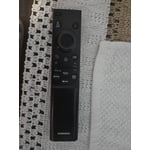
[This review was collected as part of a promotion.] TV working perfect and I love the features. Only issue is prefer a proper remote controller instead of this new version.

Review from Samsung US
Helpful?3CTS2O15ZY1416007408101
May 11, 2026
Reviewer name: Sarah Mae
4 out of 5 stars
4 out of 5 stars review

Love Samsung

[This review was collected as part of a promotion.] Rosemary satisfied with this model product... comes with everything definitely how much is everything and definitely beats the fire stick

Review from Samsung US
Helpful?3CTS2O15ZY1416007408101
May 11, 2026
Reviewer name: TheTVGuy
5 out of 5 stars
5 out of 5 stars review

One of the best TV's I've ever owned

[This review was collected as part of a promotion.] I bought this tv as a second for my Rec room and it instantly was switched out with my main living room tv. The colors and sharpness are unmatched!

Review from Samsung US
Helpful?3CTS2O15ZY1416007408101
May 20, 2026
Reviewer name: Pakat
3 out of 5 stars
3 out of 5 stars review

No Voice Commands

[This review was collected as part of a promotion.] The TV clarity is superb. I would not have purchased it if I knew it did not have voice command options.

Review from Samsung US
Helpful?3CTS2O15ZY1416007408101
reply from Samsung Advisor

Hi Pakat, Thank you for sharing your review. Your TV does not have a built-in voice assistant, but it does work with Alexa, meaning you’ll need to connect a standalone Alexa device, such as an Echo speaker, to control compatible smart home devices and some experiences on your TV. Here are the steps: 1. Download both the Amazon Alexa and Samsung SmartThings apps, if you don't already have them. Both are available for iOS or Android devices. 2. Make sure your Alexa device and TV are both connected to the same Wi-Fi network. 3. Your TV must be enabled within the SmartThings app. If not, make sure you are signed in with your Samsung account on the TV: Settings > All Settings > Samsung Account 4. Log in to the SmartThings app with the same Samsung account. Tap Devices, and if your TV isn’t already shown, tap + to add it to the app. 5. In the Alexa app, enable the SmartThings skill and sign into your Samsung account. This will automatically connect your Samsung TV to Alexa and let you use voice commands to control your television. If you need more help, we’re here. Give us a call at 1-800-SAMSUNG (8AM – 9PM EST Mon – Fri, 8AM – 6PM Sat – Sun). You can also connect with a LiveChat agent through the Support link on our website. ~ Samsung Advisor

Apr 10, 2026
Reviewer name: BabbyPiggy1
5 out of 5 stars
5 out of 5 stars review

AWSOME PICTURES

[This review was collected as part of a promotion.] Omg this is the most AWSOME picture I've never had such a good experience with a tv I was pleased and shocked

Review from Samsung US
Helpful?3CTS2O15ZY1416007408101