Skip to Main Content
Sam's Club
Sam's Club
All Departments
All Services
Customer reviews for SAMSUNG 65" Class U8000F Series 4K Crystal UHD Smart TV for
SAMSUNG 65" Class U8000F Series 4K Crystal UHD Smart TV
4.5 out of 5 stars
stars
1,472 ratings1,415 reviews
  1. 5 stars74% (1,087)
  2. 4 stars15% (219)
  3. 3 stars5% (76)
  4. 2 stars3% (47)
  5. 1 star3% (43)

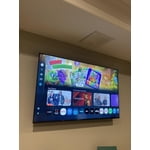
Member photos

  • +378 images
Sort by |
Showing 791-800 of 1,415 reviews
Aug 22, 2025
Fruitalishous
5 out of 5 stars review

Simply Fabulous TV absolutely love it

[This review was collected as part of a promotion.] We love our Samsung TV it was a great addition to our home we stream our favorite TV shows and movies on a regular basis I personally love listening to music and stream my favorite playlists on it all the time and get to watch the videos they're amazing the sound is amazing so clear and crisp it's great for while I'm doing my housework or entertaining my son games on it have to fight to get him off of it he loves the detail at Christmas time we live in Florida so we don't have a fireplace but we do a virtual fireplace on the screen of the TV with an app and the sound feature is great it sounds like a fire burning in the fireplace and the fire looks very realistic it makes it so cozy and Christmassy all in all it's a great product and I would recommend it to anyone

Review from Samsung US
Helpful?23IWKCJCPHCF15992409490
Aug 22, 2025
Sleepynsc
5 out of 5 stars review

Great tv this is
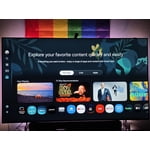
[This review was collected as part of a promotion.] The Samsung U8000FD Crystal UHD (2025) is a budget-friendly 4K LED TV that delivers solid performance without breaking the bank. Boasting Samsung’s Crystal Processor 4K, it offers smooth upscaling of HD content to near-4K clarity—a reliable performer for streaming and casual viewing . Its Direct-Lit LED panel with basic UHD Dimming software helps boost contrast and color depth—though real local dimming is absent, so blacks appear somewhat gray in darker scenes . Peak brightness is adequate for typical living rooms but falls short in rooms with intense ambient light or for truly impactful HDR . Factory-calibrated colors slightly lean blue, though switching to the “Movie” mode significantly improves accuracy . With a native refresh rate of 60 Hz augmented by Samsung’s Motion Xcelerator, fast-paced content—sports or action movies—remain watchable with minimal blur . Input lag is low and supports Allm/FRL HDMI 2.0, making it serviceable for casual gaming . Running Samsung’s refined One UI Tizen OS, the smart platform is intuitive, responsive, and delivers seamless access to all major streaming apps, plus Samsung’s plentiful free-to-watch content . Voice control is possible via SmartThings—though you’ll need an external Alexa or Google Assistant device . Audio is competent for everyday use, but not immersive—pairing with an external soundbar is recommended for theater-like sound. Samsung’s Knox security platform ensures your personal data remains well-guarded .

Review from Samsung US
Helpful?23IWKCJCPHCF15992409490
Aug 30, 2025
ItalianQueen88
5 out of 5 stars review

Amazing TV

[This review was collected as part of a promotion.] I use my Samsung TV not only to stream movies but I love the fact that I can use it for everything else like games and music. The quality of this TV is amazing. Crystal clear is an understatement. It's almost like you aren't even watching a TV but its like you are there in the movie or the music video itself!!!! Samsung you did it again and I will continue to have your products in my house, car, etc..... thank you!!

Review from Samsung US
Helpful?23IWKCJCPHCF15992409490
Aug 19, 2025
IheartSamsung
3 out of 5 stars review

Great picture but interface is clunky

[This review was collected as part of a promotion.] Love the picture and Samsung's integration with other Samsung products (ie phone). But some of it interface is clunky. Don't like the fact that Samsung TV auto loads every time and I can't just start from YouTubeTV. Also, it frequently disconnects from the internet and I frequently have to manually reconnect.

Review from Samsung US
Helpful?23IWKCJCPHCF15992409490
reply from Samsung Advisor

Hi IheartSamsung, Thank you for your review. While your U8000F TV may currently default to Samsung TV Plus when powered on, you can customize what your TV does at startup by adjusting the Start Screen Options. To do this, navigate to: Settings > All Settings > Advanced Features > Start Screen Option and choose from the following: 1. Start with Smart Hub Home – Automatically launches Smart Hub when the TV is turned on. You can enable or disable this option based on your preference. 2. Autorun Multi View Casting – If you cast YouTube content from your mobile device, the TV will automatically display the content using Multi View. 3. Autorun Multi View Mirroring – When you screen mirror your mobile device, Multi View will automatically open to show your device’s screen. For the best connection possible, please make sure both your TV and the Bluetooth device are running the latest firmware: Settings > Support > Software Update. If you’re still having trouble, we recommend trying a wired connection (HDMI or Optical) for improved reliability. For more help, please contact Samsung Support at 1-800-SAMSUNG, 8AM – 12AM EST, 7 days a week. LiveChat agents are also available on our website under ‘Support’. ~ Samsung Advisor

Sep 21, 2025
Shamalamadingdong
4 out of 5 stars review

Samsung TV Review

[This review was collected as part of a promotion.] We always have bought Samsung TVs but as time has progressed it definitely feels like the quality in regards to longevity has diminished. While the TV is functional they're great but don't seem to have much more life than 2-3 years.

Review from Samsung US
Helpful?23IWKCJCPHCF15992409490
Oct 24, 2025
JCJr222
5 out of 5 stars review

Amazing TV For The Price!!

[This review was collected as part of a promotion.] This TV unit has an impressive picture display and some very useful features for an impressively low price compared to other brands offerings of this size. Being a smart TV, it obviously connects to the internet with ease, has a very large number of apps available to download for streaming all of the most popular services along with several I've never even heard of before, is capable of controlling my connected Samsung soundbar from the single remote control, and the display quality has well surpassed my expectations of what I expected for the price point of this product. It has several connection options for peripheral devices. And my favorite feature, which I wasn't even aware was available when I made the purchase, is the built in Samsung SmartThings Hub to connect a wide variety of smart home devices without the need of any additional hardware! I've been able to connect my Matter compatible smart light bulbs which allows control even when I'm not home, my Samsung Smart Tag, and can easily stream content from my S23 Ultra, S25 Ultra, or Tab 9 FE tablet by simply selecting Smart View in the Settings app of whichever device I want to stream from. I highly recommend this TV to anyone looking for a nice sized screen with an amazing picture quality and all of the best features Samsung has to offer in their smart TV products.

Review from Samsung US
Helpful?23IWKCJCPHCF15992409490
Nov 2, 2025
Rbcoustemer23
3 out of 5 stars review

Love the settings options in this TV

[This review was collected as part of a promotion.] This TV is awesome I love the settings options it brings is easy tlfor me to navigate but the interface action is slow once I ove from settings to settings or im using the Samsung tv app and im watching movies and shows another thing the control sometimes miss clicks on the options but o ther than that I like the TV.

Review from Samsung US
Helpful?23IWKCJCPHCF15992409490
reply from Samsung Advisor

Hi Rbcoustemer23, Thank you for sharing your experience with us. It's great ot hear that you are enjoying your 4K television. For optimal performance, please ensure your U8000F TV is running the latest firmware. You can check this by going to: Home > left directional key > Settings > Support > Software Update To further optimize performance, try running Device Care, which checks memory, clears unused cached data, and closes background apps: Home > left directional key > Settings > Support > Device Care > Start Device Care If issues continue, please reach Samsung Support at 1-800-SAMSUNG, available 8AM – 12AM EST, 7 days a week. LiveChat is also available via the ‘Support’ link on our website. ~ Samsung Advisor

Sep 6, 2025
Corysabre
5 out of 5 stars review

I love the sharp picture quality of the 4K.
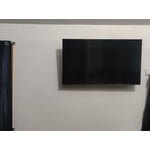
[This review was collected as part of a promotion.] I use my TV for streaming and for watching antenna TV programming. I like to watch live sports in a good vivid view. This TV allows me to experience my content in a sharp picture that is very pleasing to the eyes. I really feel like I'm on the field with the players. The movies are great to watch too,after seeing a movie you already watched in standerd definition,the Ultra High Definition makes you experience it in a whole new way as if you haven't seen it before. I look forward to watching more movies. I am also very excited to see this next NFL season come alive on my new TV.

Review from Samsung US
Helpful?23IWKCJCPHCF15992409490
Oct 18, 2025
Itisallmine
5 out of 5 stars review

It's absolutely fantastic an easy on the eyes

[This review was collected as part of a promotion.] It's good for when I'm home an Im in another room an I can still hear it clearly as if I'm still in the same room an I like how when I'm looking at in it makes me feel like I'm wherever they are even old movies an old shows also

Review from Samsung US
Helpful?23IWKCJCPHCF15992409490
Oct 14, 2025
Texasmb
5 out of 5 stars review

TV is easy to setup, with great picture & features
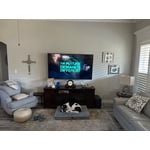
[This review was collected as part of a promotion.] We own 4 TV's 1-75" & 3-50" one in main living area 2 in bedrooms & one on outdoor patio area. All are on streaming with Spectrum & work great, they were easy to setup. They have great picture and very usable features, wouldn't buy anything other than Samsung. Will be replacing one more in my office with an updated one.

Review from Samsung US
Helpful?23IWKCJCPHCF15992409490