Skip to Main Content
Sam's Club
Sam's Club
All Departments
All Services
Customer reviews for SAMSUNG 65" Class U8000F Series 4K Crystal UHD Smart TV for
SAMSUNG 65" Class U8000F Series 4K Crystal UHD Smart TV
4.5 out of 5 stars
stars
1,462 ratings1,405 reviews
  1. 5 stars74% (1,079)
  2. 4 stars15% (218)
  3. 3 stars5% (75)
  4. 2 stars3% (47)
  5. 1 star3% (43)

Member photos

  • +373 images
Sort by |
Showing 331-340 of 1,405 reviews
Jun 20, 2026
take1pro
5 out of 5 stars review

Love It!

We, my wife and I, love the 7" Class Crystal UHD U8000FD 4k Smart TV. It has proven to exceed our expectations both in performance and purchase value.

Review from Samsung US
Helpful?23IWKCJCPHCF15992409490
Jun 28, 2026
Katdog97
5 out of 5 stars review

Highly Recommend

I absolutely LOVE this tv! I just moved to a new house and bought it for my bedroom. Its super clear, easy to navigate, smooth and fast! Highly recommend!

Review from Samsung US
Helpful?23IWKCJCPHCF15992409490
Jun 5, 2026
Lulu
5 out of 5 stars review

Great TV
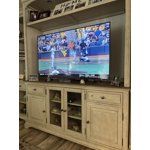
[This review was collected as part of a promotion.] This was our first Samsung TV. We are very pleased. It’s our main TV where we watch 70% of the time. Our next TV will be a Samsung

Review from Samsung US
Helpful?23IWKCJCPHCF15992409490
Jun 5, 2026
Big Daddy
5 out of 5 stars review

It's So Big

[This review was collected as part of a promotion.] I have this 85" Samsung TV and just love it. I bought the Samsung surround sound to go along with it. It is like I'm in a movie theater in my living room. It was an exceptional value also.

Review from Samsung US
Helpful?23IWKCJCPHCF15992409490
Jun 20, 2026
VadimNewYork
3 out of 5 stars review

2026 Average TV
Great TV however when connecting to Samsung phone it is lagging and also this TV doesn't have digital audio in to connect sound bar, only via Bluetooth

Review from Samsung US
Helpful?23IWKCJCPHCF15992409490
reply from Samsung Advisor

Hi VadimNewYork, Thank you for reaching out to us. Please know you can connect to external audio via Bluetooth and HDMI connection. When using Smart View with your mobile device, please keep in mind: • Performance may be affected on a 2.4GHz network. For the best experience, connect to 5GHz Wi-Fi. • Your mobile device must support Wi-Fi Direct to use that feature - check your device manual for details. • Both your TV and mobile device must be connected to the same network. • Video or audio may intermittently stop depending on network conditions. If you need further help, please don’t hesitate to reach Samsung Support at 1-800-SAMSUNG (8AM – 9PM EST Mon – Fri, 8AM – 6PM Sat – Sun). LiveChat agents are also available via the ‘Support’ link on our website. ~ Samsung Advisor

Jun 1, 2026
CarlosA
5 out of 5 stars review

Great Features works with Alexa, Airplay Google
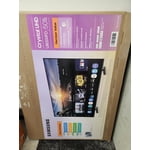
[This review was collected as part of a promotion.] This is a great product that works with all of my applications and my Samsung phones. It easy to program the options for my personal preferences.

Review from Samsung US
Helpful?23IWKCJCPHCF15992409490
Jun 12, 2026
Jetc33
5 out of 5 stars review

Samsung User For Lyfe

[This review was collected as part of a promotion.] Samsung picture clarity and sound quality is crystal clear. Plays movies and games with prestine function.

Review from Samsung US
Helpful?23IWKCJCPHCF15992409490
Jun 8, 2026
Jaws
4 out of 5 stars review

Remote

[This review was collected as part of a promotion.] My only issue is the remote. It is hard to use and I still can’t figure out how to add certain apps like Utube TV WITHIUT GOING THROUGHT 3 different screens

Review from Samsung US
Helpful?23IWKCJCPHCF15992409490
Jun 5, 2026
Mike
2 out of 5 stars review

Slow response

[This review was collected as part of a promotion.] Compared to my older Samsung 65” this interface is horrible totally inconsistent with the other and slower than a Intel 286 processor

Review from Samsung US
Helpful?23IWKCJCPHCF15992409490
reply from Samsung Advisor

Hi Mike, We appreciate your feedback regarding your U8000FD TV’s performance. If you're experiencing freezing or lag in general response time, please try the following steps: 1. Check for firmware updates – Keeping your TV up to date can resolve many performance issues: Home > left directional key > Settings > Support > Software Update > Update Now 2. Run Device Care – This tool checks system memory, frees up cached data, and closes background apps that could be slowing things down: Home > left directional key > Settings > Support > Device Care > Start Device Care 3. Cold boot your TV – With the TV powered on, press and hold the Power button on your remote for 5+ seconds until the TV restarts. This helps refresh the system. If you're still noticing performance snags after these steps, please contact Samsung Support at 1-800-SAMSUNG (8AM – 9PM EST Mon – Fri, 8AM – 6PM Sat – Sun). You can also connect with a LiveChat agent via the ‘Support’ link on our website. ~ Samsung Advisor

Jun 13, 2026
Pmartinez
5 out of 5 stars review

Great product
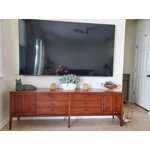
[This review was collected as part of a promotion.] Great picture and even the sound quality from being the TV speaker are good the brightness is amazing the resolution is great but you have to remember the programming matters

Review from Samsung US
Helpful?23IWKCJCPHCF15992409490