Skip to Main Content
Sam's Club
Sam's Club
All Departments
All Services
Customer reviews for SAMSUNG 65" Class U8000F Series 4K Crystal UHD Smart TV for
SAMSUNG 65" Class U8000F Series 4K Crystal UHD Smart TV
4.5 out of 5 stars
stars
1,659 ratings1,601 reviews
  1. 5 stars73% (1,209)
  2. 4 stars15% (245)
  3. 3 stars6% (98)
  4. 2 stars3% (52)
  5. 1 star3% (55)

Member photos

  • +454 images
Sort by |
Showing 1,451-1,460 of 1,601 reviews
Dec 6, 2025
Reviewer name: NickFless
5 out of 5 stars
5 out of 5 stars review

Great functionality

[This review was collected as part of a promotion.] Great apps. Great picture quality. Very easy to use. I love that it works with my phone!

Review from Samsung US
Helpful?23IWKCJCPHCF15992409490
Oct 30, 2025
Reviewer name: Jujutho
5 out of 5 stars
5 out of 5 stars review

I love it

[This review was collected as part of a promotion.] Best tv ever perfect picture and sound and has awesome connection to devices

Review from Samsung US
Helpful?23IWKCJCPHCF15992409490
Oct 4, 2025
Reviewer name: Canaree
5 out of 5 stars
5 out of 5 stars review

Clear picture and great features

[This review was collected as part of a promotion.] This tv is great for streaming and gaming my kids love it's picture quality.

Review from Samsung US
Helpful?23IWKCJCPHCF15992409490
Dec 4, 2025
Reviewer name: Yin
3 out of 5 stars
3 out of 5 stars review

It does NOT have all the streaming apps

I've always had Samsung TVs, and this is the first one I've bought that I can't download HBO Max or Peacock to. DON'T BUY IT

Helpful?23IWKCJCPHCF15992409490
reply from Samsung

Hi Yin,<br /><br />Thank you for reaching out to us. Please know that both the HBO Max and Peacock apps are available for download on the U8000F TV. <br /><br />Here&#39;s how to add apps onto your TV: <br /><br />Searching for &amp; Installing Apps<br />1. From the Home screen, press left on the remote’s directional pad. <br />2. Navigate to and select Search.<br />3. Using the search bar, enter the content or app you’d like to find.<br />4. Navigate to and select the app you’d like to install, then select Install.<br /><br />Note: Previously installed apps can be accessed on the Settings screen.<br /><br />Adding &amp; Managing Apps on Home Screen<br />1. Go to App Settings (these can be found at the bottom of the Apps screen) and select the app you want to move. The following options will be available:<br />a. Add to Home: Move the app to your desired location on the Home screen.<br />b. Delete: Delete app.<br />c. Lock/Unlock: Lock the app with a PIN so only you can use it. When the app is selected again, you will be prompted to enter the PIN to unlock it.<br />d. Reinstall: Reinstall the app.<br />e. View Details: View the app’s information and details.<br /><br />If you need more help with app management, please don’t hesitate to reach Samsung Support at 1-800-SAMSUNG, available daily from 8AM - 12AM EST. You can also visit the Samsung website and click on ‘Support’ for:<br />• Live Chat<br />• Manuals, Software, &amp; Warranty Info<br /><br />~ Samsung Advisor

Dec 28, 2025
Reviewer name: Striker
5 out of 5 stars
5 out of 5 stars review

Crystal clear

[This review was collected as part of a promotion.] It's a crystal clear screen with many features, such as connecting with phone account and stuff.

Review from Samsung US
Helpful?23IWKCJCPHCF15992409490
Oct 15, 2025
Reviewer name: FamilyTV
5 out of 5 stars
5 out of 5 stars review

This product is great
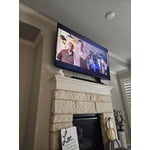
[This review was collected as part of a promotion.] I use the tv for movies and the picture is very clear 👌

Review from Samsung US
Helpful?23IWKCJCPHCF15992409490
Jun 8, 2025
Reviewer name: NattyG23
5 out of 5 stars
5 out of 5 stars review

Very smooth OS

[This review was collected as part of a promotion.] My family can easily switch from watching a cooking show to learn how to make a new dinner to of course the kids playing PS5 while I clean up. The built in camera with the free apps are always entertaining. Picture, sound and especially the vibrate distinctive colors make this yet another excellent Samsung choice!

Review from Samsung US
Helpful?23IWKCJCPHCF15992409490
May 22, 2025
Reviewer name: Bethany
4 out of 5 stars
4 out of 5 stars review

My experience

[This review was collected as part of a promotion.] So I ordered this lovely TV. Shipping was smooth and fast. My sons do alot of gaming as do myself. Pictures is on point. Crystal clear... it looks truly amazing and the TV looks great in the living room. Getting alot of comments from guest who come over. Never been happier

Review from Samsung US
Helpful?23IWKCJCPHCF15992409490
Apr 21, 2025
Reviewer name: TaaroBaap
5 out of 5 stars
5 out of 5 stars review

This TV is highly recommended.

[This review was collected as part of a promotion.] I recently purchased a Samsung TV, and I’m beyond impressed! The resolution is stunning, delivering sharp, vibrant colors that make every movie and show feel cinematic. Whether you're watching sports or gaming, the picture quality remains crisp and clear, even during fast-paced scenes. The TV is incredibly fast, with zero lag or buffering—everything loads instantly, and switching between apps is seamless. I also love the range of features available. From smart capabilities like voice control and app integration to the ability to connect multiple devices effortlessly, it’s packed with functionality. Plus, the TV comes with a bunch of free channels, which is a fantastic bonus. I was able to enjoy new content without having to pay for extra subscriptions! Overall, this Samsung TV has enhanced my viewing experience and exceeded all expectations. It’s a great investment for anyone looking for high-quality entertainment with modern tech features. Highly recommend!

Review from Samsung US
Helpful?23IWKCJCPHCF15992409490
May 20, 2025
Reviewer name: Best10outof10
5 out of 5 stars
5 out of 5 stars review

Excellent affordable TV choice

[This review was collected as part of a promotion.] This module has a great picture. The refresh rate along with the upscale feature makes for one of the best pictures available. Streaming from all platforms gives you a picture perfect view. Everything is so vivid and clear. It's as gaming is made for this TV. Very low latency and responsiveness is superb. This TV covers all angles. A 10 out of 10.

Review from Samsung US
Helpful?23IWKCJCPHCF15992409490