Skip to Main Content
Sam's Club
Sam's Club
All Departments
All Services
Customer reviews for SAMSUNG 58” Class U8000F Series 4K Crystal UHD Smart TV for
SAMSUNG 58” Class U8000F Series 4K Crystal UHD Smart TV
4.5 out of 5 stars
stars
2,527 ratings2,521 reviews
  1. 5 stars72% (1,823)
  2. 4 stars16% (399)
  3. 3 stars6% (156)
  4. 2 stars3% (70)
  5. 1 star3% (79)

Member photos

  • +766 images
Sort by |
Showing 2,231-2,240 of 2,521 reviews
Jul 30, 2025
BrentwoodBobby
4 out of 5 stars review

Samsung U8000F Crystal UHD TV (2025) Review
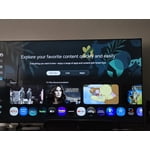
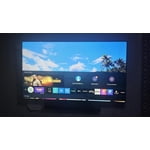
[This review was collected as part of a promotion.] After several weeks with the Samsung U8000F Crystal UHD TV, I'm genuinely impressed with what this set delivers for the price point. The standout feature is undoubtedly the picture quality – the crystal-clear display produces incredibly crisp images that make everything from streaming shows to gaming look fantastic. Colors are vibrant and details are sharp, exactly what you'd expect from Samsung's display technology. The TV's lightweight design is another pleasant surprise. Moving and mounting it was refreshingly easy compared to other TVs in this size range, and it doesn't dominate the room with bulk. Audio quality exceeded my expectations too – the built-in speakers deliver clear, well-balanced sound that eliminates the immediate need for a soundbar. From a value perspective, this TV hits the sweet spot. You're getting premium picture quality and solid build quality without the premium price tag of Samsung's flagship models. However, the user interface needs work. The home screen feels cluttered with too many icons and promotional content, and Samsung doesn't provide enough customization options to clean it up. Navigation can feel overwhelming, especially for less tech-savvy users. My biggest practical complaint is the short power cord. For a TV this size, the cord length seems inadequate and limits placement options unless you're right next to an outlet. The U8000F delivers where it matters most – excellent picture quality at a reasonable price. It's a solid choice!

Review from Samsung US
Helpful?1U5QA8D4IAB615677157353
May 18, 2025
Daveshonestreviews
5 out of 5 stars review

Tv review 65" Samsung
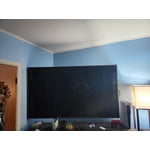
[This review was collected as part of a promotion.] So I have always bought Samsung products except for once I bought an LG of which I regretted due to the screen dieing exactly 1 year later my Current Samsung TV has lasted an excessive amount of time auto connects to mu consoles and other streaming devices if I so choose my phone with smart things app connects to my TV flawlessly and acts as a better remote of which I can access from anywhere this T.V. came with a family friendly price with a top quality product, This tv is great for gaming but none the less is not 8k or high refresh rate so keep in mind that aspect.

Review from Samsung US
Helpful?1U5QA8D4IAB615677157353
May 30, 2025
Samwin
5 out of 5 stars review

Sweet TV choice

[This review was collected as part of a promotion.] The value you get for the price that you pay is great. I would not pay more for a better picture as I believe you get to a point where you really can't tell. This TV does everything that it needs to and it does it well

Review from Samsung US
Helpful?1U5QA8D4IAB615677157353
May 10, 2025
Gettas
5 out of 5 stars review

Best tv ever

[This review was collected as part of a promotion.] Experience the vibrant colors and stunning clarity of this exceptional television. Enjoy seamless streaming and a vast selection of apps for endless entertainment options. Its sleek design complements any living room, enhancing your home's aesthetic appeal. Immerse yourself in a world of captivating content with its advanced features. Upgrade your viewing experience with a television that sets a new standard for quality and innovation.

Review from Samsung US
Helpful?1U5QA8D4IAB615677157353
Jul 10, 2025
Homelanding
4 out of 5 stars review

I like, i don't love it

[This review was collected as part of a promotion.] I like the quality and the size my only criticism is the tiny home app bar if it wasn't so impactful for functional use i have to be honest I hate it I have 4 other brand smart tvs Roku, Amazon Fire, questa to name a few and the home screens are so much better with bigger easier to navigate buttons and suggestions from your available apps that's something I would absolutely change its very dated of a smart TV home.

Review from Samsung US
Helpful?1U5QA8D4IAB615677157353
Sep 17, 2025
MJChatesHub
1 out of 5 stars review

Smart Hub Bad

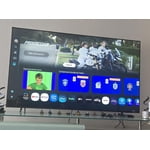
We have had this TV for quite some time now and I like it for the picture quality. The home screen "Smart Hub" is the absolute worst and it makes me hate this TV. In fact, I loathe it with a passion. The hub is cluttered and full of recommendations that I cannot remove. I want to see my downloaded apps so that I can launch them as needed. I do not want recommendations. I do not want banners with inappropriate content at 85" up for my children when we just turn on the TV. I can set parental parameters, but then I've got boxes with a stock photo of a lock. The navigation for settings is clunky and things are buried in miles of tiles that I just don't care about. I wish we hadn't bought it. I wish we had returned it. Do not leave LG for a Samsung.

Review from Samsung US
Helpful?1U5QA8D4IAB615677157353
reply from Samsung Advisor

Hi MJChatesHub, Thank you for sharing your experience. Please know that you can customize your Home screen by installing, removing or adding your favorite apps to the Home screen. Here's how: Searching for & Installing Apps 1. From the Home screen, press left on the remote’s directional pad. 2. Navigate to and select Search. 3. Using the search bar, enter the content or app you’d like to find. 4. Navigate to and select the app you’d like to install, then select Install. Note: Previously installed apps can be accessed on the Settings screen. Adding & Managing Apps on Home Screen 1. Go to App Settings (these can be found at the bottom of the Apps screen) and select the app you want to move. The following options will be available: a. Add to Home: Move the app to your desired location on the Home screen. b. Delete: Delete app. c. Lock/Unlock: Lock the app with a PIN so only you can use it. When the app is selected again, you will be prompted to enter the PIN to unlock it. d. Reinstall: Reinstall the app. e. View Details: View the app’s information and details. If you need more help with app management, please don’t hesitate to reach Samsung Support at 1-800-SAMSUNG, available daily from 8AM - 12AM EST. You can also visit the Samsung website and click on ‘Support’ for: • Live Chat • Manuals, Software, & Warranty Info ~ Samsung Advisor

Jan 20, 2026
Gam8
5 out of 5 stars review

Very Nice for the Price

The TV is great. Very clear resolution and sound. Great for the price.

Review from Samsung US
Helpful?1U5QA8D4IAB615677157353
Aug 22, 2025
Cheesyspain
5 out of 5 stars review

Works grate just dome lag from time to time

[This review was collected as part of a promotion.] Stream, Netflix and other shows like that. It works great and other than a lag, sometimes

Review from Samsung US
Helpful?1U5QA8D4IAB615677157353
Aug 22, 2025
Nuekurse
5 out of 5 stars review

Awesome TV no regrats

[This review was collected as part of a promotion.] Amazing TV. Does everything youd want it to and more. Would buy again

Review from Samsung US
Helpful?1U5QA8D4IAB615677157353
Nov 2, 2025
MamaToASoldier
5 out of 5 stars review

Great visuals and audio

[This review was collected as part of a promotion.] Wonderful system! Pricy purchase but was very well worth it!

Review from Samsung US
Helpful?1U5QA8D4IAB615677157353