Skip to Main Content
Sam's Club
Sam's Club
All Departments
All Services
Customer reviews for SAMSUNG 58” Class U8000F Series 4K Crystal UHD Smart TV for
SAMSUNG 58” Class U8000F Series 4K Crystal UHD Smart TV
4.5 out of 5 stars
stars
2,527 ratings2,521 reviews
  1. 5 stars72% (1,823)
  2. 4 stars16% (399)
  3. 3 stars6% (156)
  4. 2 stars3% (70)
  5. 1 star3% (79)

Member photos

  • +766 images
Sort by |
Showing 2,161-2,170 of 2,521 reviews
Oct 18, 2025
Carlosclof
5 out of 5 stars review

The best Smart TV on the market.
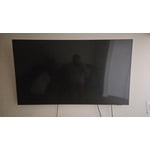
[This review was collected as part of a promotion.] I use it to play video games, watch movies and series, excellent for projecting graphics using smart view.

Review from Samsung US
Helpful?1U5QA8D4IAB615677157353
Oct 14, 2025
Sheepdog
2 out of 5 stars review

No audio out.

[This review was collected as part of a promotion.] I discovered that there was no audio out on the TV. I need to connect to my Bose surround system. The picture was good, but with no audio out, it was useless. I returned the TV.

Review from Samsung US
Helpful?1U5QA8D4IAB615677157353
reply from Samsung Advisor

Hi Sheepdog, Thank you for sharing your thoughts on the available inputs for the U8000F. If an Optical port is a crucial part of your setup needs, you’ll find that connection starting with our Q8F Series and above. If you decide to explore Samsung TVs again in the future, we’re always here to support you - whether it’s setup, features, or troubleshooting. Reach us anytime at 1-800-SAMSUNG (8AM – 12AM EST, 7 days a week), or visit the ‘Support’ section of our website for LiveChat, manuals, and more. ~ Samsung Advisor

Oct 4, 2025
Tj1990
5 out of 5 stars review

Five stars

[This review was collected as part of a promotion.] TV is awesome! Great picture, teamed up with a wireless surround system thst has no lag. The "Smart" features are easy to use and convenient!

Review from Samsung US
Helpful?1U5QA8D4IAB615677157353
Oct 10, 2025
Pineapp3710
5 out of 5 stars review

Great sound and picture quality!

[This review was collected as part of a promotion.] This samsung tv is astounding! It connects seamlessly with all of my samsung products! I use the s25 ultra and galaxy bud3 pros to simultaneously stream and game!

Review from Samsung US
Helpful?1U5QA8D4IAB615677157353
Aug 22, 2025
Oldgreg
5 out of 5 stars review

Crystal is an understatement

[This review was collected as part of a promotion.] We upgraded from a visio to this and theres no going back to visio. We use our tv for streaming and gaming. I've been glued to it since we got it.

Review from Samsung US
Helpful?1U5QA8D4IAB615677157353
Oct 14, 2025
Petesbones
4 out of 5 stars review

The product has good features and a very easy inte

[This review was collected as part of a promotion.] Right now, I'm generally using it as a great extension of my other Samsung products. The integration with my phone, my tablet, my laptop, make it all in all very convenient for me.

Review from Samsung US
Helpful?1U5QA8D4IAB615677157353
Oct 31, 2025
Crystal
5 out of 5 stars review

Great features

[This review was collected as part of a promotion.] Love the features on the TV. Simple to set up. Quality of the image is great no issues. Sound is great as well.

Review from Samsung US
Helpful?1U5QA8D4IAB615677157353
Oct 22, 2025
neonambianceallnighter
5 out of 5 stars review

Let the light shines!!

[This review was collected as part of a promotion.] I never needed to turn on the lights in my livingroom at night, at all. This thing lights up, like, reaally lights up.

Review from Samsung US
Helpful?1U5QA8D4IAB615677157353
Oct 14, 2025
VirginiaViewer
3 out of 5 stars review

Poor color quality

[This review was collected as part of a promotion.] Use tv for sports, movies and typical entertainment. Color vividness is not nearly as good as my 11 year old curved 65” Samsung!

Review from Samsung US
Helpful?1U5QA8D4IAB615677157353
reply from Samsung Advisor

Hi VirginiaViewer, Thank you for sharing your thoughts on the picture quality of Samsung’s U8000F TV. If the image doesn’t look quite right to you, there are several adjustments that can help optimize performance for your space and preferences. First, make sure your TV is up to date. Firmware updates often include picture quality enhancements. To check for the latest version, go to: Home > Left directional button > Settings > Support > Software Update > Update Now Next, explore available Picture Modes under: Settings > All Settings > Picture > Picture Mode Each mode is tailored to a different viewing style: • Standard – Balanced settings for everyday use • Dynamic – Brighter and sharper for brightly lit rooms • Movie – Softer tones ideal for low-light viewing • Eco – Reduces power consumption by adjusting brightness • Filmmaker Mode – Preserves the creator’s original color, contrast, and motion settings You can also customize the image further under: Settings > All Settings > Picture > Expert Settings, where you’ll find detailed controls for Brightness & Contrast, Color & Tint, Sharpness, and more. If you’d like help fine-tuning your display or exploring these settings, please call Samsung Customer Support at 1-800-SAMSUNG, available 8AM – 12AM EST, 7 days a week, or visit the ‘Support’ section on our website to LiveChat with an agent. ~ Samsung Advisor

Oct 2, 2025
Puruh1
5 out of 5 stars review

Great image quality

[This review was collected as part of a promotion.] I love how you can be extended periods of time in front of the tv and never get tired. It has a great quality image, beautiful color.

Review from Samsung US
Helpful?1U5QA8D4IAB615677157353