Skip to Main Content
Sam's Club
Sam's Club
All Departments
All Services
Customer reviews for SAMSUNG 58” Class U8000F Series 4K Crystal UHD Smart TV for
SAMSUNG 58” Class U8000F Series 4K Crystal UHD Smart TV
4.5 out of 5 stars
stars
3,125 ratings3,119 reviews
  1. 5 stars71% (2,213)
  2. 4 stars16% (498)
  3. 3 stars7% (210)
  4. 2 stars3% (94)
  5. 1 star4% (110)

Member photos

  • +978 images
Sort by |
Showing 1,161-1,170 of 3,119 reviews
May 20, 2026
Reviewer name: DenSef
4 out of 5 stars
4 out of 5 stars review

Good item for the money

[This review was collected as part of a promotion.] Good brightness Ggod resolution Wish the remote had channel numbers Wish remote was easier to understand and ise

Review from Samsung US
Helpful?1U5QA8D4IAB615677157353
Jun 5, 2026
Reviewer name: Charlesm
5 out of 5 stars
5 out of 5 stars review

Crystal clear image
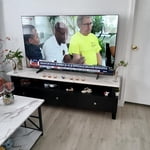
[This review was collected as part of a promotion.] Super clear screen , light weight unit easy to wall mount or move around if needed , sound quality options are very good

Review from Samsung US
Helpful?1U5QA8D4IAB615677157353
Jun 22, 2026
Reviewer name: Soots
5 out of 5 stars
5 out of 5 stars review

Great picture quality
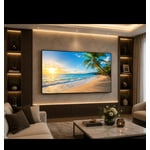
[This review was collected as part of a promotion.] The picture on this TV is awesome its operation is a little challenging in the beginning but once I used it for a bit it was fine

Review from Samsung US
Helpful?1U5QA8D4IAB615677157353
Jun 23, 2026
Reviewer name: Mere
1 out of 5 stars
1 out of 5 stars review

Can't install anything

[This review was collected as part of a promotion.] I can't install anything like YouTube I had this tv for my daughter for 3 months and I can't install anything. ATP I ready to send it back

Review from Samsung US
Helpful?1U5QA8D4IAB615677157353
reply from Samsung Advisor

Hi Mere, Thank you for your feedback. Please know the YouTube app is already installed on your TV. You can customize your Home screens by installing, removing or adding your favorite apps to Apps Home and/or For You Home screen. Here's how: Searching for & Installing Apps 1. From the Home screen, press up on the remote’s directional pad. 2. Navigate to and select Search. 3. Using the search bar, enter the content or app you’d like to find. 4. Navigate to and select the app you’d like to install, then select Install. Note: Previously installed apps can be accessed on the Settings screen. Adding & Managing Apps on Home Screen 1. Go to App Settings (these can be found at the bottom of the Apps screen) and select the app you want to move. The following options will be available: a. Add to Home: Move the app to your desired location on the Home screen. b. Delete: Delete app. c. Lock/Unlock: Lock the app with a PIN so only you can use it. When the app is selected again, you will be prompted to enter the PIN to unlock it. d. Reinstall: Reinstall the app. e. View Details: View the app’s information and details. If you need more help with app management, please don’t hesitate to reach Samsung Support at 1-800-SAMSUNG (8AM – 9PM EST Mon – Fri, 8AM – 6PM Sat – Sun), or reach us via text anytime. You can also visit ‘Support’ on our website for: • Live Chat • Manuals, Software, & Warranty Info ~ Samsung Advisor

Jun 20, 2026
Reviewer name: Saz14
5 out of 5 stars
5 out of 5 stars review

Great product

[This review was collected as part of a promotion.] I love all the new features and extra channels. The color and the picture are the perfect contrast. I would highly recommend this product.

Review from Samsung US
Helpful?1U5QA8D4IAB615677157353
Jun 10, 2026
Reviewer name: Greg
5 out of 5 stars
5 out of 5 stars review

Easy to use features
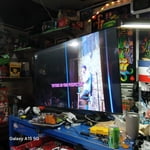
[This review was collected as part of a promotion.] it's a great TVand easy to use i love the features and how easily it syncs with my sou d barkeep it up

Review from Samsung US
Helpful?1U5QA8D4IAB615677157353
May 19, 2026
Reviewer name: Modiodi
5 out of 5 stars
5 out of 5 stars review

Love my Samsung TV

[This review was collected as part of a promotion.] I love my Samsung TV It's my 2nd. I love all of Samsung's products! I also own the Fold 5 and the S25 ultra just to name a couple. Samsung never disappoints!

Review from Samsung US
Helpful?1U5QA8D4IAB615677157353
Jun 1, 2026
Reviewer name: Gressett Home
5 out of 5 stars
5 out of 5 stars review

Good picture

[This review was collected as part of a promotion.] Tv has great picture. Could use better sound and a lower level. Ai haven't used much. Pin lock works.

Review from Samsung US
Helpful?1U5QA8D4IAB615677157353
Jul 5, 2026
Reviewer name: Karen
5 out of 5 stars
5 out of 5 stars review

Loving my TV.

[This review was collected as part of a promotion.] The screen is clear, volume is great, especially for me, I am a hard of hearing senior citizen. I went from a small 32 inch to a 40. Love all the Samsung Plus Channels I get with it.

Review from Samsung US
Helpful?1U5QA8D4IAB615677157353
Jun 9, 2026
Reviewer name: Roger
4 out of 5 stars
4 out of 5 stars review

Good Picture

[This review was collected as part of a promotion.] Picture is better than I expected.The quality is almost as good as my OLED TV that I have In another room.

Review from Samsung US
Helpful?1U5QA8D4IAB615677157353