Skip to Main Content
Sam's Club
Sam's Club
All Departments
All Services
Customer reviews for SAMSUNG 85” Class Q7FD Series 4K QLED Smart TV [Limited Inventory - Sold Out] for
SAMSUNG 85” Class Q7FD Series 4K QLED Smart TV [Limited Inventory - Sold Out]
4.6 out of 5 stars
stars
3,570 ratings3,570 reviews
  1. 5 stars78% (2,769)
  2. 4 stars15% (519)
  3. 3 stars4% (160)
  4. 2 stars1% (49)
  5. 1 star2% (73)

Member photos

  • +1110 images
Sort by |
Showing 3,161-3,170 of 3,570 reviews
Apr 24, 2025
Reviewer name: Daddybigdick
5 out of 5 stars
5 out of 5 stars review

The product iss the best

[This review was collected as part of a promotion.] Everything on this tvv is top notch the streaming. The. Quality. This tv is number. All the way around I highly recommend. This tv ever since I gotta. Mine already had 23 people friends and. Family go by the same one that have. Every one loves it

Review from Samsung US
Helpful?4WF2HDYGONT215579013784
Apr 25, 2025
Reviewer name: DannyKwak
5 out of 5 stars
5 out of 5 stars review

FANTASTIC TV EVER
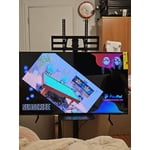
[This review was collected as part of a promotion.] My new TV is unbelievable Unexpected how good it is!! When I watch movie or drama the characters look like front of me in real that's crazy! Pro 1. Sound system is way better than my old TCL TV, usually my wife using TV as music speaker when she prepare go out. 2. Graphic is high end quality. 3. Weight is lighter than I thought so it's easy to carrying around. 4. Remote control is small and slim also it's rechargeable with C-Type cable like galaxy cellphone! That's another crazy part. 5. TV cord is think which means it takes less electricity. Con 1. There's no mount screws comes with so I had to buy separately (size will be M8 it's pretty thick) 2. When I watch movie screen cut a bit up and down side the most movie and drama aspect ratio doesn't fit on TV on full screen (probably I don't know how to setup right size of screen?) This TV is unbelievable and worth every penny. TRUST ME JUST GET IT!!!

Review from Samsung US
Helpful?4WF2HDYGONT215579013784
May 20, 2025
Reviewer name: LoveOurSamsungTV
5 out of 5 stars
5 out of 5 stars review

Love my Samsung 75 inch TV
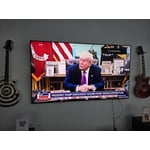
[This review was collected as part of a promotion.] We truly love our Samsung TV. My wife and I watch Netflix shows nightly and the picture is super clear. You feel like you can touch the people on screen. I also use XBOX with my 11 year old son and the games are so realistic. I definitely would recommend Samsung products! Great stuff and no functionality issues.

Review from Samsung US
Helpful?4WF2HDYGONT215579013784
Apr 16, 2025
Reviewer name: Lovetv
5 out of 5 stars
5 out of 5 stars review

Very good TV love the quality. Games on this good

[This review was collected as part of a promotion.] Love this TV very much, it has very good quality for playing games, I play couple different games and the reaction time is amazing. I also watch alof of movies and wow the quality makes it super nice to watch TV, it also has alot of hook ups to add different designs or devices. I habe the 65 inch which is super big, the lighting is super bright aswell. Overall it's a 10/10 for me, it's also very light so you can hang it on the wall with no problems

Review from Samsung US
Helpful?4WF2HDYGONT215579013784
Aug 22, 2025
Reviewer name: 1Pinkone
5 out of 5 stars
5 out of 5 stars review

The accessibility is awesome.

[This review was collected as part of a promotion.] I used my TV for gaming both the nintendo switch and sports. Games don't skip and I don't miss a step in sports. The sound quality is awesome also. Remote is also very easy to use. Bluetooth and mirror connection with my Samsung phone is on point. TV always asks if I want to connect and I usually do so it nakes it that much easier and I don't have to go looking for it. The screen is so huge.

Review from Samsung US
Helpful?4WF2HDYGONT215579013784
May 11, 2025
Reviewer name: JessiVerse666
4 out of 5 stars
4 out of 5 stars review

Quality entertainment device upholding Samsung's e

[This review was collected as part of a promotion.] Amazing product with crystal clear quality. Refresh rate is amazing in the options and settings to adjust for Power saving jiming. And other optional smart features.Alright outstanding. I love Samsung and will continue to use all of their products. I can afford.It's totally worth the price.

Review from Samsung US
Helpful?4WF2HDYGONT215579013784
Jul 22, 2025
Reviewer name: EliteRev
5 out of 5 stars
5 out of 5 stars review

Incredible Picture Quality and Smart Features!

[This review was collected as part of a promotion.] I’m really impressed with the Samsung QLED 4K TV (2025). The smart features of the TV run smoothly, and the user interface is easy to navigate. Not forgetting that the sound quality and picture quality is surprisingly the best for a slim TV.

Review from Samsung US
Helpful?4WF2HDYGONT215579013784
May 8, 2025
Reviewer name: Murph777
5 out of 5 stars
5 out of 5 stars review

So many features
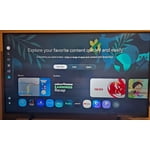
[This review was collected as part of a promotion.] I’ve been using the 43” Class Samsung QLED Q7F 4K Vision AI Smart TV primarily as a computer monitor, and the upgrade has been immediately noticeable. The 4K resolution makes everything look crisp and clean, from web browsing to video streaming. Text is much easier to read than my previous setup, and the vibrant colors stand out, especially in brighter scenes. It fits right in with my existing Samsung devices. I use a Galaxy S23 and a Samsung oven, so having everything connected through SmartThings makes it easy to control from one place. One of the coolest features is the wireless Samsung DeX. With just a quick connection from my phone, the TV turns into a complete desktop interface, which is great. All the streaming apps I use are available, and I’ve found the Tizen operating system to be fast and reliable. Some menu navigation could be more intuitive, but everything is easy to find once you're familiar with it. The built-in speakers are fine for everyday use, though I might eventually add a soundbar to boost the depth. I was impressed by how sleek and modern the TV looked in my space. The thin bezels and clean design look high-end, even when it’s off. It’s been a great addition to my workspace and entertainment setup.

Review from The Insiders
Helpful?4WF2HDYGONT215579013784
Sep 5, 2025
Reviewer name: Trying
3 out of 5 stars
3 out of 5 stars review

Good picture, but...

[This review was collected as part of a promotion.] We set up the Samsung television, but we are unable to get the remote to change the channels. We have Comcast for our cable and the Comcast remote works well on everything except changing the volume. So we have to use both remotes to watch TV. I have been unable to pair the sound bar with the TV also. Maybe eventually it will all come together?

Review from Samsung US
Helpful?4WF2HDYGONT215579013784
reply from Samsung Specialist

Hello, Thanks for your review. To change the channel using your SolarCell Remote, locate the thin rocker button just below the Play/Pause key and above the Prime Video shortcut. Push up (^) to go up one channel or push down (v) to go to the next channel. Just below the Back button and above the Netflix hotkey, you’ll find a thin rocker-style button with a (+) on top and a (–) below. Push up on this button to raise the volume, or down to lower it. To help you get the most from your TV and remote functions, you can download the full e-Manual and more by visiting Samsung’s website then navigating to: Support > Manual & Software > TVs & Home Theater. From there, you can search for and select your TV model to view or download the available guides. The e-Manual & Remote Control Guide are also conveniently built into your TV: Settings > Support > Tips and User Guides Learn TV Remote is another feature designed to help users become familiar with the layout and function of each button on the Samsung remote. When enabled, pressing any button (except the Power button, which will still turn off the TV) will prompt the TV to announce the button’s name and its purpose – without affecting TV operation. This teaching mode is especially useful for users who are visually impaired or new to Samsung remotes. To enable this feature, go to: Settings > All Settings > General & Privacy > Accessibility > Learn TV Remote. To exit, simply press the Return key twice. If you’d like more assistance with this feature, please reach Samsung Support at 1-800-SAMSUNG, available 8AM – 12AM EST, 7 days a week. LiveChat agents are also available through the ‘Support’ link on our website. ~ Samsung Specialist

May 5, 2025
Reviewer name: Murali
5 out of 5 stars
5 out of 5 stars review

Great picture quality
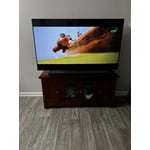
[This review was collected as part of a promotion.] I watch the TV for movies and sports, and its quality is outstanding. I love the remote with USB-C charging and solar power. So far, so good! I also connected it to a soundbar via HDMI eARC, and the sound quality is great.

Review from Samsung US
Helpful?4WF2HDYGONT215579013784