Skip to Main Content
Sam's Club
Sam's Club
All Departments
All Services
Customer reviews for SAMSUNG 75" Class Q7FD Series 4K QLED Smart TV for
SAMSUNG 75" Class Q7FD Series 4K QLED Smart TV
4.6 out of 5 stars
stars
3,603 ratings3,578 reviews
  1. 5 stars78% (2,797)
  2. 4 stars14% (520)
  3. 3 stars5% (163)
  4. 2 stars1% (48)
  5. 1 star2% (75)

Member photos

  • +1115 images
Sort by |
Showing 871-880 of 3,578 reviews
Feb 5, 2026
Reviewer name: PatL
4 out of 5 stars
4 out of 5 stars review

As good as my 15-year-old Samsung TV

[This review was collected as part of a promotion.] This is my second Samsung TV I have purchased. My first Samsung TV was purchased almost 15 years ago. What I will say is the picture quality is equivalent. Not better but the same. And considering I thought the picture of my 15-year-old TV was perfectly adequate then the same is attributed to this TV. I was just a little surprised that it wasn't noticeably better. But consistency is a good thing. The sound from the TV is acceptable. My biggest complaint is about the remote. It's incredibly difficult to figure it out. And there was very little information given about how to use it. I've had the TV for a month and I still don't know how to turn on close captions, or how to return to a recently viewed channel. Of course I can go online and find the info but it's pretty annoying that the remote is not intuitive. Kudos to Samsung for making a consistently good product. But please rethink the remote design and or providing better instructions.

Review from Samsung US
Helpful?6RA5R2FUVYS415576170273
May 20, 2026
Reviewer name: Desivitus
5 out of 5 stars
5 out of 5 stars review

Great Viewing

[This review was collected as part of a promotion.] The tv is great. i have had a previous samsung tv before. this one is awesome. great color, the resolution is mind blowing, brightness is just perfect, the interface is always great. love how sleek it is.

Review from Samsung US
Helpful?6RA5R2FUVYS415576170273
Feb 17, 2026
Reviewer name: Angel
4 out of 5 stars
4 out of 5 stars review

Great sound

[This review was collected as part of a promotion.] Before anything else, the sound. The sound is great. Brightness Is great, never put 100. Contrast.. black are not the blackest..that's why I give 4 stars. Resolution, no discussion, great and vibrance, you have to use game mode and watch a game!

Review from Samsung US
Helpful?6RA5R2FUVYS415576170273
Mar 3, 2026
Reviewer name: GalaxyGod
5 out of 5 stars
5 out of 5 stars review

Amazing TV!

[This review was collected as part of a promotion.] The TV has some of the most amazing graphics for gaming and watching shows. The TVs easy guide allows for easy access to multiple apps such as YouTube and Crunchyroll, allowing my Xbox time to rest as a primary entertainment source. We've owned this TV for years, and would buy again if it were to break.

Review from Samsung US
Helpful?6RA5R2FUVYS415576170273
Apr 20, 2026
Reviewer name: TrunkMonkey69
4 out of 5 stars
4 out of 5 stars review

Nice TV

[This review was collected as part of a promotion.] It's a really good product. I enjoy the brightness, the color is great on the television, contrast is excellent, great resolution as well. I don't enjoy the interface as well as I do a Roku interface and major issue with it is it occasionally it drops the Wi-Fi connection for some unknown reason. Outside of that it's really nice TV. Again, as I mentioned before, the the colors are rich, contrast is excellent, and brightness fantastic. Smoothness of the of the shows and all that on the TV is good I just wish that the interface was easier to use and that it would stop dropping the internet connection.

Review from Samsung US
Helpful?6RA5R2FUVYS415576170273
Apr 7, 2026
Reviewer name: NanaR
5 out of 5 stars
5 out of 5 stars review

Amazing TV

[This review was collected as part of a promotion.] This TV is the way yo go when considering long-lasting budget-friendly options!!! Its Brightness and contrast work hand in hand to provide an amazing and vibrancy. The resolution is great, and it looks wonderfull anc can refresh the room when wall mounted.

Review from Samsung US
Helpful?6RA5R2FUVYS415576170273
May 12, 2026
Reviewer name: Rportvegas
5 out of 5 stars
5 out of 5 stars review

Awesome TV. Fantastic deal.
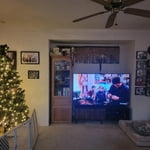
[This review was collected as part of a promotion.] Love our Samsung TV. We replaced a 65 inch with this 75 inch and are enjoying it tremendously The brightness, color, resolution and contrast are top notch. This tv gives our family security to surf the web with no issues

Review from Samsung US
Helpful?6RA5R2FUVYS415576170273
Apr 20, 2026
Reviewer name: MG88
5 out of 5 stars
5 out of 5 stars review

Excellent TV

[This review was collected as part of a promotion.] Exceptional TV, especially for the price. Fantastic resolution, brightness, and color. The TV is responsive and it easily pairs with Samsung phone and tablet. The remote charges by solar or USB-C. It hasn't happened to me, but a samsung phone or tablet can be used as the remote as well.

Review from Samsung US
Helpful?6RA5R2FUVYS415576170273
Feb 17, 2026
Reviewer name: Gabemcoelho
5 out of 5 stars
5 out of 5 stars review

Awesome image

[This review was collected as part of a promotion.] This 75-inch QLED TV has completely transformed my home viewing experience, balancing immense scale with incredible brightness that makes daytime viewing effortless, even with the blinds open. The Quantum Dot technology truly delivers vivid, punchy colors that make HDR content pop off the screen, creating a genuine cinematic feel for movies and television alike. While it doesn't achieve the absolute pitch-black levels of an OLED, the local dimming technology handles dark scenes impressively well, with minimal blooming around bright objects. Fast-paced sports and gaming are remarkably smooth thanks to the high refresh rate, making motion blur almost nonexistent. The smart interface is snappier than expected, allowing for quick navigation between streaming apps without frustrating lag. The design is sleek and minimal, featuring incredibly thin bezels that make the massive screen appear to float on the wall. Although I recommend professional installation or at least two people to handle the sheer size and weight, it is absolutely worth the effort for the immersive picture quality. For anyone looking for a centerpiece for their living room that excels in brightly lit environments, this television is a top-tier choice. Overall, it offers a fantastic blend of premium performance, smart features, and jaw-dropping size that justifies the investment for any tech enthusiast.

Review from Samsung US
Helpful?6RA5R2FUVYS415576170273
Mar 29, 2026
Reviewer name: BradW
1 out of 5 stars
1 out of 5 stars review

What the heck did they do to the interface?!

We replaced our 2018ish Samsung tv with this after an accident broke the old one. As a tv, it's great. The screen is vibrant and nice! But the interface and lag is absolutely unacceptable. They got rid of the old system that was seamless, easy to use for anyone and looked great. Now they've replaced it with a jumbled mess that take several seconds to load every screen. It looks terrible and EVERYTHING now has ads, even when the internet isn't connected. I'm an IT guy and it took me a LONG time to figure out the new setup. Especially changing inputs. Instead of just pushing a button like the old tv, you now have to do 3-5 confusing steps to change it. It's supposed to use “ai” to change inputs but it NEVER works. This tv was a huge disappointment and we're looking to replace it with the old version because it's so bad.

Review from Samsung US
Helpful?6RA5R2FUVYS415576170273
reply from Samsung Specialist

BradW, We appreciate your feedback regarding your TV’s performance. If you're experiencing freezing or lag in general response time, please try the following steps: 1. Check for firmware updates – Keeping your TV up to date can resolve many performance issues: Home > left directional key > Settings > Support > Software Update > Update Now 2. Run Device Care – This tool checks system memory, frees up cached data, and closes background apps that could be slowing things down: Home > left directional key > Settings > Support > Device Care > Start Device Care 3. Cold boot your TV – With the TV powered on, press and hold the Power button on your remote for 5+ seconds until the TV restarts. This helps refresh the system. If you're still noticing performance snags after these steps, please contact Samsung Support at 1-800-SAMSUNG (8AM – 9PM EST Mon – Fri, 8AM – 6PM Sat – Sun). You can also connect with a LiveChat agent via the ‘Support’ link on our website. ~ Samsung Specialist