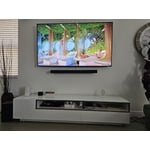
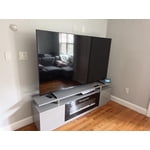
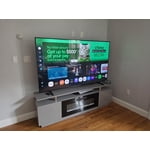
Customer reviews for SAMSUNG 75" Class Q7FD Series 4K QLED Smart TV forMember photos


+698 images
TV has 2 significant issues as I see them...
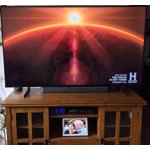
[This review was collected as part of a promotion.] A good TV overall but when switching between channels sound varies widely - not supposed to do that as a it has a feature to limit that behavior. 2nd issue - does not correctly expand some SD channels to fit the over-all screen size. No longer has the "stretch" option as did my older Samsung. Specifically, the History channel only fills a very narrow band on the screen and makes for an uncomfortable view. Other than these two issues the color and contrast are outstanding. Some on screen choices are layed out in a confusing fashion and the remote is a toy! But, still a good value for the money!
domino6378, Thank you for sharing your experience with volume fluctuations on your Samsung Q7F TV. Sudden changes in volume can often be related to audio settings or content differences between sources or apps. Please try the following adjustments to help stabilize your TV's audio: 1. Enable Auto Volume. Go to: Settings > All Settings > Sound > Expert Settings > Auto Volume. This feature helps maintain a consistent volume level when switching channels or apps. 2. Change Sound Mode. Try a different sound mode to see if one offers a more stable output: Settings > All Settings > Sound > Sound Mode (We recommend Standard or Amplify for more even performance.) 3. Check External Devices. If you're using a soundbar, receiver, or other audio device, check that its volume leveling or dynamic range settings aren’t interfering with the TV’s audio. 4. Update Firmware. Ensure your TV is running the latest software, as updates may include audio improvements: Settings > Support > Software Update > Update Now When adjusting the image size, please keep in mind that available size options may vary depending on the input signal and the type of content you're viewing. To adjust the image size on your TV, navigate to: Home > left directional key > Settings > All Settings > Picture > Picture Size Settings. From there, you can select options like Fit to Screen, Zoom and Position, or choose a Picture Size such as 16:9 Standard, Custom, or 4:3. Should you need more help, we're here for you. You can reach us at 1-800-SAMSUNG (8AM – 12AM EST, 7 days a week), or connect with a LiveChat agent by selecting ‘Support’ on our website. ~ Samsung Specialist
Nice, functional TV
[This review was collected as part of a promotion.] This TV is in my bedroom and used only to watch cable channels and streaming. It is a nice TV with a clear screen but without all the bells and whistles, which I didn't need or want for a bedroom TV. I'm pleased.
Blue Tooth issue
Blue Tooth issue: I purchased two Blue Tooth headphones so either or both my wife and I can watch TV and not disturb the other or others in the house. But, the Blue tooth connection process is a Pain each time. I would hope that once the headphones are paired with the TV they would automatically connect. But, I must respond for the 2nd Headphone to select I want it connected too. Also, the prompt to connect is always in the upper left corner and get hidden at times.
Ramjet, We appreciate your feedback on Bluetooth connectivity. Please note that some settings, such as Bluetooth, are designed to function on demand. When the TV powers off, the Bluetooth device will disconnect and won’t automatically reconnect. You’ll need to manually pair the device again when you want to use it. If you have any questions or need help, we’re always here. Call 1-800-SAMSUNG from 8AM - 12AM EST, seven days a week, or connect with a LiveChat agent anytime by selecting ‘Support’ on our website. ~ Samsung Specialist
Unbelievable Viewing
[This review was collected as part of a promotion.] Got this in my livingroom which is long but narrow which leaves about 3feet to each side of the tv which is mounted. Love the way it lights up the room but my old soundbar has one of its rear speakers not working and I'm missing out on all the great sound while watching movies or sports
Reliable and worth the money
[This review was collected as part of a promotion.] This TV is great! My place is a little on the smaller side and this was the biggest TV that would work. The picture is fantastic and can be either tailored through assisted settings or can be tuned up completely manually. The sound is solid and has a lot of options. I added a Q series sound bar and that is also very customizable too! Depending on what setting you are using, it can be really loud (like when using with a gaming console). It important to know that different video services also play at slightly different volumes (bc of the services themselves). I've never even needed to turn it above 50 bc it kicks out the sound so well. I had an older model and getting used to the new layout for menus took me a little while to get used to navigating. After a little while of practice, its actually easier to use than the series 5 menus. I strongly recommend this tv!!
Solid 3.5-4 star tv
3.5-4 star tv The upgraded tizen ui is really good and the new ai processor does a pretty decent job speed wise. The tv has a decent snap to it. The WiFi connection is strong and soundbars work really well via Bluetooth connection. Whats crazy is Apps and videos load a little bit faster than the a higher end qled tv I own. The Ai features for this year are ok I guess. If your into learning a bit more about what your watching than the ai will definitely be a treat for you. Picture wise, the ai implementation doesn't really do much. It doesn't seem to do much for up scaling or processing the image. The color booster pro is the only ai feature I found to be useful. It helped the picture pop quite a bit more than out of the box. It did take some color adjustment though. The red 2point level did need to be turned down a bit though when the booster was on. Sdr brightness and quality is pretty good overal. I really do enjoy the picture in sdr. Nice color, brightness and the motion also looks fine with minimal blur and judder. HDR is where the tv takes a pretty huge dive unfortunately. The screen gets way too dark and there's no way to turn it up without enabling the contrast enhanced on high. The resolution is fine in hdr, good detail in the image but again just way too dark with no workaround. It's sad because the tv is somehow dimmer than my 2 year old 70” crystal uhd tv I have in my living room. That being the most basic tv released that year and a non qled tv. This tv is A solid 3.5-4 star tv if you can get it at a discounted price.
Great screen with an amazing picture
[This review was collected as part of a promotion.] This TV is so bright vibrant and sharp. Paired with a UHD compatible HDMI cable and a device capable of outputting UHD makes for an amazingly, bright, beautiful picture full of color and details. I am extremely happy with this purchase and can absolutely recommend this model TV to anyone looking for a great picture quality set. Also it is a very big TV, screen wise, which is so incredible.
Samsung TVs - 4 different
[This review was collected as part of a promotion.] Other than the remote controls needing to be bigger with larger interfaces for older eyes “your largest buying group”. You need your remotes to be redesigned to allow multiple TVs to work in homes that have multiple TVs in short distances within. Maybe to allow several configurations to programmed (A, B, C, D) for 4 different TVs.
Purchased as gift
Bought this TV as a gift . I have a two year old similar model QT60T that we really like. It has a very well integrated interface for ease of use. Connectivity is easy to navigate. Excellent picture with bright colors and excellent viewing in family room from many different angles. Highly recommend the backlit QLED design for great picture quality at a reasonable cost.
TV lost picture after 8 months
[This review was collected as part of a promotion.] Very disappointed ….. I thought I was buying a reliable product. It was a beautiful tv until the picture went 2 weeks ago. Haven't even had it 8 months. All our other tvs are Samsung and I expected to have it for awhile. I'd like to get a replacement or at least credit for it to buy another tv.
Disappointed, It’s unfortunate to hear about your experience with Samsung’s Q7F TV. We’re committed to delivering quality, value, and the best possible product experience. This TV is backed by a 1-year limited manufacturer’s warranty, which includes authorized repair for eligible defects when purchased brand-new from an authorized retailer. To review full warranty terms, you can enter your model number here: https://www.samsung.com/us/support/warranty/ We’d appreciate the opportunity to assist further. Please contact Samsung Customer Support at 1-800-SAMSUNG (8AM – 12AM EST, 7 days a week), or connect with a LiveChat agent by clicking the ‘Support’ link on our website. ~ Samsung Specialist