Skip to Main Content
Sam's Club
Sam's Club
All Departments
All Services
Customer reviews for SAMSUNG 75" Class Q7FD Series 4K QLED Smart TV for
SAMSUNG 75" Class Q7FD Series 4K QLED Smart TV
4.6 out of 5 stars
stars
3,613 ratings3,588 reviews
  1. 5 stars78% (2,803)
  2. 4 stars14% (522)
  3. 3 stars5% (163)
  4. 2 stars1% (49)
  5. 1 star2% (76)

Member photos

  • +1119 images
Sort by |
Showing 1,771-1,780 of 3,588 reviews
May 20, 2026
Reviewer name: Gladirader
1 out of 5 stars
1 out of 5 stars review

Has a very hard time staying connected to WiFi

[This review was collected as part of a promotion.] This tv is very slow and doesn't stay connected to WiFi and the router is 5ft away!!! Hate this tv.

Review from Samsung US
Helpful?6RA5R2FUVYS415576170273
reply from Samsung Specialist

Thank you for sharing your experience with Wi-Fi connectivity. If your TV is having trouble connecting to the network, the following steps may help resolve the issue: Signal & Setup Tips: 1. Check TV-to-router distance – Your TV should be within 50 feet of the modem or access point for reliable signal strength. 2. Minimize interference – Turn off nearby wireless devices and make sure there are no physical barriers (stone walls, fireplaces, appliances) between the TV and router. Power Cycle Devices: 3. Restart both your TV and router – Unplug both devices for at least 30 seconds, then plug them back in and allow them to reboot fully. Connection Type: 4. Evaluate your connection method – o If using Wi-Fi, move your router closer to the TV and eliminate any obstructions. o For a more stable connection, we strongly recommend using a wired Ethernet cable. o If already using Ethernet, verify the cable is working by testing it with another device. Run Built-In Diagnostic Tools: 5. Network Test: Settings > Support > Device Care > Self Diagnosis > Smart Hub Connection Test 6. Wi-Fi Check: Settings > Support > Device Care > Self Diagnosis > Wi-Fi Last Resort: 7. Perform a Factory Reset (if issues persist): Settings > All Settings > General & Privacy > Reset > Factory Data Reset. Note that this will return all settings to their original defaults. If these steps don’t resolve the issue, please reach out to Samsung Support at 1-800-SAMSUNG (8AM – 9PM EST Mon – Fri, 8AM – 6PM Sat – Sun). LiveChat support and additional help are available at the ‘Support’ link on our website. ~ Samsung Specialist

Feb 17, 2026
Reviewer name: Samsung
5 out of 5 stars
5 out of 5 stars review

Excellent product

[This review was collected as part of a promotion.] The picture so clear that it seems like you are at the movies. I notice little things that I never noticed before with the clarity of the picture.

Review from Samsung US
Helpful?6RA5R2FUVYS415576170273
May 11, 2026
Reviewer name: Ryan
5 out of 5 stars
5 out of 5 stars review

Great picture and sound quality
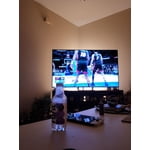
[This review was collected as part of a promotion.] This is a quality TV for the price. Great picture and sound quality. I can definitely feel like 120hz when I play Xbox

Review from Samsung US
Helpful?6RA5R2FUVYS415576170273
Feb 8, 2026
Reviewer name: JBTVwatcher
5 out of 5 stars
5 out of 5 stars review

Great picture, great sound.

[This review was collected as part of a promotion.] This TV has excellent picture quality. The colors are so real, like you are actually there. The sound quality is also excellent for an in TV speaker.

Review from Samsung US
Helpful?6RA5R2FUVYS415576170273
Feb 17, 2026
Reviewer name: KiwiLovesSamsung
5 out of 5 stars
5 out of 5 stars review

Love my Samsung TV!

[This review was collected as part of a promotion.] My TV is very vibrant and by far the best brand by far. I didn't have to adjust the brightness nor contrast at all. I look forward to watching my shows every night after work.

Review from Samsung US
Helpful?6RA5R2FUVYS415576170273
Mar 5, 2026
Reviewer name: John and Sheri
5 out of 5 stars
5 out of 5 stars review

Great TV, with minor hitches.

[This review was collected as part of a promotion.] I wish there was someway to shut off the hourly chime that comes from the TV. Also why does Fox News shut off on the end of program?

Review from Samsung US
Helpful?6RA5R2FUVYS415576170273
Feb 8, 2026
Reviewer name: SamsungTeam758
5 out of 5 stars
5 out of 5 stars review

Nice purchase

[This review was collected as part of a promotion.] Love this tv! A critique would be to have more options for shutting television off after delays in use. Otherwise, the description and performance is accurate!

Review from Samsung US
Helpful?6RA5R2FUVYS415576170273
May 12, 2026
Reviewer name: RC 2026
5 out of 5 stars
5 out of 5 stars review

Superior Technology

[This review was collected as part of a promotion.] The best t v ever... Everyone that comes over notices the picture and asks what type of tv it is. There's just nothing better out there! I will never go with a different brand.

Review from Samsung US
Helpful?6RA5R2FUVYS415576170273
Mar 1, 2026
Reviewer name: gregeder44
5 out of 5 stars
5 out of 5 stars review

Love it

[This review was collected as part of a promotion.] Perfect TV for the bedroom, good size and the auto brightness feature really helps at night so the TV isn't too bright

Review from Samsung US
Helpful?6RA5R2FUVYS415576170273
Mar 24, 2026
Reviewer name: Pizza pie
4 out of 5 stars
4 out of 5 stars review

Easy to use nice pictures

[This review was collected as part of a promotion.] Easy to use, nice, no glare screen.\n Was a replacement for a higher resolution 8k TV that had broken on us this 4K. TV has very similar resolution for very nice price.

Review from Samsung US
Helpful?6RA5R2FUVYS415576170273