Skip to Main Content
Sam's Club
Sam's Club
All Departments
All Services
Customer reviews for SAMSUNG 65" Class Q7FD Series 4K QLED Smart TV for
SAMSUNG 65" Class Q7FD Series 4K QLED Smart TV
4.6 out of 5 stars
stars
3,699 ratings3,625 reviews
  1. 5 stars77% (2,859)
  2. 4 stars14% (535)
  3. 3 stars4% (166)
  4. 2 stars1% (54)
  5. 1 star2% (85)

Member photos

  • +1118 images
Sort by |
Showing 91-100 of 3,625 reviews
Oct 14, 2025
Reviewer name: Have owned 5 Samsung TVs
3 out of 5 stars
3 out of 5 stars review

Disappointed

IMO it is dull. I took 1 star off for the remote - fortunately I had an older Samsung remote with separate labeled buttons. I subtracted another star for lack of brightness. I have owned for almost a week and have explored and adjusted all settings. I just can't get it any brighter. I should have heeded a professional review that rated the TV as 5.9 out of 10 due to the number of NITS being low and a dim picture, especially in bright rooms. The 43" Crystal display is brighter and just as good of a picture. The QLED is not worth the extra $.

Review from Samsung US
Helpful?1EU281TBRNQA15567708318
reply from Samsung Brand Ambassador

Hello, We appreciate your feedback on the picture quality of Samsung’s Q7F TV. If the image doesn’t quite match your preferences, there are several adjustments you can make to better suit your viewing environment and content type. First, please ensure your TV is running the latest firmware, as updates may include important picture quality enhancements. Go to: Home > Left directional button > Settings > Support > Software Update > Update Now To explore picture mode options, navigate to: Home > Left directional button > Settings > All Settings > Picture > Picture Mode. Options include: • Standard – Ideal for general viewing • Dynamic – Brighter and more vibrant for well-lit spaces • Eco – Optimized for energy efficiency • Movie – Best for viewing in low light • Filmmaker Mode – Preserves the content creator’s intent and disables motion smoothing for supported content You can further customize your image by going to: Settings > All Settings > Picture > Expert Settings, where you can adjust Brightness, Contrast, Color Tone, Sharpness, Contrast Enhancer and more. If you’d like help finding the best picture settings for your preferences, please don’t hesitate to contact Samsung Support at 1-800-SAMSUNG, available 8AM – 12AM EST, 7 days a week. You can also LiveChat with an agent or explore additional resources on our website by clicking the ‘Support’ link. ~ Samsung Pro

Jan 16, 2026
Reviewer name: Crix20001
1 out of 5 stars
1 out of 5 stars review

Failed in a week.
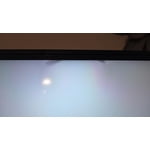
Top edge of screen had a dark spot which is now turning into 4 dark spots and the entire screen is wavy. I have samsung phones, head phones 4 other Samsung tvs Samsung appliances but this is the largest TV I ever bought and its already failing in a week highly disappointing hopefully the service tech can replace this for a better model after all the other bad reviews.

Review from Samsung US
Helpful?1EU281TBRNQA15567708318
reply from Samsung Specialist

Crix20001, We appreciate your feedback on the picture quality of Samsung’s Q7F TV. Please ensure your TV is running the latest firmware (Version 1131.0), as updates include important picture quality enhancements. Go to: Home > Left directional button > Settings > Support > Software Update > Update Now If this firmware version is not yet available on your TV, you can download the update on a USB drive and manually update your TV: 1. On Samsung's website (upper right corner), go to: Support > Manual & Software > Find your TV model, and click on the Firmware – Upgrade File. 2. When the file has finished downloading, locate it and then unzip it. There is normally one folder inside but there may be multiple files. 3. Copy or move all of the files that were included in the zip file to a USB flash drive, but do not place them inside any other folders. If you place the software folders inside a folder on the USB flash drive, the TV or monitor will not find them. 4. Connect the USB drive containing the software upgrade into a USB port on your device. 5. Using your device's remote, navigate to and select Settings, then select All Settings, and then select Support. Select Software Update, select Update Now, and then select Yes if prompted. Your device will search the USB drive for update files. Follow the on-screen instructions to install the updated software. Updates usually take a few minutes; please do not turn off the TV until the update is complete. When the update is finished, it will restart automatically. For further assistance, please contact Samsung Customer Support at 1-800-SAMSUNG, available 8AM – 12AM EST, 7 days a week. LiveChat agents are also available on the ‘Support’ link at samsung.com. ~ Samsung Specialist

Jul 27, 2026
Reviewer name: Brown
2 out of 5 stars
2 out of 5 stars review

Features good

[This review was collected as part of a promotion.] The reason I am giving it a 2 start review is there are dark spots at the top of the tv and I have had it less than a year, I also don't like the delayed response when using the tv. The other models I have had were better and they started up like a gem and were super fast.

Review from Samsung US
Helpful?1EU281TBRNQA15567708318
Aug 13, 2026
Reviewer name: Sammy J
5 out of 5 stars
5 out of 5 stars review

Dazzling Gorgeous Imagery

this is an amazing right Rogers smoking screen that takes you right to the Future So ling has great im which could be used for d iversity ei ther if a gam ing what you movies this TV is so gorgeous it take you right to the Future which it's dazzling imagery pictures and videos which could be used for diversity to eat a this TV is so gorgeous it take you right to the Future which it's dazzling imagery pictures and videos which could be used for diversity either movies your games or having a great time with the family bye good night see you tomorrow you going to miss the bus hope you don't go home safe you too nah you know yet they ain't going to get home till late 9:00 tonight that's what I'm telling you bro I'm trying to let you know

Review from Samsung US
Helpful?1EU281TBRNQA15567708318
Aug 5, 2026
Reviewer name: Doug
4 out of 5 stars
4 out of 5 stars review

Great quality!

So far the set is working well and excellent picture and sound. Initially, the apps and the different screens were a bit cumbersome and overwhelming. I wish there was a screen that you could save your frequently used or favorite apps in one easy to find location. This may exist already and maybe I just haven't figured it out yet.

Review from Samsung US
Helpful?1EU281TBRNQA15567708318
Aug 5, 2026
Reviewer name: L Lee
4 out of 5 stars
4 out of 5 stars review

Larger is better, I can see TV without my glasses

I am enjoying the TV, I would have liked if it had come with with one more HDMI port. I am enjoying the Samsung Streaming, because when I am not getting sleep there is nothing to watch on TV in the middle of the night, only Info-mercials. The TV is not as clear as an O-LED but it is better than my previous TV in brightness & clarity. If they made 98 inch in an O-LED I would have bought it. I will definitely consider buying an other Samsung TV

Review from Samsung US
Helpful?1EU281TBRNQA15567708318
Aug 20, 2026
Reviewer name: dasfdsaf
5 out of 5 stars
5 out of 5 stars review

Works for me

I'm not tech savvy and can't speak to it's performance compared to other models with different tech, but this TV works well for my needs. It's in a small living room where I seldom watch movies and TV. I am considering getting an additional one for my bedroom, and also getting a sound system for this one. I really enjoy Samsung's smart TV software.

Review from Samsung US
Helpful?1EU281TBRNQA15567708318
Apr 10, 2026
Reviewer name: PhoenixRising
5 out of 5 stars
5 out of 5 stars review

Awesome TV And One of The Best

[This review was collected as part of a promotion.] Absolutely wonderful tv...screen looks like your right inside it. Makes me feel as if im actually in the movie myself. Sound is amazing with samsung surround i have for it and immerses you in the depth of sound. Vibrant colors are a plus with contrast and brightness for each setting perfect for whatever you're watching. Picture is good and clear and I can watch it almost without my glasses which is a plus. The interface works well all my internet systems and mobile devices .

Review from Samsung US
Helpful?1EU281TBRNQA15567708318
May 23, 2026
Reviewer name: Jmh26
5 out of 5 stars
5 out of 5 stars review

Awesome picture and sound

[This review was collected as part of a promotion.] Easy to surf my favorite channels with the voice remote.clear colorful picture and sound quality doesn't require adding a sound bar. The contrast is perfect and allows the perfect interface with the resolution settings. The brightness is automatically set to fit the room lighting and mood of the evening

Review from Samsung US
Helpful?1EU281TBRNQA15567708318
Jul 27, 2026
Reviewer name: hello_clarice
5 out of 5 stars
5 out of 5 stars review

Once You Go QLED, you'll never Go Back

[This review was collected as part of a promotion.] I upgraded from a 2-year-old 65-inch Samsung UHD TV, and I honestly didn't realize how much of a difference a newer model would make until I started using this one. The interface is noticeably faster and more responsive than my previous TV, which makes navigating apps and settings much smoother. The QLED display is the biggest improvement for me. Colors are vibrant without looking overly saturated, the picture is crisp, and everything just looks more realistic. The contrast and brightness are especially impressive, and I immediately noticed more detail in both darker scenes and brightly lit content. The upscaling has also been surprisingly good. Even older shows and lower-resolution content look cleaner and sharper than they did on my previous TV. I wasn't convinced I actually needed an upgrade, but after seeing the difference in picture quality, brightness, contrast, and overall performance, I'm very happy with the purchase.

Review from Samsung US
Helpful?1EU281TBRNQA15567708318