Skip to Main Content
Sam's Club
Sam's Club
All Departments
All Services
Customer reviews for SAMSUNG 55” Class Q7FD Series 4K QLED Smart TV for
SAMSUNG 55” Class Q7FD Series 4K QLED Smart TV
4.6 out of 5 stars
stars
3,564 ratings3,561 reviews
  1. 5 stars78% (2,765)
  2. 4 stars15% (517)
  3. 3 stars4% (160)
  4. 2 stars1% (48)
  5. 1 star2% (74)

Member photos

  • +1105 images
Sort by |
Showing 1,371-1,380 of 3,561 reviews
Jun 22, 2026
Reviewer name: Joseph
5 out of 5 stars
5 out of 5 stars review

I love it

[This review was collected as part of a promotion.] I like this TV; it's very nice, bright, and beautiful. I bought two of them and recommend them to everyone.

Review from Samsung US
Helpful?1LI0EAPX5OHH15551574995
Jun 22, 2026
Reviewer name: Ronnie
4 out of 5 stars
4 out of 5 stars review

GREAT FEATURES

[This review was collected as part of a promotion.] I really like to know what this is about . controls let me see vibrancy brightness and resolution . so tell me what this is really about . contrast inaccuracy no and accuracy thank you

Review from Samsung US
Helpful?1LI0EAPX5OHH15551574995
Jun 22, 2026
Reviewer name: Creeder09
5 out of 5 stars
5 out of 5 stars review

Great features

[This review was collected as part of a promotion.] this is amazing product that I know from experience being a part of a being a part of a Samsung family I always do it Samsung products and by far the features and specs on this device is amazing

Review from Samsung US
Helpful?1LI0EAPX5OHH15551574995
Jul 5, 2026
Reviewer name: Fishmaster
5 out of 5 stars
5 out of 5 stars review

Great TV

[This review was collected as part of a promotion.] I really like the Samsung TV it's got good color good reception volume is good the sound bar I'm using is Samsung good everything works just the way I wanted to thank you very much

Review from Samsung US
Helpful?1LI0EAPX5OHH15551574995
Jul 6, 2026
Reviewer name: Dick
5 out of 5 stars
5 out of 5 stars review

Great TV!!!

[This review was collected as part of a promotion.] The TV is very reliable and has superb color and clarity as well as wide range of audio as necessary!

Review from Samsung US
Helpful?1LI0EAPX5OHH15551574995
Jun 20, 2026
Reviewer name: Lynn S
5 out of 5 stars
5 out of 5 stars review

Samsung tv home run

[This review was collected as part of a promotion.] We love our Samsung TVs!!! The colour, brightness, and contrast in superb. Easy to navigate. Love watching the old movies in bed. Highly recommend this brand. Very good pruce point.

Review from Samsung US
Helpful?1LI0EAPX5OHH15551574995
Jul 7, 2026
Reviewer name: Tkates412
5 out of 5 stars
5 out of 5 stars review

Picture perfect

[This review was collected as part of a promotion.] The picture is great! The size of the TV is amazing!! I love that I can link it with my Samsung Galaxy phone!

Review from Samsung US
Helpful?1LI0EAPX5OHH15551574995
Jun 20, 2026
Reviewer name: Bressy
4 out of 5 stars
4 out of 5 stars review

Side view not so great
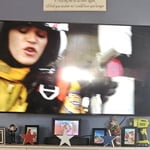
[This review was collected as part of a promotion.] Great front view, not so great side view!!! Need to adjust settings so there's no shadow also. I used CHATGPT to do that.

Review from Samsung US
Helpful?1LI0EAPX5OHH15551574995
Jun 5, 2026
Reviewer name: Jdub
2 out of 5 stars
2 out of 5 stars review

Samsung 50" Q7f

[This review was collected as part of a promotion.] I'm a die hard Samsung fan, I was very unsatisfied with my new TV. I expected so much. Their's blooming, color accuracy

Review from Samsung US
Helpful?1LI0EAPX5OHH15551574995
reply from Samsung Specialist

We appreciate your feedback on the picture quality of Samsung’s Q7F TV. If the image doesn’t quite match your preferences, there are several adjustments you can make to better suit your viewing environment and content type. First, please ensure your TV is running the latest firmware, as updates may include important picture quality enhancements. Go to: Home > Left directional button > Settings > Support > Software Update > Update Now To explore picture mode options, navigate to: Home > Left directional button > Settings > All Settings > Picture > Picture Mode. Options include: • Standard – Ideal for general viewing • Dynamic – Brighter and more vibrant for well-lit spaces • Eco – Optimized for energy efficiency • Movie – Best for viewing in low light • Filmmaker Mode – Preserves the content creator’s intent and disables motion smoothing for supported content You can further customize your image by going to: Settings > All Settings > Picture > Expert Settings, where you can adjust Brightness, Contrast, Color Tone, Sharpness, Contrast Enhancer and more. If you’d like help finding the best picture settings for your preferences, please don’t hesitate to contact Samsung Support at 1-800-SAMSUNG (8AM – 9PM EST Mon – Fri, 8AM – 6PM Sat – Sun). You can also LiveChat with an agent or explore additional resources on our website by clicking the ‘Support’ link. ~ Samsung Specialist

Jun 5, 2026
Reviewer name: Michael O
5 out of 5 stars
5 out of 5 stars review

Great Display
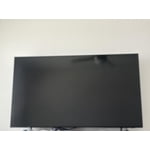
[This review was collected as part of a promotion.] The television has great features and abilities. It allows complete customizations to your personal liking. Highly recommend this product.

Review from Samsung US
Helpful?1LI0EAPX5OHH15551574995