
 Member ratings & reviews for
Member photos





 +39 images
Great printer
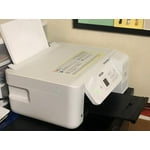
EcoTank ET-2720 wireless all-in-one supertank printer works effortlessly and prints fabulously. The size is a little on the larger size but still fits nicely on my desk area. Set up was pretty easy with the included instructions. I'm excited to use this printer for continuous printing of my necessary documents.
Good prints, poor design
This printer prints my labels so lovely, yet every single time it keeps getting stuck because the paper settings. I have my paper settings on my computer why isnt there an auto paper setting? Or am i just not able to find it? I switch constantly from plain paper to label paper. I get frustrated that my prints don't come out because I have to push a button like 3 times before it prints. Also, it says it prints 10ppm but in reality, one sheet of labels takes about 3 minutes. I need to print about 20 pages per day. But the quality is superb. My labels look beautiful and ink is not pricy. Just bad design or programming.
New ECO Tank user
I like the small size of this printer. Filling with ink was very easy, I was empressed! Print quality was good especially on photos! Will try printing a "maintenance" "nozzle check" every week (as I don't print very often and down't want print head to plug up).
Epson EcoTank ET-2720
I can't say enough good things about this printer. After complete frustration with a well-known competitor's printer, this printer is a dream. In eight months, it has never glitched or froze, I can print from any device in our house and the print quality has always been excellent. I mostly print web pages, but also do some photo printing and it's been very easy on the ink. In eight months it's barely made a dent in the ink tanks.
Ridiculous
I see a lot of great reviews but it looks as if no one has used their printer as long or as much as I do. Wi-fi is horrible and then....then... After so many pages printed, you get a notification that your printer needs to have a sponge replaced and there is no way for you to do it yourself, so you pack it up in a box and ship it to the service center in the next state over to have it done, hopefully, you don't use this for a business like I do, trying to be eco friendly but find the cost of shipping and not having a printer costs money so I have to buy a new one every 4 months. They really thought this one through
Great printer
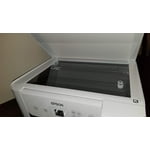
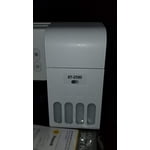
I'm loving this version of printer from Epson. The EcoTank option allows me to easily fill the ink and always be able to see exactly how much ink it has at all times. No wasting of ink or disposing of cartridges with this model. You just fill the cartridge bag when it starts to get low. Print quality is great for both standard printing as well as photos. It prints quite fast and is quiet. I like the top load feature for the paper so I can always tell how much I have left. It feeds well and doesn't get jammed at all. The scan feature also is nice and easy to use with the onscreen buttons. I was able to scan to my nearby computer in no time. I also like being able to make a quick copy via the scanner bed. On the overall I love this printer model and would highly recommend it.
I Lost Patience With All The Problems
I was looking for a printer to replace my Canon, which had printer head issues. I settled on the Epson ET 2720 because of all the positive reviews. I really like the idea of supertank ink, and the potential savings, especially since other companies like HP gouge you with their high ink prices. Trying to setup this printer was difficult. I am no novice to electronics and computers/printers, etc., but this printer took over 3 hours to setup properly. I had constant problems downloading the software to my laptop, and problems with the printer recognizing external devices. After finally getting the printer setup, my next issue was with wifi connection. Every single time I tried to print, the printer could not find my wifi, even though I have extenders close by. I placed this printer in the exact spot where my previous Canon printer had been, and I never had any problems with that printer. This Epson, however, was a nightmare to try to stay connected. I then tried out the remote printing, where you can send a page to the printer via a dedicated email address. My printer rarely received the page. Unreliable connectivity is extremely important for me, and I cannot rely on a printer that may or may not print because of connectivity issues. Another negative for me was no auto duplex printing. That is my fault for assuming this printer would have one, but for the price I paid I felt it should have had it. On a positive note, the printer was fast, when it did work, and the photo quality was excellent. The printer, for me however, was unacceptable due to the constant dropping of wifi signal. I returned it for a Canon G7020 which also has supertank ink. It is slower and photos aren't as good, but it stays connected 24/7 and has duplex printing. Maybe other people will have better luck with the connectivity, but for me it just didn't want to stay connected.
Monster Ink Capacity!
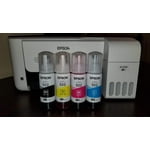
This printer is light, compact and extremely capable at printing excellent quality photos and documents! But the thing that I really valued the most was the over-sized ink capacity that this printer features. You receive all of the ink that you will need (Black, Yellow, Magenta, and Cyan), and filling up the ink reservoirs is easier than any printer that I've used in the past. You simply unscrew the cap and slide the tip into the corresponding ink port and allow the ink to be drawn into the machine. I actually enjoyed this part the best! Once the printer was filled with ink and loaded with paper, I printed some test photos of our family, just to see how they turn out on standard printer paper instead of the photo paper that you would normally use. It printed a full photo within a minute or less, and then I let the ink dry. I know that normally this is where the ink tends to make the page curl up and looks terrible once dry. However, the ink in this printer dried evenly and the paper was not curled at all. It was something that I would be happy to frame and put on my wall! I printed a few dozen personal documents related to treasure hunting and metal detecting just to see the speed that mostly black & white documents process at, and this printer did it amazingly fast! Oh, did I mention that most of my documents were being printed directly from my smart phone? No? I was pleasantly surprised and equally impressed! It made printing documents fun and effortless, while using my laptop to print was just as simple. My only qualm with the printer was the TINY size of the display that you use to go through the settings and enter your Wi-Fi password to connect to your home network. Using the small display (that's smaller than my index finger) was not the best experience I've had, and I would highly suggest Epson consider increasing the size of the display in their future models, especially at this price point. But for the most part, my smart phone and laptop handled the relevant settings for each print I ran, so it is not an "end of the world observation". Please Note: This is a review for the Epson EcoTank ET-2720 All-In-One Supertank Printer that I received free of charge to do a beta test and review.
Very Slow - Difficult to Use
I have had this machine since the beginning of the pandemic. I like the inktank concept. It is very efficient in using ink. Print quality is very good, for graphics and photos. The reason I plan to replace it is the speed of printing and the difficulty in adjusting settings. It has a very small "window" in which the instructions and settings are displayed. The information is small and difficult to read. Once read, both my wife and I are often stumped as to the meaning. It's a shame such good print quality at lower print costs but the minuses just won out in our house and we are shopping for a replacement.
Colors aren't even close to true no matter what
I had this printer for approx 2 weeks before taking it back for a refund. Colors weren't true. Not with color calibration, not with manual adjustment, not with professional help. As I really needed the color printed to be the same as the color showed on the screen this was a no for me. If you're just printing out memos and whatnot then I could see it being great. But when you need something to be a true red and the closest you can get is a faded brick color, it's a trash printer. They need to figure out how to make all eco tanks work correctly in regard to color. I know the "ink" used is actually a dye, so maybe that's the issue?