
 Member ratings & reviews for
Member photos




 +12 images
Quick and Easy set up and printing!
I purchased this printer two days ago. I am excited about not having to purchase ink very often. The print quality is excellent and it was easy to set up.
Excellent All-in-One EcoTank Wireless Printer
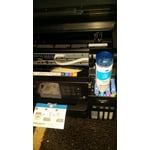
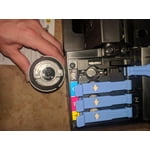
The Epson WorkForce ET-3750 EcoTank All-in-One Printer. I will start off with the step by step guide to make it running. From: * Unpacking, *Filling the ink tanks, *Loading the paper, *Connecting the fax line, and *Installing the software. The process was not complicated at all and the two page step by step guide that comes with printer was very helpful and precised. I just followed all the directions stated and no problems encountered. Refilling the ink was easy because the bottle of ink fits perfectly into the tank. Once the tank was fully filled, time to power up the printer. When it's powered up, there are intructions appeared on the LCD screen which I basically follow the steps again. The charging the ink takes around 10 minutes to finish and once it is fully charged another instruction will follow like loading the paper and stuff. On LCD screen will show the options of paper sizes and I just select the size of paper I put in which is size 8.5"x11".a2.4". Next step was connecting the fax line and Installing the software. I used the the DVD that comes with printer. While doing that, the printer is still not connected to my computer. Once installation of the software is done I have the option to connect it through a USB port or wireless connection and in this case I used the wireless one. Again, the whole process went well and no problem occur during the connectivity step. And I have successfully installed the new printer. I did a few test printing first that was prompted on the screen, I registed the printer on my name and all that stuff. Printing, Scanning, and Photocopying: Through my mobile phone I installed the Epson Print Enabler from Google play. Went to my phone to do a test printing. I just selected a picture fom my phone then select the print option and instantly find the printer which the Epson ET-3750, and then print. What I love about it is, it printed so fast like instantly unlike the printer I have it take few second to process the document especially through wireless printing. I have done printing from my laptop through WiFi, done WiFi scanning as well which for me a very convenient process. I have tried the photocopying which also comes out perfectly. I love the fact that the printer comes with a 2 year supply of ink. 2 Bigger Bottles of Black Ink, 2 Botthels of Magenta, @ Bottles of Yellow Jaune, 2 Bottle of Cyan Which for me, is not very common in buying a printer. I think this is a plus factor to choose Epson WorkForce ET-3750 EcoTank Wireless Color All-in-One Supertank Printer. Probably the overall procees in installing the printer to make it running, takes less than an hour. Overall impression: The Epson WorkForce ET-3750 EcoTank Wireless Color All-in-One Supertank Printer is a high quality all-in-one printer. Gives me a great quality printing results. Which at home I do a lot of printing for my small business especially when I am doing some inventory with my supplies. My husband's paper for his Master's Degree which he does a lot of printing on that. My kids kids love to do coloring and this would be a great help in printing their printable coloring activity. I would high recommend this kind of printer to family, friends and colleagues. "This is a review for the Epson WorkForce ET-3750 EcoTank All-in-One Printer that I received free of charge to do a beta test and review.”

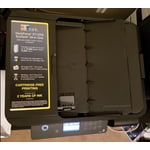
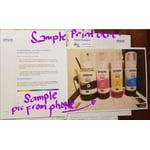
Compact, but a powerful, ink saving printer
I just purchased this Epson ET-3750 printer and have completed the installation and wi-fi connections. This was about as easy of an installation I have ever done. No frustrations, no problems, just easy to follow instructions. I will know in a few weeks how I like the print quality and ease of use, but my initial feelings are great.
Highly Techommended
Setting up the Epson printer was extremely easy the ink filling bottles were nice not one drop of ink spilled on during filling the instructions were easy to follow and sitting up my wireless network only took 10 minutes to complete I have Windows 7 on my laptop which is an older operating system but encountered no problems with it the actual printing of pages went very smooth I printed out an owner's manual for my monitor heater which was 76 pages and from start to finish it took 6 minutes I'm very happy with the product and went would recommend it to anyone who needs a reliable printer fax machine the wireless printing feature was very easy to set up. I will enjoy using this printer for many years to come thank you so much for allowing me to test out this product. I highly recommend this to everyone! It's a great printer! This is a review for the Epson WorkForce ET-3750 EcoTank All-in-One Printer that I received free of charge to do a beta test and review.”
Excellent Quiet Printer! Worth the Price!
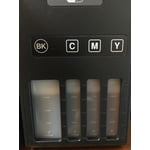
The Epson Workforce ET 3750 EcoTank printer has step by step instructions that were very easy to follow. Preparing the ink tanks was simple and the ink bottles are practically spill proof. I love that you can just look at the front of the printer to see when the ink runs out and needs to be replaced. It's an ecotank printer which means the ink tanks can hold the equivalent of about 30 cartridges! When buying a printer, I always look to see how many color/black pages it can print with one cartridge. This printer can print up to 14,000 pages black/11,200 color. In the box, there is also a replacement bottle for each ink tank which means you're getting almost 2 years worth of ink! The printer is a bit pricier than the printers I'm used to buying but the money you save in ink makes it well worth its price!!! I also absolutely love the convenience of being able to print from ANY of my devices just by connecting the printer to my WiFi. I also connected it to my Google Cloud Print account. I also love the printer's QUIET setting! This was important because I have 3 small children and I've always wanted to do most of my printing at night but my old printers were way too noisy. The quiet feature allows me to do most of my work at night while they are asleep. I'm a stay at home mom with a part time job. I print out a lot of learning activities for both home and work. It also scans flawlessly, acts as a fax machine, and has double sided scanning and printing which most printers have but this one has the ADF feature! The ET 3750 allows you to save money on ink and time with its high speed printing. It has an excellent printing quality for both regular prints AND photos! I would definitely recommend this product, in fact I already have recommended it to my family and friends! This is a review for the Epson Workforce ET 3750 EcoTank All-in-One printer that I received free of charge to do a beta test and review.
Hardly worth the savings in Ink
I bought this printer for the refillable tanks. I regret it most days. This printer technology must be ancient. The touch screen is archaic. It does not communicate well with my computer. Sometime printing is immediate. Sometimes I wait 20 minutes for something to print. The biggest let down is the inability to scan to a jump drive. It said it could scan to my computer but that's another sob story.
Set up terrible.
I checked with various sites about this printer and I read all the 4 and 5 star reviews and decided on the ET 3750. When I received it the viewer stayed in the select paper mode and I still can not get out of it. The set up procedure needs to better defined and easier. The 1 star reviews 90% of complaints comment about setting the printer up. To evaluate the printer it is a 5 star but the set up is 1 start and even now it is not set up correctly.
Best Printer I have Owned or Tested
Bottom Line: I love this printer and highly recommend it!. I was offered the opportunity to beta test the Epson EcoTank Work Force 3750 and jumped at the chance to put it through its paces. I've had the Printer for two weeks and this review is based on working with it over this time period. I have printed over 100 documents so I can attest to its performance. Setup was extremely easy and took less than 10 minutes. I followed the basic instructions provided in the Instructions and didn't encounter any issues. In fact the setup was very intuitive and if you have set up printers at home in the past, you really don't need the instructions. Just follow the prompts on the printer screen. What I really appreciate is the larger than average screen size and easy to follow menu. Most printers I have owned and/or tested had small screens and/or less than intuitive menus . Using the CD provided, loading the Software on my laptop was without incident and the installed software was then automatically updated. Setting up the WIFI was quick and effortless. especially if you have the WPS button on your Router. Follow the prompts on the printer screen and when indicated, press the WPS on your Router. Connecting our laptops and smartphones was also simple. Again, all you need to do is follow the printer screen prompts, use the PIN number provided and enter on your devices. In less than 10 minutes I was printing Test Pages! The ET 3750 prints one-sided and two-sided pages. Unlike similarly priced printers, you don't have to manually add a page at a time to go from one sided to two sided. Just load all your pages and let the printer do it's thing. Printing is very fast for a unit of this price. In fact, I have a high end HP Inkjet at home and this model prints faster. I have printed over 100 pages in two weeks and haven't had one issue crop up. The EcoTank feature makes printing large number of pages so much better. I'm not worried about running out of ink. Picture quality is amazing and the pictures are very sharp. The scan feature is very good. You can insert multiple pages for the printer to scan and not have to worry about doing it one page at a time. I tested saving scans to our laptops and smartphones and also to MS OneDrive. Worked every time. I then opened the files from each device and sent it to them to the printer. Everything printed perfectly. I can't comment on how well the FAX works as I haven't tested this feature yet. Based on everything else I have seen, I wouldn't expect any issues. Final Thoughts: This Printer is a WINNER and a great value for the price. Setup is quick and intuitive, prints crisp, clear photos and print in B&W and Color, nice scanning capability and easily connects to your smart devices. I highly recommend this All-in-One to anyone looking to get a new device. This is a Review for the Epson EcoTank Work Force ET-3750 All-in-One Printer that I have received free of charge to do a beta test and review.
Nice Printer
It's a really nice printer.I haven't had any problems with it and it's always ready to go with just the WiFi connection. Prepare yourself for a lengthy setup to get form opening the box to ready to print, scan and copy from your computer, tablet, cellphone and the printer itself. Realistically I think it was hours, but in the end it's well worth it. Well worth the higher upfront cost for this tank system. The things I remember reading in some negative reviews before I purchased it are either non-existent or require you to simply by the more expensive model for the more features you want.
Great printer
Pros The Printer setup was quick at roughly 30 minutes to include un-boxing. The printer prints flawlessly without smudging or clipping. The multitude of content options make printing a breeze for normal documents, images and letterheads. Cons When loading Ink into the system, it presents a precarious situation where the ink may leak or drip. Although the current configuration for loading the ink is good and I haven't seen any issues yet, I fear this may happen in the future with enough usage. Summary The EPSON ET-3750 is a printer for the home business or professional office setting. The printer provides ease of access and a multitude of printing/scanning options. This printer has a 30-sheet Auto Document Feeder; fast auto 2-sided printing.150-sheet paper capacity, border-less printing up to 8.5" x 11".The printer is connected via USB or WiFi connection and works well with the windows 10 environment. The installation of the software from the EPSON website was straightforward and the self installer provided all of the options a normal user could expect to cleanly install the drivers and software for this printer. The interface of the software is intuitive and works well with the theme aspects of Windows 10. From the moment I opened the box, the craftsmanship was apparent. I commented immediately that the printer has the manufacturing aroma that old time gamers would recognize from the Nintendo 64 when it was unboxed (nostalgic moment). The printer has a 2.4" color LCD. The LCD is small at roughly 2 inches across and has a color screen. You can scan, print, fax, and copy from the LCD screen or you can print from tablets and smart phones using the download-able app. The printer comes with 8 bottles of ink (2 black, 2 Cyan, 2 Magenta, 2 Yellow). You fill the printer with 4 bottles and you still have 4 more bottles for later. Includes enough ink to print up to 14,000 pages black/11,200 color. The Epson 502 ink bottle costs $20 each for total of $80 for a complete refill for black and colors which is amazing. This is a review for the Epson WorkForce ET-3750 EcoTank All-in-One Printer that I received free of charge to do a beta test and review.