Skip to Main Content
Sam's Club
Sam's Club
Member ratings & reviews for
Canon Color imageCLASS MF644Cdw Wireless Multifunction Laser Printer
2.9 out of 5 stars
stars98 ratings97 reviews
  1. 5 stars35% (34)
  2. 4 stars12% (12)
  3. 3 stars5% (5)
  4. 2 stars9% (9)
  5. 1 star39% (38)

Member photos

Sort by |
Showing 81-90 of 97 reviews
Jul 23, 2021
Doris999
5 out of 5 stars review

Great features, very good quality color prints for the price.

Bought this 2 months ago. Great features, very good quality prints for the price. got some help setting it up the first time, and it's working excellent.

Review from canon.com
Helpful?2JTB8BK12J4T15303858892
Oct 9, 2021
MAL14
1 out of 5 stars review

NOT USER FRIENDLY OR INTUITIVE!!!

Gave this printer a year to prove its worth. Failed miserably!!! I can honestly say I have never been so frustrated over anything in my entire life more than this printer and user manual. I cannot return it, cannot even give it away.

Review from canon.com
Helpful?2JTB8BK12J4T15303858892
May 27, 2020
chr537
1 out of 5 stars review

touch screen nearly inoperable; printing from Mac via wifi unreliable

This printer takes aggravation to a new level. The touch screen often takes several tries before it registers a touch. Printing from Mac via wifi is hit-or-miss at best.

Review from canon.com
Helpful?2JTB8BK12J4T15303858892
Dec 11, 2020
Denis
3 out of 5 stars review

Unnecessary and unexpected Noise

Anyone have any idea why, after printing is complete, the printer shuts down for a few seconds, then starts loudly shifting something around inside for a full 35 seconds? That stops and all is quiet. Does it the majority of the time, but not every time.

Review from canon.com
Helpful?2JTB8BK12J4T15303858892
Apr 19, 2022
Will Hates This Scanner
1 out of 5 stars review

WORST. SCANNER. EVER.

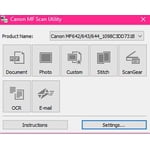
This is NOT compatible with a Mac. I spent HOURS with a tech and they still could not help me get it set up the scanner to work consistently. 9/10 an erroneous error message will pop up and no amount or rebooting (the canon or my computer or my router) would do the trick.

Review from canon.com
Helpful?2JTB8BK12J4T15303858892
Dec 29, 2019
JoeITman
4 out of 5 stars review

Not sure about this printer yet. Agree with what others have to say

Owned now about a month. Agree with manual being way to big, not a home type printer for sure and needs an I.T. person, has gone to sleep once and couldn't wake it up without a power down. I sure hope this doesn't continue. Very difficult to search out a function and use for such. Sadly too complicated and I worked in I.T.

Review from canon.com
Helpful?2JTB8BK12J4T15303858892
Aug 8, 2019
SHANNON BURKLUND
3 out of 5 stars review

Canon Printer

It has great printing everything is really clear and bright. My only issue with it has so many options that I have not been able to utilize not even close to all it has. The owner manual is 164pages long to print, so I am disappointed that I haven't been able to completely utilize the printer

Helpful?2JTB8BK12J4T15303858892
May 30, 2020
PatriciaS
1 out of 5 stars review

won't print on any paper other than 8.5 x 11

even though the printer has guides for smaller paper and envelopes. It will not print on smaller paper. You can only choose a limited number of page sizes. You can set the printer to register custom page sizes but it still won't let you select on of those sizes.

Review from canon.com
Helpful?2JTB8BK12J4T15303858892
May 30, 2019
LisaH
4 out of 5 stars review

Overall, great printer

LOOK: I received this product in exchange for my unbiased opinion. Overall I like the look of the printer. I enjoy the look of the touch screen and shape of the printer overall. I do wish it came in the color black though. FUNCTIONALITY: The printer connected very quickly to my wireless network and setting it up was a breeze. One problem I faced at set up was installing the driver onto my laptop as it has no optical drive. Since more and more laptops are being produced without an optical drive, it would be nice for alternate installation directions to be front and center for ease of set up for all computer types. I got it to work after going through some extra steps. The printer and copier itself prints beautifully and produces great images. But I would say that I feel the printer, for the large size it is, should hold way more paper so it would not have to be refilled as often. PRACTICALITY: The printer weighs well over 50 lbs. and I had to recruit help to get it upstairs to my office. With traditional inkjet printers they are more mobile and can be moved from room to room if needed. This printer is not mobile. Once you pick a place you want it to go you'll probably have to leave it there. PROBLEMS: My only complaint would be the cost and availability of cartridges. I'm used to being able to pop into my local department store to buy my ink cartridges but the cartridges for this printer are not as readily available. I hope the ink lasts long enough to make the price and inconvenience of finding replacement cartridges worth it. VALUE: I found this printer to be a little on the expensive side for my needs. Since I don't have a need for a fax machine and probably will rarely use the copier feature, the price is a little high for me. For someone who regularly utilizes all the features this printer has, I think the price may be worth it.

Review from canon.com
Helpful?2JTB8BK12J4T15303858892
Dec 12, 2019
khansen
1 out of 5 stars review

Will not print

Will not print This machine will do anything EXCEPT print from my computer using the paper tray. The machine says it is out of paper. Its clearly some type of software or driver error, because I can copy pages and they will print from the tray, I can print from my phone and they print from the tray and come out beautiful. But the whole reason I bought a printer was to PRINT from my computer. If I feed a single sheet at a time into the MP slot, yes, that is a work around. But the machine will say it needs paper when it is full of paper, and has no problem printing a copy from the tray? I will be returning it, Schoolwork does not wait, I don't have time to mess around.

Review from canon.com
Helpful?2JTB8BK12J4T15303858892