 Customer reviews for SAMSUNG 70” Class Q60D Series QLED Smart TV for
Member photos


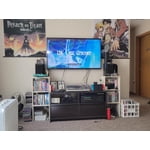
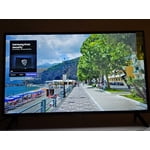
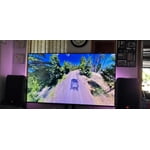

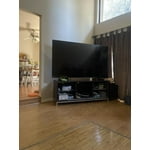 +120 images
Great picture
Excellent picture. Minor tweaking to the color balance, unusually, it needed some red push. Black levels good for and LED, colors vivid, very sharp picture. Streaming operating system a bit slow for this wireless set up, and its not my WiFi, which is super fast. But overall, a good TV. I'd buy it again.
Beautiful picture
We bought our TV about a month ago and I’m having fun with it because I’m old and slow I need to learn how to use the remote control lol, I guess it will take me time but the picture is beautiful there are so many choices, but like I said I have to learn the remote Thank you Pam
False Advertising
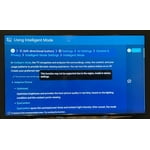
It took mere hours to regret my purchase. One of the primary reasons I chose this TV was for the promise it would adapt to the content and my viewing habits. It says, "Get a natural, realistic picture and accurate contrast with innovative technology that adapts automatically to match your content." During setup I couldn't find any mention of it. I looked in the User Guide and found "Intelligent Mode" that matches the feature description for this TV. It reads, "In Intelligent Mode, the TV recognizes the surroundings, noise, the content, and your usage patterns to provide the best viewing experience. Optimizes brightness and provides the best picture quality in real time, based on the lighting condition and the content you're viewing..." But when you try to follow the prompts to engage the setting, what you get is "This function may not be supported depending on the region, model, or device settings." Additionally, unless you're sitting dead-center in front of the screen, the image looks awful. I multi-task on my computer same distance back and 10 feet to the right and the TV looks like garbage. I dim down my lights as the evening goes on, and my old 2008 Vizio that just died would adapt and you could see the true picture from practically any angle. If this is a "smart" TV, I'll take the dumb ones any day.
SavvyCat, Thank you for sharing your thoughts on the picture quality of your Q60D TV. To ensure you’ve got the latest image quality updates, please confirm that your TV is up to date with the latest firmware version. You can check by going to: Home > Menu > Settings > Support > Software Update. If the picture you’re seeing is still not to your liking after updating firmware, there are several picture settings you may want to try adjusting. Go to Home > left direction button > Settings > All Settings > Picture > Picture Mode ...and select the mode that best fits your usage: 1. Standard: Is the default mode suitable for general viewing environments 2. Dynamic: Makes the picture brighter and clearer in bright viewing environments 3. Eco: Provided to save energy 4. Movie: Suitable for watching TV or movies in a dark room 5. Filmmaker Mode: Provides source content just as the creators intended. If the image is defined as Filmmaker Mode, it’ll automatically switch to Filmmaker Mode while watching. You can also fine-tune your picture with expert settings such as brightness, contrast, sharpness and more (All Settings > Picture > Expert Settings). Intelligent Mode enables the TV to recognize and analyze the surroundings, noise, content, and your usage patterns to provide the best viewing experience. You can enable Intelligent Mode by going to Menu > Settings > All Settings > General & Privacy > Intelligent Mode Settings > Intelligent Mode. If adjusting image settings does not improve your picture, please contact Samsung Customer Support at 1-800-SAMSUNG, 8AM - 12AM EST, 7 days a week. Or visit us on the Samsung website and click on the ‘Support’ link for: • LiveChat • Manuals, Software, & Warranty Info ~ Samsung Specialist
Definitely one of my favorites.
[This review was collected as part of a promotion.] Our family uses our TV alot, for a little bit of everything. Streaming, media, sometimes just for music, and gaming. The picture is very clear, sound is always clear. Color never has to be adjusted, and with a big family with constant clumsy mishaps, it's been very versatile and held up better than I hoped. Definitely would recommend, and won't consider any other brand next time I am shopping for a TV. Thank you guys at samsung for the great products we enjoy using daily.
Love love it!!
I'm a fan of Samsung so yes I definitely went to their TV like always no questions asked! In our household almost all of the appliances are Samsung, we used to have 55'' TV for our living room but we now upgraded it to 70'' and let me tell you it's the best thing ever!! I could watch my football game on it and the sound quality as well as picture quality is so amazing I just love it! That price tag is worth it honestly!!
A significant upgrade and addition to my Samsung F
I am absolutely thrilled to replace my earlier Samsung TV with this one! It provides all the channels that the earlier one didn’t. It will allow me to replace my monopolized cable TV with streaming capabilities at a much reduced monthly cost. And I get to add other channels that I have always loved!!! Well done, Samsung!
Good pic Poor Remote
I bought my 65 inch OLED Samsung TV about 2 weeks ago. The picture is excellent. However, the small remote control is a nightmare. There are too many functions in a small area and several buttons/bars have dual functions. It’s very confusing. Several times, some functions stopped working. The remote control is needs to be redesigned. A friend had the same issues with the same size remote. Both of us have gone back to using our cable provider’s remote.
Nice tv awful remote
Nice TV- clear picture and sound is good. However the functioning is weird. It just automatically goes on to another show after I am finished watching a show show. I have no interest in this other show and then it keeps it and it’s memory and keeps returning to it when I turned the TV on. Very irritating. Also, the remote is awful- not user-friendly at all. Tiny buttons in weird places and virtually impossible to get it to cooperate with the voice feature. It keeps telling you to ask Alexa- and then Alexa essentially cannot help you. Also impossible to figure out how to use the closed caption feature.
HDR10+ support is SEVERELY LACKING
Because of Samsung policy to not support Dolby Video, It uses hdr10+. There is no help for enabling this on Q60DD. I tried online chat and phone support, but they did not help. I get horizontal bars when playing some video formats. I don't think I want to buy a Samsung again unless there is support for Hdr10+.
Hi NMKUSER3996, Thank you for sharing your review. The Q60DD supports HDR10+ Adaptive, HDR10 and HLG. You can stream HDR10+ through the Prime Video, YouTube, and Google Play Movie and TV apps. A growing number of UHD Blu-ray discs are also available with HDR10+ from major studios Warner Bros, Universal, 20th Century Fox, and Lionsgate. Look for the HDR10+ logo on UHD Blu-ray Discs. You can even shoot HDR10+ video on your Galaxy Phone and then view it on your TV. If you need more help, Samsung is here for you. Please call us at 1-800-SAMSUNG, 8AM - 12AM EST, 7 days a week. Our LiveChat agents are also available by clicking on the ‘Support’ link on our website. ~ Samsung Specialist
This TV shows an amazing picture
[This review was collected as part of a promotion.] We got this TV for the entertainment room and it is a success for different reasons, here they are. The QN32Q60DAFXZA is part of Samsung’s basic QLED 4K TV series and it features Quantum Dot Color technology, which provides a wide color gamut for rich and accurate colors on the screen. The TV has a 4K UHD resolution with 4K upscaling, ensuring excellent picture clarity even from non-4K content. It does come with Dual LED backlighting, which enhances natural color details. The TV’s native refresh rate is 60Hz, but it still delivers smooth motion for action movies and sports. Auto Low Latency Mode support enhance the gaming experience. The QN32Q60DAFXZA supports HDR10+, HDR10, and HLG formats, allowing us to enjoy enhanced details and expanded contrast from a wide range of HDR content sources. As for the TIZEN the integrated operating system, it offers access to a variety of premium entertainment and smart apps. The Wi-Fi 5 ensures easy connectivity to the home network. Control options include the included TM2360E smart remote, Google Assistant, Amazon Alexa, Apple AirPlay, and Bixby. The speaker system is basic (2CH 20W), but it still delivers decent sound quality with Q-Symphony and Object Tracking Sound Lite (OTS Lite). Overall, the Samsung QLED 4K TV is a good choice. It offers Wide Color Gamut and good contrast on its VA panel, keep in mind that it does not come with advanced gaming and motion features, yet it is perfect for us.