
Skip to Main Content
Sam's Club
Sam's Club
All Departments
All Services
Customer reviews for SAMSUNG 75" Class TU700D-Series Crystal Ultra HD 4K Smart TV UN75TU700DFXZA for
SAMSUNG 75" Class TU700D-Series Crystal Ultra HD 4K Smart TV UN75TU700DFXZA
4.4 out of 5 stars
stars
10.4K ratings10K reviews
  1. 5 stars69% (7,257)
  2. 4 stars18% (1,886)
  3. 3 stars5% (566)
  4. 2 stars3% (265)
  5. 1 star5% (498)

Member photos

  • +1523 images
Sort by |
Showing 3,431-3,440 of 10,063 reviews
Feb 17, 2023
Reviewer name: Jacob
2 out of 5 stars
2 out of 5 stars review

Technical problems

Hdmi ports keep losing connection. The screen will appear to shut off in the middle of gaming. I've upgraded the hdmi cables thinking that was the issue, I've switched the hdmi ports, I've tried gaming mode on, off, and auto and it doesn't make a difference. I check to make sure the software is up to date and it is. We are loyal Samsung users from our tvs to our oven to our phones. But this TV is making me consider changing courses.

Review from Samsung US
Helpful?3STAXRT0NDXF13883163940
reply from Samsung Brand Ambassador

Hi Jacob, We appreciate you sharing your details regarding the HDMI ports on the TV. Your feedback is important to us and will be shared with our product teams. Samsung is committed to providing the best possible product experience, quality, and value. We back this Samsung TV with a 1-year limited manufacturer's warranty, including authorized repair for manufacturer defect, if purchased brand-new directly from an authorized seller. Please give us a chance to make this right by calling us at 1-800-SAMSUNG, 8 AM - 12 AM EST, 7 days a week. Our LiveChat agents are also available by clicking on the ‘Support’ link on our website. ~ Samsung Advisor

Oct 25, 2022
Reviewer name: ChimChurri
5 out of 5 stars
5 out of 5 stars review

This product is easy to use and has great quality
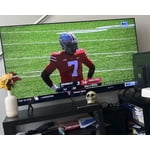
[This review was collected as part of a promotion.] I use the tv to watch Netflix, Hulu, YouTube, and football. It is so easy to navigate and getting logged in to all of the apps was a breeze with the Samsung TV app. The quality is fantastic, I wouldn't change a thing

Review from Samsung US
Helpful?3STAXRT0NDXF13883163940
Nov 30, 2021
Reviewer name: Clay
3 out of 5 stars
3 out of 5 stars review

Nice TV, but not a very bright picture

everything works on the tv, but the picture is dimmer than my last samsung. i even turned the brightness all the way up, and it still has a dim look. if you are going to buy make sure you see how it looks in the store first. that was my mistake. wont make it next time

Review from Samsung US
Helpful?3STAXRT0NDXF13883163940
reply from Samsung Brand Ambassador

Hi Clay, Thank you for purchasing the TU7000 TV and for your review. I am sorry to hear that you are not happy with the brightness levels of your picture. If the colors on your TV are correct but just a little too dark or bright you can try the different Picture Modes or manually adjust the Brightness settings to your liking. Dynamic Picture Mode will make pictures brighter and clearer in bright viewing environments. Go to: Settings > Picture > Picture Mode > Dynamic Or manually adjust the Brightness and other settings to your liking. Press the HOME button on your remote, then navigate to: Settings > Picture > Expert Settings You may also want to disable Power Saving Mode which automatically adjusts the brightness to reduce the TV’s power consumption. Go to Settings> General> Eco Solution> Power Saving Mode. Ambient Light Detection will also automatically adjust the brightness level of the TV, according to the ambient light level, to reduce power consumption. If Ambient Light Detection has adjusted the screen brightness to a too bright or dark level, you can select Minimum Brightness to manually adjust the minimum screen brightness. Go to Settings> General> Eco Solution> Ambient Light Detection Please also be sure you are running the latest firmware. You can check to see what software version your TV is using and if there is an available update through the settings on your TV. Go to: Settings>Support>Software Update. I hope this helps to improve your picture. Should you need further assistance, please contact Samsung Customer Support at 1-800-SAMSUNG (ask for TVs), available 8AM - 12AM EST, 7 days a week. For additional support resources, visit us on the Samsung website and click on the ‘Support’ link in the upper right corner of the homepage for: 1) Chat with Us/Product Help: To begin a chat or find solutions, choose ‘TVs & Home Theater’ and select your model & topic. 2) Register a Product: For access to easy warranty support, convenient opt-in to special promos and offers, faster troubleshooting and service, and quick notification of system updates. 3) Manuals & Software 4) Warranty Info 5) Contact Us ~ Samsung Solutions

Oct 26, 2020
Reviewer name: Nette
5 out of 5 stars
5 out of 5 stars review

I love this TV!!

[This review was collected as part of a promotion.] This tv has excellent quality picture and sound. My kids and I love to watch things like Jurassic Park and others and we feel like we're at the movie theater. I wasnt really looking for a tv this large, but with everything closed down, it was a great decision for me and my family. I am very happy that i made this purchase with Samsung!!!

Review from Samsung US
Helpful?3STAXRT0NDXF13883163940
Aug 10, 2022
Reviewer name: ZackP14
5 out of 5 stars
5 out of 5 stars review

The crystal clearness

[This review was collected as part of a promotion.] Great tv for gaming and binge watching. The game display mode helps when playing darker games and also shows great when you watching a darker movie. All the features are great and I would recommend it.

Review from Samsung US
Helpful?3STAXRT0NDXF13883163940
Oct 25, 2022
Reviewer name: CoffeeMom
5 out of 5 stars
5 out of 5 stars review

Unbelievable value

[This review was collected as part of a promotion.] The picture on this TV is unreal. It is mostly used for gaming. There are so many features that after a month, we're still learning about them. Not a single regret. Thinking about ordering another one.

Review from Samsung US
Helpful?3STAXRT0NDXF13883163940
Jun 17, 2022
Reviewer name: Jonezy2h
5 out of 5 stars
5 out of 5 stars review

Best TV Ever!

[This review was collected as part of a promotion.] I love this TV with my whole heart I use it for a multitude of things. I love being able to easily stream my favorite movies and Tv shows directly from the Tv and they look absolutely amazing with the crystal UHD 4K resolution! I also enjoy gaming on this tv it's game mode provides an amazing experience and has my games looking crisps. This tv made my dorm room the hangout spot to watch movies and all sorts of things and I would just like to say thank you Samsung for making amazing products for amazing memories!

Review from Samsung US
Helpful?3STAXRT0NDXF13883163940
Oct 18, 2022
Reviewer name: Bedadildal
5 out of 5 stars
5 out of 5 stars review

Love love love!!!

[This review was collected as part of a promotion.] I chose this TV only because the price for what it is was great but now that I use it I could see I didn't make a mistake choosing this one over one of the newer brands. The audio is great smooth clean and clear. The display is even better it's the first tv in a long time that Coffman disappoint me in anyway.

Review from Samsung US
Helpful?3STAXRT0NDXF13883163940
Jun 16, 2022
Reviewer name: aquakittie
3 out of 5 stars
3 out of 5 stars review

great size and clear picture - some draw backs

[This review was collected as part of a promotion.] issues: It doesn't appear that I can link it up to wifi earbuds the sound is all over the place, doesn't pic up conversation well but blasts you out on the sound effects and music the screen is incredibly dark. the rep I bought it from warned me but I didn't believe him. Its dark and I've tried adjusting what little I can in the display settings but its a lost cause. I can't watch darker themed things during the day with blinds open on my windows. pairs well with firestick is thin and very lightweight reasonably priced

Review from Samsung US
Helpful?3STAXRT0NDXF13883163940
reply from Samsung Brand Ambassador

Hi there aquakittie, We appreciate you sharing your experience when connecting your wifi earbuds to the TU7000 TV. Please try re-pairing your wifi earbuds with your TV. Go to Settings > Sound > Sound Output > Bluetooth Speaker List Some things to keep in mind when using Bluetooth headphones: - You can only pair one Bluetooth audio device at a time. - You can't use Bluetooth devices and the Wi-Fi Speaker Surround Setup feature (also called Surround), or TV SoundConnect simultaneously. To adjust your TV's sound, you may want to try adjusting the settings to suit your personal sound preferences. You can change the Sound Mode by going to Settings > Sound > Sound Mode You can also customize the sound with Expert Settings by going to Settings > Sound > Expert Settings I see that you’ve already tried adjusting your image, please try the below instructions: Go to Home > Settings > Picture > Picture Mode and select the mode that best fits your usage: 1) Standard: Is the default mode suitable for general viewing environments. 2) Natural: Reduces eye strain for a comfortable viewing experience. 3) Movie: Is suitable for watching TV or movies in a dark room. 4) Dynamic: Makes the picture brighter and clearer in bright viewing environments. 5) Filmmaker Mode: You can watch the source content (e.g., movie) as it is. If the image is defined as Filmmaker Mode, it will automatically switch to Filmmaker Mode while watching. You can also go to: Settings > Picture > Expert Settings > to manually fine-tune your image. If you need more help, Samsung is here for you. Call us at 1-800-SAMSUNG, 8 AM - 12 AM EST, 7 days a week. LiveChat with an agent as well as manuals, software, and warranty info can be found at the ‘Support’ link on our Samsung website. ~ Samsung Advisor

Nov 13, 2020
Reviewer name: catlady
5 out of 5 stars
5 out of 5 stars review

This TV is great

[This review was collected as part of a promotion.] I enjoy the screen features and the size of the screen that I have on my TV perfect for my one bedroom apartment complex. I can screen mirror my phone easily and the settings on this TV are easy to get to.

Review from Samsung US
Helpful?3STAXRT0NDXF13883163940






