
Skip to Main Content
Sam's Club
Sam's Club
All Departments
All Services
Customer reviews for SAMSUNG 75" Class TU700D-Series Crystal Ultra HD 4K Smart TV UN75TU700DFXZA for
SAMSUNG 75" Class TU700D-Series Crystal Ultra HD 4K Smart TV UN75TU700DFXZA
4.4 out of 5 stars
stars
10.4K ratings10K reviews
  1. 5 stars69% (7,257)
  2. 4 stars18% (1,886)
  3. 3 stars5% (566)
  4. 2 stars3% (265)
  5. 1 star5% (498)

Member photos

  • +1523 images
Sort by |
Showing 1,801-1,810 of 10,063 reviews
Aug 23, 2022
Reviewer name: Santos
5 out of 5 stars
5 out of 5 stars review

This product is good

[This review was collected as part of a promotion.] I love the image of this tv and it's very easy to handle because on it I can download the best apps for television and use what I like the most like YouTube and Netflix are the main apps I use and I have no problem opening them.

Review from Samsung US
Helpful?3STAXRT0NDXF13883163940
Oct 25, 2022
Reviewer name: Whataboutbob
3 out of 5 stars
3 out of 5 stars review

Pixelation

[This review was collected as part of a promotion.] It's a great picture and bright but you clearly see distortion around objects when they move across the screen. Most times it isn't that noticeable but sometimes it's pretty disheartening because it's a brand new tv. I had an LG prior to this and never had any issues like what I'm having with my Samsung. It's disappointing I always bragged about a Samsung I owned years ago. I guess you need to spend a grand to get a better picture.

Review from Samsung US
Helpful?3STAXRT0NDXF13883163940
reply from Samsung Brand Ambassador

Hi Whataboutbob, We are happy to hear that you are enjoying the crisp picture that the Crystal Processor 4K provides. If you are experiencing distortion, the issue may be due to not connecting correctly with an external device. Please check your connection with these steps: 1. Disconnect and reconnect the power cables and HDMI cables on the back of your TV, then unplug the power cord and plug it back into the wall outlet. 2. If the external device supports UHD video, use a dedicated HDMI cable (4K) for HDMI video playback. 3. If a component cable is used, make sure that the colored connectors are connected to the matching connectors on the external device and the TV. 4. Check the cable connection if you use a set-top box. The cable you need to check depends on the type of set-top box. 5. Make sure that your access point is connected to the Internet. If not, disconnecting and reconnecting its power cable may be required. 6. If the problem persists, check the video output settings in the settings menu of the external device, and ensure that your TV supports the video output mode. I hope these tips help you enjoy your new product. You can contact us for further help at 1-800-SAMSUNG, 8 AM - 12 AM EST, seven days a week. Our LiveChat agents are also available by clicking on the ‘Support’ link on our website. ~ Samsung Advisor

Jun 16, 2022
Reviewer name: SAMSUNGWORLD1
5 out of 5 stars
5 out of 5 stars review

VIEWING AT ITS BEST
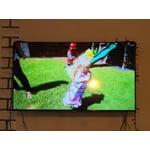
[This review was collected as part of a promotion.] It doesn't natter if it is streaming, Gamong watching sports, outdoors, or if I have my computer linked. This is one of the most amazing pictures I have ever had the pleasure of owning. Paired with the right surround system, You will have your very own movie theater right in your loving room

Review from Samsung US
Helpful?3STAXRT0NDXF13883163940
Sep 16, 2020
Reviewer name: Gogo
1 out of 5 stars
1 out of 5 stars review

Avoid

[This review was collected as part of a promotion.] we purchased two of the same models thinking the first was a lemon. Both TVs had great quality and pictures for the first few weeks, then quality quickly dropped. Screen would flicker, image would bleed. The last draw was when the screen turned maroon for 10 minutes.

Review from Samsung US
Helpful?3STAXRT0NDXF13883163940
reply from OBA

Gogo: Thank you for your review of the TU7000 TV. If your TV is flickering or dimming sporadically, you may need to disable some of the energy efficiency features. Disable Ambient Light Detection, Power Saving Mode, Motion Lighting, or Contrast Enhancer. Settings > General> Eco Solution> Ambient Light Detection Settings > General> Eco Solution> Power Saving Mode Settings > General> Eco Solution> Motion Lighting Settings > Picture > Expert Settings > Contrast Enhancer Run Picture Test. When the tested image quality is normal, check the signal of the connected device. Settings > Support > Device Care > Self Diagnosis > Picture Test I am very sorry for the color glitch issue you encountered. Please check that your TV has the latest firmware update, which should resolve this specific issue. To update directly from your TV, press the HOME button on your remote. - Go to SETTINGS (gear icon) > Support > Software Update > Update Now - Your TV will check for the update and should start downloading the update. After the update is installed the TV will shut down and restart. Once the TV restarts, press and hold the Power button until the TV turns off and back on. If your issues persist after the firmware update, please contact Samsung Customer Support. 1-800-SAMSUNG (8AM -12AM EST, 7 days a week) On the Samsung website and click on the SUPPORT link in the upper right corner for: 1) Contact Us Options (LiveChat, Remote Support, Facebook, Twitter) 2) Product Support 3) Manuals and Downloads 4) Warranty Info 5) Product Registration: Registering your product gives you access to easy warranty support, convenient opt-in to special promos and offers, faster troubleshooting and service, and quick notification of system updates 6) Samsung Community: A great resource for getting help from Samsung moderators and customers and more 7) …and more product, repair, order, and care options ~ Samsung Solutions

Oct 5, 2020
Reviewer name: Mountainbearnc
5 out of 5 stars
5 out of 5 stars review

Great TV

[This review was collected as part of a promotion.] I love Samsung products! I've only owned Samsung TV's. I bought this one for my mountain cottage. The picture is fantastic and has great sound for the low cost of the TV. I would definitely recommend this model.

Review from Samsung US
Helpful?3STAXRT0NDXF13883163940
Jul 27, 2022
Reviewer name: Wicheewoman
5 out of 5 stars
5 out of 5 stars review

Crystal Clear Picture

[This review was collected as part of a promotion.] I use my SmartTV to stream and watch Cable TV. It's easy to navigate. My one complaint is, the "aspect ratio" feature in the Settings is disabled. I do not like to watch movies or shows with black bars on top or bottom of my screen. It defeats the whole point of having a large screen TV. People have told me that's the way the item was shot, but I know if I watch a show/movie in that format on my cable TV, I can adjust the aspect ratio to ZOOM and get rid of the bars. I would like to be able to do this on my TV when I am streaming Netflix, Prime, etc

Review from Samsung US
Helpful?3STAXRT0NDXF13883163940
Nov 13, 2020
Reviewer name: AnnieG
5 out of 5 stars
5 out of 5 stars review

Easy Setup, Great Picture

this tv was purchased for our guest room, which will be used with an antenna instead of with cable. scanning channels was easy, and the tv was able to pick up more than 100 broadcast channels. the guide is also great for a tv that is getting free channels only.

Review from Samsung US
Helpful?3STAXRT0NDXF13883163940
Jul 12, 2022
Reviewer name: Al K
5 out of 5 stars
5 out of 5 stars review

Great Features, Great Picture Quality

I have been enjoying the 75" for about a month now. The picture quality is fantastic, and I have paired it with a Samsung Sound bar, which provides a full experience. I was surprised with the picture quality considering the size of the TV, my first 75'. The tv itself is nice and sleek, which makes it look clean with it mounted with concealed wiring. I definitely recommend.

Review from Samsung Canada
Helpful?3STAXRT0NDXF13883163940
reply from Operations

Thank you, Al K! We love to hear positive feedback and we’re delighted you’re enjoying your new Samsung TV. 

Aug 15, 2021
Reviewer name: Jess
1 out of 5 stars
1 out of 5 stars review

I do not value the continuous wifi disconnect

only had this tv one week and i am having issues with it connecting to my internet. i have troubleshot every thing and it still will not connect. all of my other devices are functioning great on the same wifi. i only watch tv based on my wireless connection through streaming so this is truly disappointing

Review from Samsung US
Helpful?3STAXRT0NDXF13883163940
May 20, 2020
Reviewer name: mike2321
5 out of 5 stars
5 out of 5 stars review

Very vivid color

[This review was collected as part of a promotion.] The Samsung Crystal UHD TV has the clearest picture I have seen on a TV. I never thought that picture would be so vivid with the different shades of color! The colors really defines the picture making it more real. It makes you feel like you are in the scene. The application options are very nice and easy to use. Even cartoons are more real looking!

Review from The Insiders
Helpful?3STAXRT0NDXF13883163940






