Skip to Main Content
Sam's Club
Sam's Club
All Departments
All Services
Customer reviews for SAMSUNG 65" Class TU700D-Series Crystal Ultra HD 4K Smart TV UN65TU700DFXZA for
SAMSUNG 65" Class TU700D-Series Crystal Ultra HD 4K Smart TV UN65TU700DFXZA
4.5 out of 5 stars
stars
11.3K ratings10.3K reviews
  1. 5 stars70% (7,942)
  2. 4 stars18% (1,994)
  3. 3 stars5% (589)
  4. 2 stars3% (284)
  5. 1 star5% (524)

Member photos

  • +1564 images
Sort by |
Showing 4,781-4,790 of 10,374 reviews
Jan 31, 2023
Reviewer name: Ninad
3 out of 5 stars
3 out of 5 stars review

OK TV, global dimming feature ruins the experience

unlike a few other led backlit tvs, this samsung tv dims the entire areas of screen with a broader than required dimming. that makes the dark scenes a bit too dark, with the few lit areas in the screen also being dimmed. no good. next, the tv's smart meny feature sucks. i have roku for streaming, and this tv's ‘landing page' is the default one when turned on. to get rid of it, you have to press exit every single time. there is no option not to display the smart meny screen upon power on. sucks, samsung. did you get that? convey this to your software team. make the smart menu not default. people with their own streaming devices dont want to be bothered to find the tv remote every time to press exit. same foes for wifi connectivity. stop forcing customers to make the tv connect to wifi.

Review from Samsung US
Helpful?3V8BU16WBLTL13878902648
reply from Samsung Brand Ambassador

Hi Ninad, Thank you for reaching out and letting us know about the issues you are experiencing with the TU700D TV. Please know we are here to help. First, you can change the dimming feature of your TV by adjusting some of the energy efficiency features designed to reduce power consumption. To disable Power Saving Mode, which automatically adjusts the brightness to reduce the TV’s power consumption, go to Settings > General > Eco Solution> Power Saving Mode. Or you can manually adjust the Brightness by pressing the HOME button on your remote, then navigating to Settings > Picture > Expert Settings. Next, to turn off Smart Hub, go to Settings> General> Smart Features> Disable Autorun Smart Hub. Try turning the TV off and on again, and the Smart Hub menu should be disabled, with the current Input Source banner displayed in its place. Alternatively, you can leave Smart Hub enabled and utilize the Autorun Last App feature to automatically start the last app you used once the TV is turned on. To enable this feature, follow the steps below: 1) Navigate to Settings > General > Smart Features > Autorun Smart Hub 2) Enable the Autorun Smart Hub feature 3) Navigate to Settings > General > Smart Features > Autorun Last App 4) Enable the Autorun Last App feature I hope these tips help to improve your enjoyment. For more assistance, please call us at 1-800-SAMSUNG, 8 AM - 12 AM EST, seven days a week. LiveChat with an agent, as well as manuals, software, and warranty info, can be found at the ‘Support’ link on our Samsung website. Thanks for being a part of the Samsung family! ~ Samsung Advisor

Jul 25, 2022
Reviewer name: Strekoza
4 out of 5 stars
4 out of 5 stars review

Excellent TV packed with features.
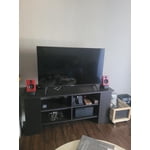
[This review was collected as part of a promotion.] Moved me with across the country. Works great with all dozens of streaming apps I installed and XBOX Series X plays great on it. Was able to connect my Bluetooth speakers and headphones without issues. However it seems to have gotten a bit slower at times possibly from the amount of apps installed on it.

Review from Samsung US
Helpful?3V8BU16WBLTL13878902648
Oct 22, 2020
Reviewer name: SamsungfortheW
5 out of 5 stars
5 out of 5 stars review

Samsung for the win

[This review was collected as part of a promotion.] Ever since I bought my q7 in 17 I will never buy another brand TV. I have been loyal with the new ones since then. Furtherance the new 2020 7 series doesn't disappoint as usual. Love it as loaded with all my apps and for the deal I got couldn't go wrong thanks again. I would do all things Samsung as I feel they are the leader in technology but since my iPhone won't let move my pictures to the note20 easily and there is not Samsung iMessage I am stuck with a sub par phone

Review from Samsung US
Helpful?3V8BU16WBLTL13878902648
Jul 26, 2022
Reviewer name: Love2play
5 out of 5 stars
5 out of 5 stars review

My New TV

[This review was collected as part of a promotion.] My new TV by Samsung has so many features it's hard to know where to begin. This is my second Samsung TV the 1st of the 55 inch and I got the exact same TV but in a 65 inch version as well for another room. The picture absolutely pops first of all on both of them the picture quality is unmatched in 4k gaming on my Xbox I feel like I'm in the game. Which is also a testament to the amazing sound built into both television I also have a soundbar which even accents it even more and it is amazing. It also comes loaded with apps that are not useless father almost all the ones that come with it I use. I am deeply in love with the fact that my Samsung tablet syncs easily and perfectly so that I can utilize it to turn channels if I need to or adjust the volume level and it makes it very easy because they're in the same family now. I highly suggest fitting your home with Samsung televisions it's one of the best decisions I ever made.

Review from Samsung US
Helpful?3V8BU16WBLTL13878902648
Jul 28, 2022
Reviewer name: Diamondqueen
5 out of 5 stars
5 out of 5 stars review

This tv has great picture and sound

[This review was collected as part of a promotion.] I use my Samsung TV for mostly streaming its has all the apps I use except Philo and bet plus but I was able to hook my roku up which has those apps on it I really love that the TV has amazing sound quality it's almost like it has built in car speakers the picture is crystal clear funny cause it's the crystal model color and frame is incredible never had a TV with such high quality in picture I just love it

Review from Samsung US
Helpful?3V8BU16WBLTL13878902648
Oct 25, 2022
Reviewer name: Djcrash
2 out of 5 stars
2 out of 5 stars review

Maybe just me but….

[This review was collected as part of a promotion.] Ok let's say this… I've been eyeing this tv for awhile. It has everything i wanted and wasn't going to break the bank. Saying that, I've had one tv sent with a broken screen and the replacement had the backlight go out and sent it for repair under warranty. Now, the picture quality is great! I like the features and it also has better factory speakers than i expected. I'd probably still recommend it a good low end buy. I've had cheaper ones from other brands and they weren't as good as Samsung (didn't think i was gonna say that did you?)

Review from Samsung US
Helpful?3V8BU16WBLTL13878902648
reply from Samsung Brand Ambassador

Hi Djcrash, We appreciate your feedback on the TU7000 TV and your patience while waiting for a replacement TV. If there’s anything we can ever help with, please call us at 1-800-SAMSUNG, 8 AM - 12 AM EST, seven days a week. Or visit us on the Samsung website and click on the ‘Support’ link for: 1) LiveChat 2) Manuals, Software, & Warranty Info Thanks for being a part of the Samsung family! ~ Samsung Advisor

Oct 11, 2021
Reviewer name: Anonymous
5 out of 5 stars
5 out of 5 stars review

Great TV

[This review was collected as part of a promotion.] We use our TV for streaming, cable programming, movies, games. We live t they clarity of the picture in a wide range of watching. Would recommend Samsung to anyone looking for quality at a good price!

Review from Samsung US
Helpful?3V8BU16WBLTL13878902648
Oct 21, 2020
Reviewer name: Noel
5 out of 5 stars
5 out of 5 stars review

Best Tv at Best Price

[This review was collected as part of a promotion.] Using samsung Tv from past 20 years. Recently purchased Crystal UHD 7000 58”. Picture clarity is too good. Sound clarity is awesome. Easy to connect to Airplay. Loaded with lots of apps that works on WIFI. Highly Satisfied and Definitely recommended.

Review from Samsung US
Helpful?3V8BU16WBLTL13878902648
Oct 22, 2020
Reviewer name: Travion27
4 out of 5 stars
4 out of 5 stars review

I enjoy this tv

[This review was collected as part of a promotion.] My new Samsung has many great features and is very smart and the resolution and game mode are stunning the cpu isn't as great as the 8 series but it's cool I don't do much streaming from the tv itself but picture and sound are great

Review from Samsung US
Helpful?3V8BU16WBLTL13878902648
Sep 27, 2022
Reviewer name: Matthew
5 out of 5 stars
5 out of 5 stars review

This TV was a game changer.

[This review was collected as part of a promotion.] I had been using the same TV for years and was content with what I had. On a whim I bought this TV and since then I've realized how much I had been missing out on. Wgether it be its 4k resolution or 60 hz refresh rate, this TV can make a major difference in your movies, games or a anything else. I thought only having 2 hdmi ports would be an issue but there are several methods of bypassing that issue should you need to and 2 hdmi ports is honestly plenty for most people. The sound quality is fairly good and I have never had issues with tge speakers being to quiet which I have had issues with in the past. I also found myself really enjouing the smart TV capabilites more than I expected, especially the convenience of inputs changing automatically depending on what was in use. Finally, the range of options available to customize your viewing experience is varied and detailes. I especially appreciate the available "Game mode" which offers reduced latency which allows full appreciation of the 60 hz refresh rate. Overall, whether you are looking for a TV to watch movies with your family or game on one of your consoles, I'd be hard pressed to find a better option then this.

Review from Samsung US
Helpful?3V8BU16WBLTL13878902648