
Skip to Main Content
Sam's Club
Sam's Club
All Departments
All Services
Customer reviews for SAMSUNG 65" Class TU700D-Series Crystal Ultra HD 4K Smart TV UN65TU700DFXZA for
SAMSUNG 65" Class TU700D-Series Crystal Ultra HD 4K Smart TV UN65TU700DFXZA
4.5 out of 5 stars
stars
11.3K ratings10.3K reviews
  1. 5 stars70% (7,942)
  2. 4 stars18% (1,994)
  3. 3 stars5% (589)
  4. 2 stars3% (284)
  5. 1 star5% (523)

Member photos

  • +1563 images
Sort by |
Showing 2,861-2,870 of 10,373 reviews
Aug 23, 2022
Reviewer name: Love2shop
5 out of 5 stars
5 out of 5 stars review

Have not had one problem and works great
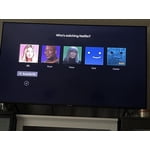
[This review was collected as part of a promotion.] I use my tv for my bedroom so I want a lot of movies which the picture quality is great. I love that I can put all my streaming alls on my Home Screen and that Samsung has its own tv station. I have not experienced one problem with this tv so far which is amazing compared to other brands I've had in the past. I highly recommend.

Review from Samsung US
Helpful?3V8BU16WBLTL13878902648
Sep 14, 2021
Reviewer name: Marqj
5 out of 5 stars
5 out of 5 stars review

Great TV!

[This review was collected as part of a promotion.] This tv is phenomenal. The picture quality is crystal clear. I upgraded from the 2018 model and I definitely can tell the difference. Also, everything feels more smoother on this tv as well. Definitely recommend.

Review from Samsung US
Helpful?3V8BU16WBLTL13878902648
Aug 23, 2022
Reviewer name: Batzzz
5 out of 5 stars
5 out of 5 stars review

Smart tvvvvvvvv

[This review was collected as part of a promotion.] The bluetooth option to be able to cast from my phone. We hdo not have internet in our area. We have to use internet on our phone. So casting from my phone is the only way we can stream Netflix and other platforms.

Review from Samsung US
Helpful?3V8BU16WBLTL13878902648
May 24, 2020
Reviewer name: Sully
3 out of 5 stars
3 out of 5 stars review

Good TV so far but not the POP that had hoped for

Had this TV for a few weeks now. It was an easy set up but the picture quality is no better than our 48” ten year old Samsung. The remote is poorly designed (impossible to use in no or low light - it does not light up when used.) On the whole, it is an okay TV. I should have shopped more. My bad!

Review from Samsung US
Helpful?3V8BU16WBLTL13878902648
reply from OBA

Sully: Thank you for purchasing the Samsung TU7000 TV. I am sorry that you are not completely happy with the picture quality and remote design. We appreciate your feedback and will share it with our teams. Please know that adjusting the picture settings may improve your viewing experience. Choose a Picture Mode by going to Settings > Picture > Picture Mode and choose from Dynamic, Standard, Natural, Movie, or Filmmaker Mode. You can further adjust your brightness, contrast, color, and more by going to Settings > Picture > Expert Settings. Should you need assistance with features or usage, please contact Samsung Customer Support via any of the below options: 1) Phone: 1-800-SAMSUNG, available 8AM - 9PM EST, Mon - Fri 2) LiveChat: https://www.samsung.com/us/support/#contact_us_for_support 3) Facebook Messenger: https://www.facebook.com/samsungsupport 4) Twitter: https://twitter.com/SamsungSupport 5) The Samsung Members Community is also a great resource for getting help from Samsung moderators and customers: https://us.community.samsung.com If you have not already done so, we invite you to register your new Samsung product at: https://www.samsung.com/us/account/signin/?redirect=https%3A%2F%2Fwww.samsung.com%2Fus%2Fsupport%2Fregister%2F Registering your product gives you access to easy warranty support, convenient opt-in to special promos and offers, faster troubleshooting and service, and quick notification of system updates. ~ Samsung Solutions

Oct 22, 2020
Reviewer name: Jinngo
5 out of 5 stars
5 out of 5 stars review

Good Choice

[This review was collected as part of a promotion.] Needed a new tv that would support my KODI box (android tv box) and went to find a suitable device. Speaking with a salesperson, this particular set was highly recommended. I am extremely pleased that I purchased this product and have been pleased with my purchase. Thank you Samsung. Gene

Review from Samsung US
Helpful?3V8BU16WBLTL13878902648
Oct 21, 2020
Reviewer name: 8765
5 out of 5 stars
5 out of 5 stars review

This tv is huge!

[This review was collected as part of a promotion.] I watch older movies and I always wondered how much of this movie was I missing. Now I know. A lot! I love reading signs off of older buildings and now being able to see the whole picture as it was. Thank you.

Review from Samsung US
Helpful?3V8BU16WBLTL13878902648
Feb 20, 2023
Reviewer name: Eddiep
1 out of 5 stars
1 out of 5 stars review

To many changes time to keep shopping

One of the reasons I have always got and used Samsung tvs was the ability to yuse a thumb drive to watch movies on. I usually use divx format, apparently starting in 2021 this changed where is a port the TV does not support that any longer. Shame on me for doing zero research because I trusted this product as I have bought several Samsung tvs.

Review from Samsung US
Helpful?3V8BU16WBLTL13878902648
reply from Samsung Brand Ambassador

Hi Eddiep, We appreciate your purchase and review of the TU700D TV. Please know your feedback will be shared with our internal teams. Although you can play videos via USB, you are correct that the DivX and DTS codecs are not supported by the TU700D TV. If you have any questions or need help, Samsung is here for you! Just give us a call at 1-800-SAMSUNG, 8 AM - 12 AM EST, seven days a week. Our LiveChat agents are also available by clicking on the ‘Support’ link on our website. ~ Samsung Advisor

Oct 6, 2020
Reviewer name: EGmike84
5 out of 5 stars
5 out of 5 stars review

Great TV

[This review was collected as part of a promotion.] the TV was bought because previous TV stoped turning, no displays when turned on. So bought this tv which was a model newer. Overall satisfied, only downfall was the previous model offered more hdmi ports.

Review from Samsung US
Helpful?3V8BU16WBLTL13878902648
Feb 12, 2021
Reviewer name: Hiddinn
5 out of 5 stars
5 out of 5 stars review

Crystal Clear and Awesome

was not expecting this tv to be as good as it actually is. i know the samsung name rocks but was still a little skeptical about a lower priced version. extremely happy with my purchase. i actually wasn't even aware that it had speakers, so that was just an added bonus for me.

Review from Samsung US
Helpful?3V8BU16WBLTL13878902648
Aug 6, 2022
Reviewer name: Letterboxed
1 out of 5 stars
1 out of 5 stars review

Worked Great For About 3 Years

[This review was collected as part of a promotion.] The first Samsung flat screen I purchased in 2007 was a workhorse. Not a problem over years of use. In 2018, I decided to upgrade and bought a new 50" Samsung. Worked great until last summer (2021). It started to get dark gray/black banding that moved to different locations across the screen until the banding finally settled on each edge of the screen. So now, I basically have a vertically letterboxed screen. If it's happening on the edges of the screen, I can't see it. How nice. And the thing is, it's not quite to the level of annoying to make me get rid of it, but some day I'll probably release it to the forces of gravity and chuck it from my 23rd floor window. (And if there's an easy fix I don't know about, I'd sure love to know it.) I doubt you'll publish this, but you did ask for a review. So here we are.

Review from Samsung US
Helpful?3V8BU16WBLTL13878902648
reply from Samsung Brand Ambassador

Hi Letterboxed, We are very sorry about your experience with the TU7000 not displaying correctly. Please know we are here to help you. Please try the following tips to help resolve your issue. First, let's make sure your firmware is up to date. To do so, head to Settings > Support > Software Update. From there, you can easily update if needed. 1. Run a Picture Test on the TV. Navigate to Settings, select Device Care, and then select Self Diagnosis. Select Picture Test, select OK and then view the test. You can choose Yes if the picture looks normal, No if there is a problem with the picture, or Show again to see the image a second time. 2. Determine if lines are appearing during the Picture Test. Look for a lines or screen abnormalities on the screen during the Picture Test. If there are no issues, this means your TV is working fine. To identify and fix the issue, try replacing the cable of the external device that is showing abnormalities. - If the abnormalities still appear after replacing the cable, troubleshoot the external device. - If abnormalities appear during the Picture Test, proceed to the next step. 3. Request service if abnormalities appear during the Picture Test. Please visit our Support Center to request service if you see lines during the Picture Test. You can contact us at 1-800-SAMSUNG, 8 AM - 12 AM EST, seven days a week. Or visit us on the Samsung website and click on the 'Support' link for: 1) LiveChat with an agent 2) Manuals, Software, & Warranty Info ~ Samsung Advisor




