
Skip to Main Content
Sam's Club
Sam's Club
All Departments
All Services
Customer reviews for SAMSUNG 65" Class TU700D-Series Crystal Ultra HD 4K Smart TV UN65TU700DFXZA for
SAMSUNG 65" Class TU700D-Series Crystal Ultra HD 4K Smart TV UN65TU700DFXZA
4.5 out of 5 stars
stars
11.3K ratings10.3K reviews
  1. 5 stars70% (7,942)
  2. 4 stars18% (1,994)
  3. 3 stars5% (589)
  4. 2 stars3% (284)
  5. 1 star5% (523)

Member photos

  • +1563 images
Sort by |
Showing 2,681-2,690 of 10,373 reviews
Aug 23, 2022
Reviewer name: Anonymous
1 out of 5 stars
1 out of 5 stars review

Brand new tv with sound malfunction

[This review was collected as part of a promotion.] Bought a brand new tv, came home set up the entire thing to find out that the sound came with a problem. Need to put the volume more then 50 to hear something. Always had LG and the one time I make the switch this Happens.

Review from Samsung US
Helpful?3V8BU16WBLTL13878902648
reply from Samsung Brand Ambassador

Hi, paulnetojr, Thank you for sharing your experience with low volume on the Samsung TU7000 TV. I understand how frustrating it is when your product is not working as expected. I have a few setting adjustments for you to try that should help resolve your issues. 1) Auto Volume automatically adjusts the sound to a certain level when changing channels or switching to another external input. 2) Adaptive Volume automatically adjusts to a specific volume level while watching TV. The TV analyzes your volume usage history by time period to automatically adjust the volume when you use an app or switch to an external input source. 3) Several Sound Modes are likewise available to meet your personal preferences: Home > Settings > Sound > Sound Mode. Also, some sources have their own volume control, which might be set too low. Please check the volume control of the external device (cable box or satellite box, DVD, Blu-ray, etc.) connected to your TV. Also, check the cable connection between an external device and the TV and then try the cable connection again. For more help, please reach out to us at 1-800-SAMSUNG, 8 AM - 12 AM EST, seven days a week. Or visit us on the Samsung website and click on the ‘Support’ link for: 1) LiveChat with an agent 2) Manuals, Software, & Warranty Info ~ Samsung Advisor

Oct 25, 2022
Reviewer name: SRICRYAN
4 out of 5 stars
4 out of 5 stars review

Great TV but not user friendly

[This review was collected as part of a promotion.] I use my TV for cable watching and streaming. It has great clarity and looks amazing. The apps are harder to find than on other tv's I've had and the remote is bunched with many buttons that I feel are unnecessary in this day and age. Overall a good buy though.

Review from Samsung US
Helpful?3V8BU16WBLTL13878902648
May 23, 2022
Reviewer name: Ruffhouse259
5 out of 5 stars
5 out of 5 stars review

Great tv for a great price

[This review was collected as part of a promotion.] I love everything about this tv. The picture and sound quality are great. I use this tv to watch to watch sports and movies. The picture really enhances everything. The sound is great also. The Samsung Home Screen took a little while to get used to, but I actually like it better now than my other tv's.

Review from Samsung US
Helpful?3V8BU16WBLTL13878902648
May 23, 2022
Reviewer name: Besttvever
5 out of 5 stars
5 out of 5 stars review

This TV has a crystal clear picture.

[This review was collected as part of a promotion.] I stream from many different sources by simply downloading their app and installing on the toolbar. I also watch videos from my connected blue ray player. Most of my time, I watch shows from Samsung TV.

Review from Samsung US
Helpful?3V8BU16WBLTL13878902648
May 24, 2022
Reviewer name: Love4Samsung
5 out of 5 stars
5 out of 5 stars review

Great picture

[This review was collected as part of a promotion.] At first I was a little skeptical about buying a Samsung Tv. Sony is usually the brand I purchase my televisions from. But I took a shot with with this one and I am so impressed with the picture quality. For the price and the features this tv comes with I am very pleased.

Review from Samsung US
Helpful?3V8BU16WBLTL13878902648
Aug 22, 2022
Reviewer name: Idahospud787
4 out of 5 stars
4 out of 5 stars review

Love all the features!
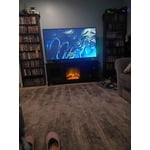
[This review was collected as part of a promotion.] I love how crisp and clear everything appears. And how user friendly, easy to set up it ended up being. It has all of my streaming service apps right there, and I can download any more I might need. Only downside is just how delicate the screen itself is. Kids were being kids, and threw a toy, cracking the screen. Unfortunately, it costs just as much to fix it, as to buy a whole replacement TV. Otherwise, we've been very happy with our purchase!

Review from Samsung US
Helpful?3V8BU16WBLTL13878902648
Aug 22, 2022
Reviewer name: JRD3262724
4 out of 5 stars
4 out of 5 stars review

Great TV for the price!
[This review was collected as part of a promotion.] Ok so to start off I love the TV. It works very well for how I use it. We stream all the time and never have any problems with the feature. I also game on it regularly, PS4 and the picture is amazing especially with the HDR and automatic "game mode". I even occasionally screen mirror or screen view. All in all GREAT TV. I have just 2 problems.. 1. Trying to get Google Assistant hooked up with it is ridiculous. The options in menu do not match what troubleshooting says. Still haven't gotten it to work. 2. It needs a smart remote not the old style for previous models. It would be so much easier to do everything not nearly as many buttons or confusion. Other than that.."Hands down best TV I've had in a Long Time".

Review from Samsung US
Helpful?3V8BU16WBLTL13878902648
reply from Samsung Brand Ambassador

Hi JRD3262724, Thank you for reviewing the TU7000 TV; we are happy to hear you are enjoying your TV. You mentioned having issues getting Google Home set up; if you haven't already, please try the following steps. 1) Make sure you have the SmartThings app on your mobile device. Add your TV device to the SmartThings app. 2) Open the Google Home app on your phone. If you do not have the app on your phone, you can search for Google Home in the Google Play Store and download the app. 3) Select the Add button. On the next screen, select Set Up Device. 4) Press on the text under the title Works with Google. Here you will see a list of accounts. Scroll down until you see SmartThings and select it or search SmartThings by pressing the search icon in the top right-hand corner. 5) Once you have selected SmartThings, press the “Sign in with Samsung Account”’ and use the same Samsung Account you used to sign in on the SmartThings app on your mobile. 6) The TV will be added automatically. If you continue to have issues, please give us a call! Contact us at 1-800-SAMSUNG, 8 AM - 12 AM EST, seven days a week. Or visit us on the Samsung website and click on the ‘Support’ link for: 1) LiveChat with an agent 2) Manuals, Software, & Warranty Info ~ Samsung Advisor

Sep 27, 2022
Reviewer name: Jb1985
2 out of 5 stars
2 out of 5 stars review

Pretty tv until it broke.

[This review was collected as part of a promotion.] Tv started off great. Picture was ok, not the brightest for sure. But you know.. It'll get the job done with shear size being on it's side. After about 6 months of average use, the screen started flickering then it would've produce a picture. Called a repair man out. He told me the whole screen needed to be replaced and at that time no parts available. Even if they did have them available the cost would almost be the same as the tv. So needless to say, we bought a lg c2.

Review from Samsung US
Helpful?3V8BU16WBLTL13878902648
reply from Samsung Brand Ambassador

Hi Jb1985, Thank you for your purchase and review of the Samsung TU7000 TV. Please know we are here to help. Samsung is committed to providing the best possible product experience, quality, and value. We back this Samsung TV with a 1-year limited manufacturer's warranty, including authorized repair for manufacturer defects, if purchased brand-new directly from an authorized seller. To set up warranty service, please call us at 1-800-SAMSUNG, 8 AM - 12 AM EST, seven days a week. Our LiveChat agents are also available by clicking on the ‘Support’ link on our website. ~ Samsung Advisor

Oct 25, 2022
Reviewer name: Green50178
5 out of 5 stars
5 out of 5 stars review

The ease of this product is amazing
[This review was collected as part of a promotion.] This tv is great for streaming on any platform. It also has a game mode for when you are hooked up with a gaming console. It also has a feature with my Xbox that it starts It up for me when I start app from TV and I can use the remote with my Xbox as well. I love that it has web browser capabilities. When using with my Samsung S10 phone it is very easy to cast or connect with my phone to the tv. I have had my TV for almost 2 years now and it is just as amazing as it was on day one, no dimming or screen issues. I would highly recommend this product.

Review from Samsung US
Helpful?3V8BU16WBLTL13878902648
Sep 17, 2020
Reviewer name: Goodsound
4 out of 5 stars
4 out of 5 stars review

Great TV for the price

[This review was collected as part of a promotion.] Excellent picture and features. Bought it based on reviews stating it had the best sound in its class. I'm not 100% satisfied with sound quality and volume but it is actually very good in comparison with some others I have had. All around very good quality and price. Easy to use features and Apps

Review from Samsung US
Helpful?3V8BU16WBLTL13878902648




