
Skip to Main Content
Sam's Club
Sam's Club
All Departments
All Services
Customer reviews for SAMSUNG 65" Class TU700D-Series Crystal Ultra HD 4K Smart TV UN65TU700DFXZA for
SAMSUNG 65" Class TU700D-Series Crystal Ultra HD 4K Smart TV UN65TU700DFXZA
4.5 out of 5 stars
stars
11.3K ratings10.3K reviews
  1. 5 stars70% (7,942)
  2. 4 stars18% (1,994)
  3. 3 stars5% (589)
  4. 2 stars3% (284)
  5. 1 star5% (523)

Member photos

  • +1563 images
Sort by |
Showing 2,441-2,450 of 10,373 reviews
Nov 11, 2020
Reviewer name: amr14
5 out of 5 stars
5 out of 5 stars review

Great picture, perfect size!

[This review was collected as part of a promotion.] I love Samsung TVs, we have a larger one in the living room. This is the perfect size for the master bedroom. The apps available are great, no more firestick needed. The picture is also fantastic and very clear. But I think the best part...the remote! I can control everything with one remote and this new remote is so much better than the one we have with the other Samsung, the more buttons the better! The only thing I would change is the stands, they look out of place because they are a plastic material and not a nice finish like the rest of the TV.

Review from Samsung US
Helpful?3V8BU16WBLTL13878902648
Apr 18, 2021
Reviewer name: Rabbit
5 out of 5 stars
5 out of 5 stars review

Superior picture quality, and Great sound

[This review was collected as part of a promotion.] I play games system ,cast pictures, movies from my phone and laptop. Very quick and easy connecting . TV menu easy to navigate and understand. TV offers Samsung Assistant. The turner picks up so many local and digital stations and really thinking of cancelling my cable service. Thanks Samsung

Review from Samsung US
Helpful?3V8BU16WBLTL13878902648
Sep 15, 2020
Reviewer name: Star
4 out of 5 stars
4 out of 5 stars review

Great pic quality.Apps sometimes do not function

[This review was collected as part of a promotion.] Great picture quality for its current price, and the built-in apps such as Netflix, Amazon Prime, Disney Plus and even Samsung's own line-up of channels help in setting up your viewing entertainment without the need of an external device. The only negative side to that is that the apps sometimes do not open up . You either disconnect the tv for a few minutes and turn it back on and try to open the app or you have to call a samsung representative to fix the problem for you, which is kind of kool because i would of been really upset to return this tv the same say i purchased it.

Review from Samsung US
Helpful?3V8BU16WBLTL13878902648
Sep 27, 2022
Reviewer name: Kaostony
5 out of 5 stars
5 out of 5 stars review

Best tv I have purchased so far

[This review was collected as part of a promotion.] Works for everything I need. Don't require anything else or further outside electronics. My tv has all features and covered everything I need. Plus has amazing picture and sound. Also very easy to use.

Review from Samsung US
Helpful?3V8BU16WBLTL13878902648
Jul 26, 2022
Reviewer name: Cinnamon
5 out of 5 stars
5 out of 5 stars review

No Problems!

[This review was collected as part of a promotion.] I stream movies/tv series and I love my tv! The volume is great, I don't have to have it up so high to clearly hear it. This thing is bright though, so depending on what I'm watching, I may have to turn down the brightness. Animated movies look exceptional on here, bright colors, clarity…I truly have no complaints.

Review from Samsung US
Helpful?3V8BU16WBLTL13878902648
Aug 23, 2022
Reviewer name: idd123
5 out of 5 stars
5 out of 5 stars review

Amazing for gaming!
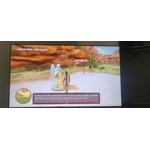
[This review was collected as part of a promotion.] It works really well with my Xbox series S in 4K HDR, the game mode makes games super beautiful and immersive. It also has pretty good sound quality! I like the phone tap feature with the TV as well as using the remote on my phone. It comes in handy and feels super futuristic. It's rather large for my bedroom, but it makes games more immersive.

Review from Samsung US
Helpful?3V8BU16WBLTL13878902648
May 2, 2023
Reviewer name: Clint
2 out of 5 stars
2 out of 5 stars review

Can not recommend

Worked well for a couple of years then the continuous rebooting started. None of the many suggestions from other similarly stricken Samsung TV owners helped. Unplugging, resetting, disconnecting devices, changing settings all failed. Very frustrating and disappointing. Had not been anticipating having to buy a new TV every few years, but the next one won't be a Samsung.

Review from Samsung US
Helpful?3V8BU16WBLTL13878902648
Oct 22, 2020
Reviewer name: Horselover4e
5 out of 5 stars
5 out of 5 stars review

Completely Satisfied!!!!

[This review was collected as part of a promotion.] The picture is crystal clear with defined images. Easy to set up and use. I was able to set up the tv up using my phone- that was awesome!! I have received many compliments on my new TV. This i is s the first time I have bought a Samsung TV and now have found the best out there. The tv was recommended to me by my son. I highly recommend purchasing a Samsung.

Review from Samsung US
Helpful?3V8BU16WBLTL13878902648
Jun 27, 2020
Reviewer name: Hank
4 out of 5 stars
4 out of 5 stars review

Simply to dark in low light conditions.

[This review was collected as part of a promotion.] my two new samsung televisions are simply too dark in low light conditions, no matter what settings we chose. specifically, disney's the mandalorian is so dark that images are almost indiscernible during scense that are shot in darkness/night. i have never had this issue with any other led television.

Review from Samsung US
Helpful?3V8BU16WBLTL13878902648
reply from OBA

Hank: Thank you for purchasing the Samsung TU7000 and for your review. I am very sorry you are viewing scenes that appear too dark. Samsung is aware of the problem, and a new firmware update will be released soon to address this issue. Using your TV's remote, navigate to Settings, and select Support. Select Software Update, and then select Update Now. New updates will be downloaded and installed on your TV. Updates usually take a few minutes; please do not turn off the TV until the update is complete. When the update is finished, the TV will restart automatically. If there aren't any new updates, select OK to exit. You may want to enable automatic updates for conveniences. Select Settings > Support > Software Update, then select Auto Update. If you would like to update your software using USB, please check for the latest version at: https://www.samsung.com/us/support/owners/product/crystal-uhd-tvs-tu7000-2020 Instructions for how to update firmware are detailed here: samsung.com/us/support/answer/ANS00062224/ If you need further assistance or have any questions, please contact Samsung Customer Support. 1) Phone: 1-800-SAMSUNG, Available 8AM -12AM EST (7 Days a Week) 2) LiveChat: https://www.samsung.com/us/support/#contact_us_for_support 3) Facebook Messenger: https://www.facebook.com/samsungsupport 4) Twitter: https://twitter.com/SamsungSupport 5) The Samsung Members Community is also a great resource for getting help from Samsung moderators and customers: https://us.community.samsung.com If you have not already done so, we invite you to register your new Samsung product at: https://www.samsung.com/us/account/signin/?redirect=https%3A%2F%2Fwww.samsung.com%2Fus%2Fsupport%2Fregister%2F Registering your product gives you access to easy warranty support, convenient opt-in to special promos and offers, faster troubleshooting and service, and quick notification of system updates. ~ Samsung Solutions

Jan 31, 2021
Reviewer name: Momatm
5 out of 5 stars
5 out of 5 stars review

It is crystal clear

i love this tv. at first i didn't like how everything looked so real, like your there with them filming, but i got used to it fast. it is the perfect size for my living room. the one thing i do not like is i have to turn the tv volume up to 38 just to hear it clearly. so i have my sound bar hooked up so i don't have to use tv speaker. i definitely recommend this tv.

Review from Samsung US
Helpful?3V8BU16WBLTL13878902648




