Skip to Main Content
Sam's Club
Sam's Club
All Departments
All Services
Customer reviews for SAMSUNG 65" Class TU700D-Series Crystal Ultra HD 4K Smart TV UN65TU700DFXZA for
SAMSUNG 65" Class TU700D-Series Crystal Ultra HD 4K Smart TV UN65TU700DFXZA
4.5 out of 5 stars
stars
11.3K ratings10.3K reviews
  1. 5 stars70% (7,942)
  2. 4 stars18% (1,994)
  3. 3 stars5% (589)
  4. 2 stars3% (284)
  5. 1 star5% (523)

Member photos

  • +1563 images
Sort by |
Showing 2,321-2,330 of 10,373 reviews
Oct 5, 2020
Reviewer name: Melnel
5 out of 5 stars
5 out of 5 stars review

Features

[This review was collected as part of a promotion.] This TV is worth every penny. The image texture is amazing it has the Apple TV built in so I don't have to buy an extra device to hang on my wall. It has simple TV for free as well as netflix, youtube, apple tv, and internet options too. I highly recommend it to anyone looking for a affordable tv with great features.

Review from Samsung US
Helpful?3V8BU16WBLTL13878902648
Oct 25, 2022
Reviewer name: Arsoun2
5 out of 5 stars
5 out of 5 stars review

This product is great to own
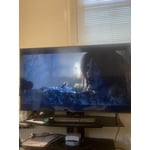
[This review was collected as part of a promotion.] I use my Samsung TV to watch movies, sports shows, and gaming. It's fairly easy to use and not expensive to purchase in a tough economy. The Bluetooth compatibility one of the best features I enjoy with my Samsung TV.

Review from Samsung US
Helpful?3V8BU16WBLTL13878902648
Jun 20, 2022
Reviewer name: yayelectronics
4 out of 5 stars
4 out of 5 stars review

Great TV with clear visuals.

[This review was collected as part of a promotion.] I have this TV in our living room, so it gets used for movie night, game night... I even use it to play music on Spotify when I have people over. It's great - the visuals and the audio is amazing in my opinion. I love the wide selection of all of the available apps. My only complaint is sometimes the apps don't load, particularly YouTube and HBO. However, my building has spotty wifi, so I don't know if the wifi could be the issue. Overall, I'm glad I have this TV!

Review from Samsung US
Helpful?3V8BU16WBLTL13878902648
Aug 4, 2022
Reviewer name: justme33
3 out of 5 stars
3 out of 5 stars review

Could be better

[This review was collected as part of a promotion.] The way the home screen is set up is confusing and not easy to navigate. It is not easy to find and download apps, I couldn't even find a specific app that should be available. Also, after about 2-3 months of use, a horizontal line showed up in the middle of the screen that won't go away.

Review from Samsung US
Helpful?3V8BU16WBLTL13878902648
reply from Samsung Brand Ambassador

Hi justme33, Thank you for your review and feedback on the Samsung TU7000. We are sorry to hear it has not held up to your expectations. Please know we are here to help you. To assist you in learning the various features, functions, and settings of the TV and Remote, you can download the User Manual and Remote Guide directly from Samsung's website under 'Support' (top right corner) > Manuals & Software > TVs & Home Theater. From there, you can search for the TU7000 under Crystal UHD TVs > T Model Lineup. In regards to the horizontal line on your screen. First, let's make sure your firmware is up to date. To do so, head to Settings > Support > Software Update. From there, you can easily update if needed. Next, 1. Run a Picture Test on the TV. Navigate to Settings, select Device Care, and then select Self Diagnosis. Select Picture Test, select OK and then view the test. You can choose Yes if the picture looks normal, No if there is a problem, or Show again to see the image a second time. 2. Determine if lines are appearing during the Picture Test. Look for a line or lines on the screen during the Picture Test. If there are no lines, this means your TV is working fine. To identify and fix the issue, try replacing the cable of the external device that is showing lines. - If the lines still appear after replacing the cable, troubleshoot the external device. - If lines appear during the Picture Test, proceed to the next step. 3. Request service if lines appear during the Picture Test. Please visit our Support Center to request service if you see lines during the Picture Test. When calling, ensure you have the TV's model code, software version, and serial number. You can contact us at 1-800-SAMSUNG, 8 AM - 12 AM EST, seven days a week. Or visit us on the Samsung website and click on th'e 'Suppo't'r link for: 1) LiveChat with an agent 2) Manuals, Software, & Warranty Info ~ Samsung Advisor

Jan 20, 2022
Reviewer name: Dennis
3 out of 5 stars
3 out of 5 stars review

Great Picture

picture is great. smart interface is terrible. samsung tv plus should be an option instead of automatic. i feel like im playing tug of war with the operating system of what i want to watch. again picture and quality is great but the smart features. are slow and dumb !! can you turn them offf ?????

Review from Samsung US
Helpful?3V8BU16WBLTL13878902648
reply from Samsung Brand Ambassador

Hi Dennis, Thank you for purchasing the Samsung TU7000 Crystal UHD TV and for sharing your feedback regarding the built in Samsung TV Plus feature. I am glad to hear you are enjoying the picture quality. Please know, Samsung TV Plus can be disabled, removing the channels from your default guide. Should you want to disable TV plus, follow the steps below: 1) Navigate to the Samsung TV Plus app and press the down button on the remote. This will bring up two options. ‘Move’ and ‘Remove’. 2) Navigate to ‘Remove’ and select. This option brings up the ability to remove the app icon or disable the service. 3) Navigate to ‘Disable’ and select. This will remove the service from the launcher bar and the channels from the TV Guide. Alternatively, you can leave TV Plus enabled and utilize the Autorun Last App feature to automatically start the last app you used once the TV is turned on. To enable this feature, follow the steps below: 1) Navigate to Settings > General > Smart Features > Autorun Smart Hub 2) Enable the Autorun Smart Hub feature 3) Navigate to Settings > General > Smart Features > Autorun Last App 4) Enable the Autorun Last App feature I hope this helps you further enjoy the experience provided by your new Crystal UHD TV. Should you ever have questions or need additional assistance, please call us at 1-800-SAMSUNG (ask for TVs), available 8AM - 12AM EST, 7 days a week. For additional support resources, visit us on the Samsung website and click on the ‘Support’ link in the upper right corner of the homepage for: 1) Chat with Us/Product Help: To begin a chat or find solutions, choose ‘TVs & Home Theater’ and select your model & topic. 2) Register a Product: For access to easy warranty support, convenient opt-in to special promos and offers, faster troubleshooting and service, and quick notification of system updates. 3) Manuals & Software 4) Warranty Info 5) Contact Us ~ Samsung Solutions

Jun 16, 2022
Reviewer name: PNWHiker
5 out of 5 stars
5 out of 5 stars review

Can't beat the value for the price!

[This review was collected as part of a promotion.] Oh wow, I love this TV. This was a housewarming present to myself, and I mounted it on the wall in my living room. The picture and the sound are both incredible, and I love how easy it is to navigate to get to Amazon, HBO Max, Netflix, etc. The Samsung TV channels are a nice added bonus! I'm a cord cutter, so the access to extra news, sports, and other programming is always welcome!

Review from Samsung US
Helpful?3V8BU16WBLTL13878902648
Jun 16, 2022
Reviewer name: Linnie
5 out of 5 stars
5 out of 5 stars review

I love my tv!

[This review was collected as part of a promotion.] This TV is perfect for browsing online, watching movies, series, scenic scenes are beautiful. The picture quality is great. When I have company, they always comment about what a great picture it is.

Review from Samsung US
Helpful?3V8BU16WBLTL13878902648
Oct 27, 2020
Reviewer name: MamaBear82
5 out of 5 stars
5 out of 5 stars review

Amazing quality, great value!!

[This review was collected as part of a promotion.] Samsung is a well trusted brand in our household and this 43” 4K Smart Tv is no exception to the quality we've come to expect. The picture is so vivid and clear, no other tv we've had is like this plus it's easy to learn to use!

Review from Samsung US
Helpful?3V8BU16WBLTL13878902648
Oct 21, 2020
Reviewer name: Desiree
4 out of 5 stars
4 out of 5 stars review

Overall Good Product

[This review was collected as part of a promotion.] Clear picture, great screen size for details and reading the guide, and nice selection of handy channels and apps. I love that this TV provides me with a tv guide not only for my antenna tv programs but also for the Smart TV channels. A quick press of a button for apps like Netflix, Hulu, Prime, Tubi, etc. I appreciate the thoughtfulness that went into this TV. Such as when I press the remote to turn the TV off, the pictures closes and the sound lowers to off. The remote has numbers, a tv guide button, and a back button along with many other features. I suggest the remote have a backlight for use during the night or while watching a movie in the dark.

Review from Samsung US
Helpful?3V8BU16WBLTL13878902648
Oct 2, 2021
Reviewer name: Chris
4 out of 5 stars
4 out of 5 stars review

Great TV for the price

[This review was collected as part of a promotion.] I love that the Samsung remote programs to cable service equipment. We have used it to controll our xfinity cable equipment. If I had any negative comments, it would be that there is not enough hdmi inputs. Picture is ok, it don't look like the store display, that's the reason for the 4 stars. I also feel like the more I need to type in this review the more negative it will get, so to have a minimum number of characters is a bit daunting and redundant.

Review from Samsung US
Helpful?3V8BU16WBLTL13878902648