Skip to Main Content
Sam's Club
Sam's Club
All Departments
All Services
Customer reviews for SAMSUNG 85" Class Q7-Series 4K Ultra HD Smart QLED TV - QN85Q7DAAFXZA for
SAMSUNG 85" Class Q7-Series 4K Ultra HD Smart QLED TV - QN85Q7DAAFXZA
4.7 out of 5 stars
stars
1,797 ratings1,775 reviews
  1. 5 stars80% (1,432)
  2. 4 stars15% (270)
  3. 3 stars3% (45)
  4. 2 stars1% (22)
  5. 1 star2% (28)

Member photos

  • +297 images
Sort by |
Showing 551-560 of 1,775 reviews
Oct 11, 2021
Reviewer name: Xraymankb30
5 out of 5 stars
5 out of 5 stars review

Love our 75

[This review was collected as part of a promotion.] What can I say, it's a Samsung. There reputation speaks for itself. T v is clear, not a problem at all. Colors are crisp, and vibrant. Streaming is great, love that it connects to my network and can't complain at all. We love it. Buy one, you won't regret it.

Review from Samsung US
Helpful?6VT5DVUKIND213737353383
Jun 1, 2022
Reviewer name: jkline
5 out of 5 stars
5 out of 5 stars review

Great Overall TV

[This review was collected as part of a promotion.] We use QLED Q70A for watching cable tv, movies and games. It is very user friendly, easy to navigate through the Samsung remote. Luckily the Q70A Series has a rechargeable solar remote... Best remote ever!

Review from Samsung US
Helpful?6VT5DVUKIND213737353383
Sep 14, 2021
Reviewer name: Commonsense101
5 out of 5 stars
5 out of 5 stars review

Five star quality & performance!

[This review was collected as part of a promotion.] This Samsung TV has the most vibrant colors and crystal clear picture. The quality of the picture on the screen is better than anything I've ever seen. It's has the most simple, user friendly device we own. It's by far the highest quality electronics device and TV I've ever purchased.

Review from Samsung US
Helpful?6VT5DVUKIND213737353383
Oct 11, 2021
Reviewer name: Arocky24
4 out of 5 stars
4 out of 5 stars review

Q70 QLED TV

[This review was collected as part of a promotion.] I currently have YouTubetv, HBO, Disney, Prime Video and a few other watching platforms and overall it is a very nice picture. However, when watching sports it tends to run. I bought this TV because of the ratings but also wanted to make sure my sports programs would look amazing. Unfortunately, that is not the case. It is good but not amazing. I also think the speakers and sound on the TV are not that great. The speakers are in the rear and you do have to turn up the TV volume for to hear your program. I am working on purchasing a surround sound system but this is definitely a drawback to this TV. I do love the smart TV feature and how it displays the the watching platform options. Very easy, very accessible and its just smooth. You can switch between them very quick and easy. Overall I would give this TV a 4 out 5 stars. The picture is beautiful and amazing for movies.

Review from Samsung US
Helpful?6VT5DVUKIND213737353383
reply from Samsung Brand Ambassador

Arocky24, Thank you for choosing the Samsung Q70A TV and for sharing your feedback regarding your picture when watching fast motion. For optimal motion image performance, you may want to adjust the picture clarity setting by going to: Settings > Picture > Expert Settings > Picture Clarity Settings - Off: Picture Clarity Settings will always be off - Auto: Picture Clarity Settings will automatically activate and deactivate based on the type of program being watched - Custom: Allows custom adjustments and settings to be used. By selecting the Custom option, you can access these advanced settings for Judder Reduction, LED Clear Motion, and Noise Reduction. Additionally, your TV has several volume features you can enable/disable/adjust to your liking. 1) Auto Volume automatically adjusts the sound to a certain level when changing channels or switching to another external input. 2) Adaptive Volume automatically adjusts to a specific volume level while you are watching TV. The TV analyzes your volume usage history by time period to automatically adjust the volume when you use an app or switch to an external input source. 3) Several Sound Modes are likewise available to meet your personal preferences: Home > Settings > Sound > Sound Mode Also, some sources have their own volume control which might be set too low. Please check the volume control of the external device (cable box or satellite box, DVD, Blu-ray, etc.) connected to your TV. Also, check the cable connection between an external device and the TV and then try cable connection again. Should you need further assistance with features or other product usage, please reach out to Samsung Support at 1-800-SAMSUNG (ask for TVs), available 8AM - 12AM EST, 7 days a week. For additional support resources, visit us on the Samsung website and click on the ‘Support’ link in the upper right corner of the homepage for: 1) Contact Us: For additional Chat & Text options, choose ‘TVs & Home Theater’ and select your model & topic. 2) Manuals, Software, & Warranty Info ~ Samsung Specialist

Apr 2, 2021
Reviewer name: QueenAkita
5 out of 5 stars
5 out of 5 stars review

I'm just head over heels

[This review was collected as part of a promotion.] I've had a lot of television's but none like this. The picture is like your in the tv. Your part of the action. It just puts you front and center. It just blew my mind when we got it home. I have had five star rating with Samsung. Customer service is top notch . I am very pleased with my experience and product and CS. Thank you Samsung for making me feel important and putting me first. I will shop again. Actually I just bought a washer and dryer. And i will recommend you to family and friends. Thank you.

Review from Samsung US
Helpful?6VT5DVUKIND213737353383
Oct 5, 2022
Reviewer name: Denny99
5 out of 5 stars
5 out of 5 stars review

Outstanding picture and quality

[This review was collected as part of a promotion.] TV is used for live broadcasts, streaming, and movies. I moved up from a 55" curved Samsung 4K to the 75" Samsung 4K to capture college football games at its finest. I split the screen into 8 channels and can effortlessly move from game to game, click to enlarge to full screen and then back to 8 different channels. Absolutely love this TV, I have been a loyal Samsung owner for years and this TV does NOT disappoint. Love it

Review from Samsung US
Helpful?6VT5DVUKIND213737353383
Oct 25, 2022
Reviewer name: Shanay
5 out of 5 stars
5 out of 5 stars review

Great Picture Quality
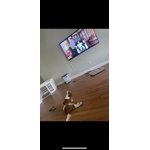
[This review was collected as part of a promotion.] I have had my tv for nearly 3 months and it has amazing picture quality and thinness. Mounted on the wall with a low profile mount truly makes it seamlessly connect to the decor and the wall. My only complaint would be for the software. A lot of apps that were available in older models are no longer available in this version. Part of the reason I purchased this television was the integration of these apps. Aside from that, this TV is excellent.

Review from Samsung US
Helpful?6VT5DVUKIND213737353383
Oct 15, 2021
Reviewer name: Jake
5 out of 5 stars
5 out of 5 stars review

Sharp screen, clean interface, and great remote

[This review was collected as part of a promotion.] I've been ogling QD tv's for many years. After my old tv finally passed away, I hit the books like a college undergrad. The research wasn't clear, but I've had good success with Samsung in the past. We've had the tv for a few months and aren't disappointed. Scream colors and clarity are excellent; the refresh is excellent. We really like the Samsung channels, the clean interface, and solar charging remote. Well done with that innovation.

Review from Samsung US
Helpful?6VT5DVUKIND213737353383
May 20, 2022
Reviewer name: Jerzee
5 out of 5 stars
5 out of 5 stars review

Not happy with Google
[This review was collected as part of a promotion.] The picture is great and I love all the smart features on the television . The only problem I have is with the Google home feature. I cant seem to get how it works it doesn't seem to work like other Google home which I have alot of in my home. Seems very difficult to use. Other than that the TV is awesome.

Review from Samsung US
Helpful?6VT5DVUKIND213737353383
reply from Samsung Brand Ambassador

Jerzee, We appreciate your feedback on your experience with using your TV's voice assistant feature. In addition to built-in voice capabilities, your Q70A also syncs with other Google Home devices in your home, allowing you the convenience of using voice commands for certain functionalities, such as power on/off, volume up/down, channel change, input source change, and playback control. Here is a step-by-step guide for syncing with Google Home: 1) Make sure you have the SmartThings app on your mobile device. Add your TV device to the SmartThings app. 2) Open the Google Home app on your phone. If you do not have the app on your phone, you can search for Google Home in the Google Play Store and download the app. 3) Select the Add button. On the next screen select Set Up Device. 4) Press on the text under the title Works with Google. Here you will see a list of accounts. Scroll down until you see SmartThings and select it or search SmartThings by pressing the search icon in the top right-hand corner. 5) Once you have selected SmartThings , press the “Sign in with Samsung Account”’ and use the same Samsung Account which you used to sign in on the SmartThings app on your mobile. 6) The TV will be added automatically. I hope this tip helps improve your enjoyment. For more help, please call us at 1-800-SAMSUNG, 8AM - 12AM EST, 7 days a week. LiveChat with an agent as well as manuals, software, and warranty info can be found at the ‘Support’ link on our Samsung website. ~ Samsung Specialist

Apr 14, 2021
Reviewer name: Gage0623
5 out of 5 stars
5 out of 5 stars review

Awesome picture

[This review was collected as part of a promotion.] This television was a spontaneous purchase but after taking it home and hanging it up on the wall it's perfect. The quality is amazing seemed like I'm sitting front row at all my favorite sporting events or television shows. Thanks samsung you guys rock!!

Review from Samsung US
Helpful?6VT5DVUKIND213737353383