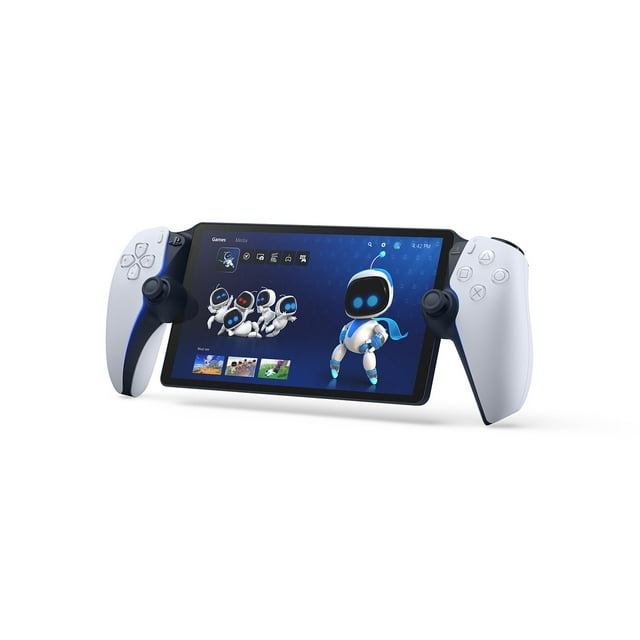
PlayStation Portal Remote Player for PS5 Console

Smart summary
- Wireless Connectivity: Play your PS5 console's games over a Wi-Fi network, providing access to your gaming library without needing to play on a TV.
- Broad Game Access: Access and play compatible PS5 and PS4 games that are already installed on your console through Remote Play functionality.
- Premium Streaming: With PlayStation Plus Premium, stream hundreds of games from the Game Catalog and Classics Catalog, along with select digital PS5 games from your library, without downloads.
- Immersive Controls: Experience breathtaking immersion through haptic feedback and adaptive triggers, replicating in-game sensations in supported titles.
- Stunning Visuals: Features a beautiful 8-inch LCD screen delivering 1080p resolution at up to 60fps for silky smooth gameplay and high image clarity.
- Spatial Audio: Surround yourself with realistic sound via Tempest 3D AudioTech in supported PS5 games when using compatible audio devices connected wirelessly or with a 3.5mm jack.
Specifications
What's Included:
- PlayStation Portal™ Remote Player – White
- USB Cable
- Printed Materials
FAQ
Question: Can PlayStation Portal™ Remote Player only be played on my home Wi-Fi network?
Answer: While your home Wi-Fi network represents a great option to use PlayStation Portal™ Remote Player because you have control over the quality of your own home Wi-Fi, it is not required. PlayStation Portal™ Remote Player can also be played wherever you have access to broadband internet Wi-Fi with at least 5Mbps for use.1 For a better play experience, a high-speed connection of at least 15Mbps is recommended. If you are using public Wi-Fi, be aware that the quality of the internet connection may be out of your control and could impact the quality of your play experience.
Question: Is a PlayStation Plus membership required to use PlayStation Portal™ Remote Player and PlayStation® Remote Play?
Answer: No, using PlayStation Portal™ Remote Player and PlayStation® Remote Play does not require a PlayStation Plus membership.2 If you are using Remote Play to play a game that requires a PS Plus membership to access multiplayer, then you would need to have an active membership to access that game’s multiplayer features. You will need an active PlayStation®Plus Premium membership to access Cloud Streaming for PS5® Games on PlayStation Portal™ Remote Player5
Question: Can someone else use the TV my PS5 is connected to while I am using PlayStation Portal™ Remote Player?
Answer: Yes, they can. For example, someone else in your household could be watching a show or a movie on the TV while you use PlayStation Portal™ Remote Player to play your favorite compatible games on its gorgeous 8” HD screen.
Question: What audio devices work with the PlayStation™ Portal Remote Player?
Answer: You can connect audio devices that have a 3.5mm jack audio cable or feature PlayStation Link™ wireless technology – such as the PULSE Explore™ wireless earbuds and PULSE Elite™ wireless headset. You also have the option to listen to audio via the remote player’s built-in speakers, although 3D Audio isn’t supported.
Question: Where can I use the PlayStation Portal™ Remote Player?
Answer: While your home Wi-Fi network represents a great option to use PlayStation Portal™ Remote Player because you have control over the quality of your own home Wi-Fi, it is not required. PlayStation Portal™ Remote Player can also be played wherever you have access to broadband internet Wi-Fi with at least 5Mbps for use1. For a better play experience, a high-speed connection of at least 15Mbps is recommended. If you are using public Wi-Fi, be aware that the quality of the internet connection may be out of your control and could impact the quality of your play experience.
Question: Can the PlayStation Portal™ Remote Player be connected to public Wi-Fi networks?
Answer: PS Portal can connect to a range of public Wi-Fi networks, and those running system software version 3.0.1 or later can also connect to select Wi-Fi networks that require additional validation steps beyond entering the network password. Please note your smartphone or tablet will be required to complete these additional validation steps, and that before connecting to public Wi-Fi networks, you’ll need to have completed the initial PS Portal setup on your home Wi-Fi network.
Shipping




About this item
Member ratings & reviews
Showing 1-3 of 1,314 reviews
Verified Purchase
Good for story games
Verified Purchase
PSPortal is a plus
Verified Purchase