Sony PlayStation Portal Remote Player for PlayStation 5 – Midnight Black
Hero image 0 of Sony PlayStation Portal Remote Player for PlayStation 5 – Midnight Black, 0 of 6

Sony PlayStation Portal Remote Player for PlayStation 5 – Midnight Black

|387 ratings

Smart summary

Generated by AI
  • No TV Required

    No TV Required

    Stream and play your installed PS5 games over Wi-Fi from any room.
  • Realistic Controller Vibrations

    Realistic Controller Vibrations

    Responsive vibrations and trigger resistance like standard PS5 controller.
  • Sharp 8-Inch Screen

    Sharp 8-Inch Screen

    The full HD 1080p display runs at 60fps for crisp, fluid gameplay.
  • Stream Without Downloading

    Stream Without Downloading

    Stream compatible cloud games instantly over Wi-Fi without waiting for installations.
  • Starts Up Quickly

    Starts Up Quickly

    Turn it on and connect to your PS5 with a single button press.

Specifications

What's Included:

  • PlayStation Portal™ Remote Player – Midnight Black
  • USB Cable
  • Printed Materials

FAQ

Question: Can PlayStation Portal™ Remote Player only be played on my home Wi-Fi network?

Answer: While your home Wi-Fi network represents a great option to use PlayStation Portal™ Remote Player because you have control over the quality of your own home Wi-Fi, it is not required. PlayStation Portal™ Remote Player can also be played wherever you have access to broadband internet Wi-Fi with at least 5Mbps for use.1 For a better play experience, a high-speed connection of at least 15Mbps is recommended. If you are using public Wi-Fi, be aware that the quality of the internet connection may be out of your control and could impact the quality of your play experience.

Question: Is a PlayStation Plus membership required to use PlayStation Portal™ Remote Player and PlayStation® Remote Play?

Answer: No, using PlayStation Portal™ Remote Player and PlayStation® Remote Play does not require a PlayStation Plus membership.2 If you are using Remote Play to play a game that requires a PS Plus membership to access multiplayer, then you would need to have an active membership to access that game’s multiplayer features. You will need an active PlayStation®Plus Premium membership to access Cloud Streaming for PS5® Games on PlayStation Portal™ Remote Player5

Question: Can someone else use the TV my PS5 is connected to while I am using PlayStation Portal™ Remote Player?

Answer: Yes, they can. For example, someone else in your household could be watching a show or a movie on the TV while you use PlayStation Portal™ Remote Player to play your favorite compatible games on its gorgeous 8” HD screen.

Question: What audio devices work with the PlayStation™ Portal Remote Player?

Answer: You can connect audio devices that have a 3.5mm jack audio cable or feature PlayStation Link™ wireless technology – such as the PULSE Explore™ wireless earbuds and PULSE Elite™ wireless headset. You also have the option to listen to audio via the remote player’s built-in speakers, although 3D Audio isn’t supported.

Question: Where can I use the PlayStation Portal™ Remote Player?

Answer: While your home Wi-Fi network represents a great option to use PlayStation Portal™ Remote Player because you have control over the quality of your own home Wi-Fi, it is not required. PlayStation Portal™ Remote Player can also be played wherever you have access to broadband internet Wi-Fi with at least 5Mbps for use1. For a better play experience, a high-speed connection of at least 15Mbps is recommended. If you are using public Wi-Fi, be aware that the quality of the internet connection may be out of your control and could impact the quality of your play experience.

Question: Can the PlayStation Portal™ Remote Player be connected to public Wi-Fi networks?

Answer: PS Portal can connect to a range of public Wi-Fi networks, and those running system software version 3.0.1 or later can also connect to select Wi-Fi networks that require additional validation steps beyond entering the network password. Please note your smartphone or tablet will be required to complete these additional validation steps, and that before connecting to public Wi-Fi networks, you’ll need to have completed the initial PS Portal setup on your home Wi-Fi network.

Current price is $249.00
Max 2 per order. Max 2 per membership.
Prices may vary in club and online
How do you want your item?

Shipping

Columbus, 43215
Sam's credit card
Limited time! Get a $60 statement credit when you open an account between 10/28-12/2 and use it to make $30 in eligible Sam’s Club purchases within 30 days¹

About this item

Product details

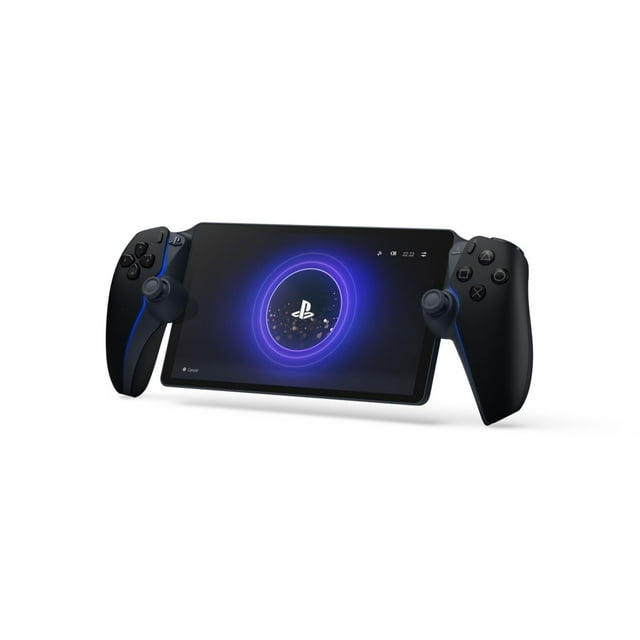
PlayStation Portal™ Remote Player

Play your PS5® console over Wi-Fi with console quality controls using PlayStation Portal™ Remote Player.1

Put Your PS5 ® in the Palm of Your Hand

PlayStation Portal™ Remote Player gives you access to the games on your PS5 over a Wi-Fi network,1 letting you jump right into gaming without needing to play on a TV.

Play Your Game Collection with Remote Play

PlayStation Portal™ Remote Player can play compatible games you have installed on your PS5® console, including your favorite games for PS5 and PS4.2

Cloud Streaming from the Game Catalog and Classics Catalog5

Discover an awesome library of PS5® games on the PlayStation Portal™ Remote Player with PlayStation®Plus Premium. Access hundreds of games from the Game Catalog6 and Classics Catalog6, streamed directly to your PlayStation Portal™ Remote Player with new games added every month.

Cloud Streaming for PS5® Games in Your Library7

With PlayStation®Plus Premium5, stream select digital PS5® games in Your Library from PlayStation™Store directly to your PlayStation Portal™ Remote Player, with no downloads required. Enjoy instant access to some of the latest and greatest PS5® games in the palm of your hand.

Experience Breathtaking Immersion with DualSense® Wireless Controller Features

Feel the immersive power of haptic feedback and adaptive triggers in supported games.4 Responsive vibrations react to your in‑game choices and simulate environmental factors. Dynamic resistance mimics the tension of interactions with in‑game gear and objects in select PS5® games.

Tempest 3D AudioTech

Surround yourself with sound via Tempest 3D AudioTech on PlayStation Portal™ Remote Player. Experience realistic, immersive audio in supported PS5® games when a compatible audio device is connected, either wirelessly via PlayStation Link™ or wired via the 3.5mm audio jack.

Beautiful 8” LCD Screen

Take in every exquisite detail of your favorite games as they come alive on a brightly lit and gorgeous full HD screen.

60fps Capable at 1080p Resolution

PlayStation Portal™ Remote Player can deliver silky smooth gameplay at up to 60fps with high image clarity on its 1080p resolution screen.3

Get Gaming Fast

PlayStation Portal™ Remote Player is a purpose-built device dedicated to delivering an incredible remote play experience. That means you can turn it on, press a button to connect to your PS5® console and get right to playing with remarkable speed.

Enjoy complimentary Apple Service Trials with this purchase

Redemption instructions will be emailed post purchase. Terms apply.

info:
If the item details above aren't accurate or complete, we want to know about it. 

Key specifications

Specifications

What's Included:

  • PlayStation Portal™ Remote Player – Midnight Black
  • USB Cable
  • Printed Materials

FAQ

Question: Can PlayStation Portal™ Remote Player only be played on my home Wi-Fi network?

Answer: While your home Wi-Fi network represents a great option to use PlayStation Portal™ Remote Player because you have control over the quality of your own home Wi-Fi, it is not required. PlayStation Portal™ Remote Player can also be played wherever you have access to broadband internet Wi-Fi with at least 5Mbps for use.1 For a better play experience, a high-speed connection of at least 15Mbps is recommended. If you are using public Wi-Fi, be aware that the quality of the internet connection may be out of your control and could impact the quality of your play experience.

Question: Is a PlayStation Plus membership required to use PlayStation Portal™ Remote Player and PlayStation® Remote Play?

Answer: No, using PlayStation Portal™ Remote Player and PlayStation® Remote Play does not require a PlayStation Plus membership.2 If you are using Remote Play to play a game that requires a PS Plus membership to access multiplayer, then you would need to have an active membership to access that game’s multiplayer features. You will need an active PlayStation®Plus Premium membership to access Cloud Streaming for PS5® Games on PlayStation Portal™ Remote Player5

Question: Can someone else use the TV my PS5 is connected to while I am using PlayStation Portal™ Remote Player?

Answer: Yes, they can. For example, someone else in your household could be watching a show or a movie on the TV while you use PlayStation Portal™ Remote Player to play your favorite compatible games on its gorgeous 8” HD screen.

Question: What audio devices work with the PlayStation™ Portal Remote Player?

Answer: You can connect audio devices that have a 3.5mm jack audio cable or feature PlayStation Link™ wireless technology – such as the PULSE Explore™ wireless earbuds and PULSE Elite™ wireless headset. You also have the option to listen to audio via the remote player’s built-in speakers, although 3D Audio isn’t supported.

Question: Where can I use the PlayStation Portal™ Remote Player?

Answer: While your home Wi-Fi network represents a great option to use PlayStation Portal™ Remote Player because you have control over the quality of your own home Wi-Fi, it is not required. PlayStation Portal™ Remote Player can also be played wherever you have access to broadband internet Wi-Fi with at least 5Mbps for use1. For a better play experience, a high-speed connection of at least 15Mbps is recommended. If you are using public Wi-Fi, be aware that the quality of the internet connection may be out of your control and could impact the quality of your play experience.

Question: Can the PlayStation Portal™ Remote Player be connected to public Wi-Fi networks?

Answer: PS Portal can connect to a range of public Wi-Fi networks, and those running system software version 3.0.1 or later can also connect to select Wi-Fi networks that require additional validation steps beyond entering the network password. Please note your smartphone or tablet will be required to complete these additional validation steps, and that before connecting to public Wi-Fi networks, you’ll need to have completed the initial PS Portal setup on your home Wi-Fi network.

Warnings and disclaimers

Ingestion Hazard

This product contains a battery. Death or serious injury can occur if ingested. A swallowed battery can cause Internal Chemical Burn in as little as 2 hours. Keep new and used batteries OUT OF REACH OF CHILDREN. Seek Immediate medical attention if a battery is suspected to be swallowed or inserted inside any part of the body.

Member ratings & reviews

4.1 out of 5 stars
stars
387 ratings384 reviews
Write a review
Filtered and sorted results would be available on the new 'Customer ratings & reviews' page.
Sort by |

Showing 1-3 of 384 reviews

Oct 8, 2026
Reviewer name: Etana
5 out of 5 stars
5 out of 5 stars review

Verified Purchase

My son LOVES this handheld PS5 and it's perfect for our road trips. The only thing I wish we knew is his subscription on his PS5 console does not transfer to the handheld, even though it's the same account. So you end up paying for two of the same game subscriptions. So just FYI. Be aware you will need to pay for the monthly game subscription twice a month.

Review from walmart.com
Helpful?2DNWFOY27GU116156816846
Nov 3, 2026
Reviewer name: Alexander
5 out of 5 stars
5 out of 5 stars review

Verified Purchase

Good Remote Play / Cloud Device

It's actually a good device for what it is. Sometimes I just don't feel like playing my PS5 off of my tv. I can have a show or stream going on my PC and play the Portal at the same. It's a comfortable device and the input lag is pretty nonexistent.

Review from walmart.com
Helpful?2DNWFOY27GU116156816846
Oct 15, 2026
Reviewer name: ershadur
5 out of 5 stars
5 out of 5 stars review

Verified Purchase

Worth it with a Strong Connection

Great for casual gaming to pass the time. However, you need a strong connection for streaming games. The console part requires a fiber connection to the system.

Review from walmart.com
Helpful?2DNWFOY27GU116156816846
Current price is $249.00
Max 2 per order. Max 2 per membership.
Prices may vary in club and online
How do you want your item?

Shipping

Columbus, 43215