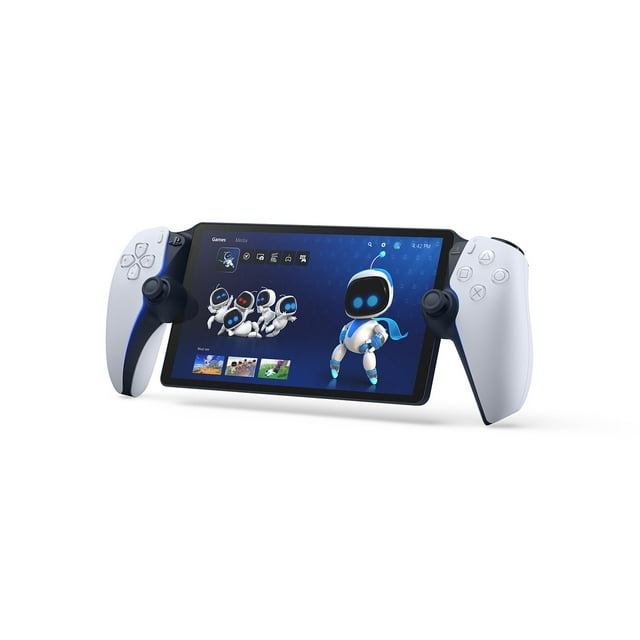
PlayStation Portal Remote Player for PS5 Console

Item # 990334046
Current price is $249.00
Max 2 per order. Max 2 per membership.
Prices may vary in club and online
How do you want your item?

Shipping

Free for Plus on eligible orders over $50
Columbus, 43215
Return or replace within 90 days.
Sam's credit card
Get a $30 statement credit when you open an account and use it to make $30 in eligible Sam's Club purchases within 30 days¹.

Smart summary

Generated by AI
  • Wireless Connectivity: Play your PS5 console's games over a Wi-Fi network, providing access to your gaming library without needing to play on a TV.
  • Broad Game Access: Access and play compatible PS5 and PS4 games that are already installed on your console through Remote Play functionality.
  • Premium Streaming: With PlayStation Plus Premium, stream hundreds of games from the Game Catalog and Classics Catalog, along with select digital PS5 games from your library, without downloads.
  • Immersive Controls: Experience breathtaking immersion through haptic feedback and adaptive triggers, replicating in-game sensations in supported titles.
  • Stunning Visuals: Features a beautiful 8-inch LCD screen delivering 1080p resolution at up to 60fps for silky smooth gameplay and high image clarity.
  • Spatial Audio: Surround yourself with realistic sound via Tempest 3D AudioTech in supported PS5 games when using compatible audio devices connected wirelessly or with a 3.5mm jack.
PlayStation Portal Remote Player for PS5 Console
Hero image 0 of PlayStation Portal Remote Player for PS5 Console, 0 of 4

About this item

Product details

PlayStation Portal™ Remote Player

Play your PS5® console over Wi-Fi with console quality controls using PlayStation Portal™ Remote Player.1

Put Your PS5® in the Palm of Your Hand

PlayStation Portal™ Remote Player gives you access to the games on your PS5 over a Wi-Fi network,1 letting you jump right into gaming without needing to play on a TV.

Play Your Game Collection with Remote Play

PlayStation Portal™ Remote Player can play compatible games you have installed on your PS5® console, including your favorite games for PS5 and PS4.2

Cloud Streaming from the Game Catalog and Classics Catalog5

Discover an awesome library of PS5® games on the PlayStation Portal™ Remote Player with PlayStation®Plus Premium. Access hundreds of games from the Game Catalog6 and Classics Catalog6, streamed directly to your PlayStation Portal™ Remote Player with new games added every month.

Cloud Streaming for PS5® Games in Your Library7

With PlayStation®Plus Premium5, stream select digital PS5® games in Your Library from PlayStation™Store directly to your PlayStation Portal™ Remote Player, with no downloads required. Enjoy instant access to some of the latest and greatest PS5® games in the palm of your hand.

Experience Breathtaking Immersion with DualSense® Wireless Controller Features

Feel the immersive power of haptic feedback and adaptive triggers in supported games.4 Responsive vibrations react to your in‑game choices and simulate environmental factors. Dynamic resistance mimics the tension of interactions with in‑game gear and objects in select PS5® games.

Tempest 3D AudioTech

Surround yourself with sound via Tempest 3D AudioTech on PlayStation Portal™ Remote Player. Experience realistic, immersive audio in supported PS5® games when a compatible audio device is connected, either wirelessly via PlayStation Link™ or wired via the 3.5mm audio jack.

Beautiful 8” LCD Screen

Take in every exquisite detail of your favorite games as they come alive on a brightly lit and gorgeous full HD screen.

60fps Capable at 1080p Resolution

PlayStation Portal™ Remote Player can deliver silky smooth gameplay at up to 60fps with high image clarity on its 1080p resolution screen.3

Get Gaming Fast

PlayStation Portal™ Remote Player is a purpose-built device dedicated to delivering an incredible remote play experience. That means you can turn it on, press a button to connect to your PS5® console and get right to playing with remarkable speed.

info:
If the item details above aren't accurate or complete, we want to know about it. 

Specifications

What's Included:

  • PlayStation Portal™ Remote Player – White
  • USB Cable
  • Printed Materials

FAQ

Question: Can PlayStation Portal™ Remote Player only be played on my home Wi-Fi network?

Answer: While your home Wi-Fi network represents a great option to use PlayStation Portal™ Remote Player because you have control over the quality of your own home Wi-Fi, it is not required. PlayStation Portal™ Remote Player can also be played wherever you have access to broadband internet Wi-Fi with at least 5Mbps for use.1 For a better play experience, a high-speed connection of at least 15Mbps is recommended. If you are using public Wi-Fi, be aware that the quality of the internet connection may be out of your control and could impact the quality of your play experience.

Question: Is a PlayStation Plus membership required to use PlayStation Portal™ Remote Player and PlayStation® Remote Play?

Answer: No, using PlayStation Portal™ Remote Player and PlayStation® Remote Play does not require a PlayStation Plus membership.2 If you are using Remote Play to play a game that requires a PS Plus membership to access multiplayer, then you would need to have an active membership to access that game’s multiplayer features. You will need an active PlayStation®Plus Premium membership to access Cloud Streaming for PS5® Games on PlayStation Portal™ Remote Player5

Question: Can someone else use the TV my PS5 is connected to while I am using PlayStation Portal™ Remote Player?

Answer: Yes, they can. For example, someone else in your household could be watching a show or a movie on the TV while you use PlayStation Portal™ Remote Player to play your favorite compatible games on its gorgeous 8” HD screen.

Question: What audio devices work with the PlayStation™ Portal Remote Player?

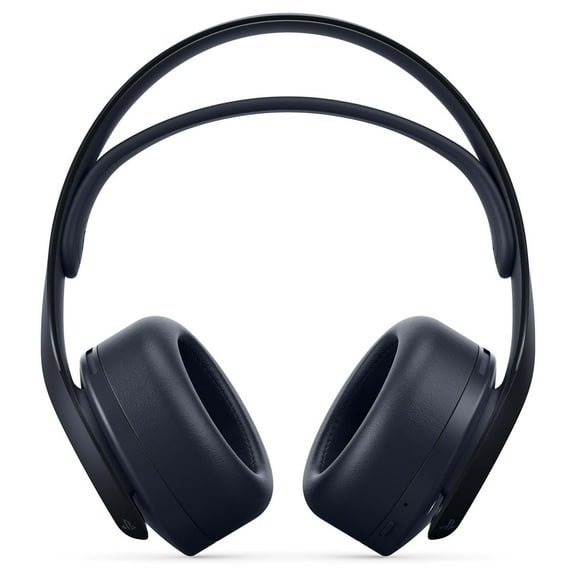
Answer: You can connect audio devices that have a 3.5mm jack audio cable or feature PlayStation Link™ wireless technology – such as the PULSE Explore™ wireless earbuds and PULSE Elite™ wireless headset. You also have the option to listen to audio via the remote player’s built-in speakers, although 3D Audio isn’t supported.

Question: Where can I use the PlayStation Portal™ Remote Player?

Answer: While your home Wi-Fi network represents a great option to use PlayStation Portal™ Remote Player because you have control over the quality of your own home Wi-Fi, it is not required. PlayStation Portal™ Remote Player can also be played wherever you have access to broadband internet Wi-Fi with at least 5Mbps for use1. For a better play experience, a high-speed connection of at least 15Mbps is recommended. If you are using public Wi-Fi, be aware that the quality of the internet connection may be out of your control and could impact the quality of your play experience.

Question: Can the PlayStation Portal™ Remote Player be connected to public Wi-Fi networks?

Answer: PS Portal can connect to a range of public Wi-Fi networks, and those running system software version 3.0.1 or later can also connect to select Wi-Fi networks that require additional validation steps beyond entering the network password. Please note your smartphone or tablet will be required to complete these additional validation steps, and that before connecting to public Wi-Fi networks, you’ll need to have completed the initial PS Portal setup on your home Wi-Fi network.

Warnings and disclaimers

Ingestion Hazard

This product contains a battery. Death or serious injury can occur if ingested. A swallowed battery can cause Internal Chemical Burn in as little as 2 hours. Keep new and used batteries OUT OF REACH OF CHILDREN. Seek Immediate medical attention if a battery is suspected to be swallowed or inserted inside any part of the body.

Disclaimer

This product contains a battery. Death or serious injury can occur if ingested. A swallowed battery can cause Internal Chemical Burn in as little as 2 hours. Keep new and used batteries OUT OF REACH OF CHILDREN. Seek Immediate medical attention if a battery is suspected to be swallowed or inserted inside any part of the body.

Member ratings & reviews

Filtered and sorted results would be available on the new 'Customer ratings & reviews' page.
Sort by |

Showing 1-3 of 1,295 reviews

Jun 19, 2026
CJ
5 out of 5 stars review

Verified Purchase

A nice investment

I bought this as a birthday gift to myself %26 I must say that I have been pleasantly surprised by how smooth it’s been going. In house connected to the WiFi it’s marvelous no issues whatsoever %26 u don’t even need to turn on your tv which saves on electricity. If you’re someone on the go you will need a PlayStation Plus Premium membership for around $22/month %26 a nice amount of reliable Hotspot.

Review from walmart.com
Helpful?1KIE2ZD9S6AQ13614703382
Jul 17, 2026
JustMe
5 out of 5 stars review

Verified Purchase

Love this

The kids love playing their PlayStation on this while they listen to music. It is similar to the switch but better graphics. The transition from the PlayStation on the monitor to this product was easy.

Review from walmart.com
Helpful?1KIE2ZD9S6AQ13614703382
May 17, 2026
Taylor
5 out of 5 stars review

Verified Purchase

I was always skeptical of having to connect a PlayStation portal to my PlayStation at my home just to be able to have screen mirroring and control what’s happening on my PlayStation with the PlayStation portal. However, since Sony came out with the game, changing update a handful of months or so maybe a little longer back you no longer have to be in range of your PlayStation and Wi-Fi at home. You can play it your portable pretty much anywhere you could possibly imagine. As long as your game is downloaded on your PlayStation at home you can play the same game on the portal out in the world, not connected to any Internet at all unless you would like to hook your portal up to the hotspot on your phone if you have one but it is not required

Review from walmart.com
Helpful?1KIE2ZD9S6AQ13614703382