
Verified Purchase
Terrible
Our connection was faster and didn't constantly drop using the outdated net gear router we had before buying this thing.
Verified Purchase
Solved Problem
I had been having problems with speed during backups to a NAS, this totally solved that. I only wish it came with a printed manual.
Verified Purchase
Great!
Has changed my outlook on the internet. Very fast now.
Verified Purchase
Works great
Works great , no dropping signal
Verified Purchase
Works great
Works great and easy to hook up
Best Combination of Performance & Price
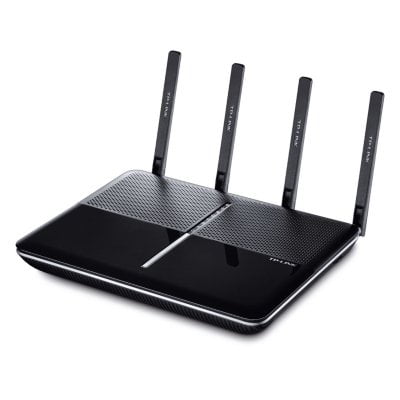
This is a review of a free product received from TP-LINK for evaluation & feedback as part of their review program. The Archer C2600 is an 802.11ac Wave 2 Router offering the Best Combination of Performance & Price. I am an electrical engineer who tests routers & communication gear. In my judgment the C2600 is a best buy with outstanding performance in terms of Wi-Fi signal strength, coverage & its ability to handle multiple simultaneous data streams. I've used the C2600 for 2 months & have only good things to say. The C2600 has been stable with the out-of-the-box firmware (Hardware v1.0, Firmware Version 1.1.2 Build 20150924 Rel. 66046). No disconnects, resets or other incidents. No buffering delays with several devices streaming video simultaneously. No reboots were needed. It has been smooth sailing & I highly recommend the C2600 router to friends. Although TP-LINK's C2600 uses the same Qualcomm chips as its competitors, which is reflected in its performance, the C2600 costs less. A comparison table “Find the Right Router for You,” on the back of the retail box, indicates that the C2600 has the furthest “Wi-Fi Range” & designates it as “Best” in “Wi-Fi Class”, “4K Streaming” & “Online Gaming”. The C2600 is a Dual Band (2.4GHz & 5.0GHz) 802.11ac Wave 2 router, meaning it's faster than standard 11ac routers. There are 4 Gigabit Ethernet RJ45 ports, 4 full-length detachable antennas, it handles 4 simultaneous Wi-Fi streams per band, has Beamforming Technology, a Dual-Core 1.4Ghz CPU & 2 USB 3.0 Ports. TP-Link's C2600 router is MU-MIMO 4x4, capable of fielding 4 simultaneous data streams on each of the 2 bands, increasing speed & reducing latency. (Acronyms: MU=Multiuser; MIMO=Multiple-Input Multiple-Output) On the 2.4GHz band it's capable of 800Mbps (4x200Mbps) & on 5.0GHz it's1,733Mbps (4x433Mbps). Hence, the AC2600 designation. Wi-Fi 802.11ac is a significant improvement over 802.11n. When I recently shopped for new laptops a primary consideration was that they have 802.11ac. After witnessing the superiority of 802.11ac, I will never again consider an 802.11n device, even bargain priced. I have a Time Warner Cable (TWC) Internet subscription, 200Mbps down & 20Mbps up. One might ask why in the world I'd need a high-end router like the C2600, that's capable of much higher speeds. At first glance this router might look like overkill. The answer is that having extra router capacity means different phones, tablets, laptops, PC's, webcams & smart TV's can all be streaming video & data simultaneously without impacting one another. Also, aside from the Internet, we transfer HD video & data from one device to another thru our internal LAN & router. No buffering occurs when we stream HD video to a far-away back bedroom Roku TV, even while others are using the Internet for their own thing. After enjoying the benefits of a C2600 router for 2 months, family members now take it granted & we'd never be able to go back. For us the C2600 router has been a significant upgrade. My experience is that external antennas work better than internal ones, & external full size antennas function better than small midget antenna. The C2600 has 4 full-length 5” antennas. For optimum Wi-Fi performance adjust the antenna orientation. Stand the middle 2 antennas straight up. Bend the 2 end antennas outward by 30 degrees. There are 2 USB 3.0 ports on the C2600. Files on the USB devices can be accessed by any Android, iOS, Windows, Linux & Roku device in my house. Using browsers, editors or FTP we can see all the folders & files on these USB storage devices from any phone, tablet, laptop or PC connected to the router. On our smart TV the “Roku Media Player” displays “Share-C2600 Media Player” with four folders (Browse Folders, Music, Pictures, Video). Content is conveniently categorized so we can view USB stored photo slideshows, videos & hear audio books on our smart TV's. I live in an old large 2 story brick house in New York City, where there is lots of interference from neighboring Wi-Fi. The C2600 is in my front living room on the first floor. To give you an idea of the C2600 capabilities, 3 Speedtest screenshots are included. They were measured with a new ThinkPad 802.11ac laptop, running Windows 10. Wired Ethernet speeds were 233/24Mbps. In the same room as the router, Wi-Fi 802.11ac speeds were 219/24Mbps. Even in a second-floor corner back bedroom, furthest away from the router, Wi-Fi 802.11ac speeds were 103/24Mbps. That's pretty good considering the Wi-Fi went through a ceiling, three plaster-lathe walls & a walk-in closet. All these test results are conservative because 2 Roku TV's & 2 TP-LINK NC200 cloud webcams were simultaneously streaming video through the C2600 router. Even a 10 year old PC had Ethernet speeds of 90/24 Mbps; that limitation was due to its internal 10/100 Mbps NIC card. Router configuration settings are made via a simple web browser User Interface from any tablet or computer connected by either Ethernet or Wi-Fi. In the browser address bar type “192.168.0.1/”. The menu is well organized. “Login” & you'll see “Quick Setup”, “Basic” & “Advanced” tabs. Initially Username & Password are both “admin”. Select the “Quick Setup” tab, follow instructions on the one page Quick Installation Guide, & you'll be on the Internet within 5-minutes. It's that simple. I used the same SSID & password for both bands. “Basic” lists all connected “Wired Clients” & “Wireless Clients”. “Advanced” lets you adjust & modify numerous settings. “Guest Network” & “Parental Controls” appear on both the “Basic” & “Advanced” tabs. I used the “Guest Network” a few days ago when visiting relatives requested Wi-Fi access. Worked great! Gave my visitors what they needed while keeping my regular SSID password & files secure. For me, one of the handiest features of the C2600 User Interface menu is configuring “Address Reservations”. My routers are normally set up with 12 fixed IP reserved addresses; a fixed static IP address is assigned to each of these devices. I have a separate IP Address for each Roku TV, printer, webcam & analog telephone adapter. That's so I can place shortcuts to them on my Windows desktops. Until the C2600, entering Address Reservations had been a chore. With the C2600, go to “Advanced”, “Network” & “DHCP Server”. Under “Address Reservation” click “Add”. Click on the MAC address to be added, enter the desired “Reserved IP Address” & type a “Description”. Repeat for each device. When done, “Save” & “Reboot”. The router was configured in a snap. “Tether”, an Android & iOS App, can also be used to configure router essentials. Plus, a visual Network Map is displayed of all your connected devices. “Beamforming” concentrates & focuses Wi-Fi on the 5.0GHz band towards active 802.11n,ac devices, increasing range, speed & stability. Built-in intelligence also automatically handles QoS (Quality of Service). Since I started using the C2600 all my Voice Over Internet (VoIP) telephone calls have been clear, without delays or dropouts. That's without manually changing QoS settings. The C2600 comes with a powerful external power supply, resembling a laptop charger. It has a regular power plug that uses only one power-strip outlet. Some other routers have wide or long power adapters which take up significant power-strip real-estate. The charger never feels warm. The top of the router is barely warm, never gets hot. A 5' Ethernet CAT.5E data cable was in the retail box (10,100,1000BASE-T). My setup requires more than 4 LAN ports, so I teamed up the C2600 with an inexpensive TP-LINK 8-Port Gigabit Desktop Switch (TL-SG1008D). They work very well together. No Switch setup or configuration change was needed. Just connect an Ethernet cable from any LAN Port on the C2600 to any port on the Switch. This increases the number of usable Gigabit LAN Ports from 4 to 10. The C2600 comes with a 2-year warranty. If you need help TP-Link offers unlimited 24x7 toll-free technical support by telephone & email. When I phone during regular business hours my call gets answered in California, after-hours by helpful & knowledgeable English speaking technicians in China. TP-LINK also sponsors extremely useful Tech Support Forums (Google: TP-LINK Forums).
Happy
Bought this router to use as a wireless access point. It's an older model, so it required manual changing of IP address and DHCP. Newer models have an access point mode selection. Updated the firmware (I think 3 total updates) and it works great. Fast speeds and great range. For the price and features, it's in the sweet spot of bang for buck.
Verified Purchase
Great addition to my metwork..
Verified Purchase
It's fine
Seems to work ok.