Skip to Main Content
Sam's Club
Sam's Club
All Departments
All Services
Customer reviews for SAMSUNG 70" Class U7900F Series 4K Crystal UHD Smart TV for
SAMSUNG 70" Class U7900F Series 4K Crystal UHD Smart TV
4.5 out of 5 stars
stars
3,901 ratings3,894 reviews
  1. 5 stars73% (2,860)
  2. 4 stars15% (592)
  3. 3 stars6% (240)
  4. 2 stars2% (91)
  5. 1 star3% (118)

Member photos

  • +1527 images
Sort by |
Showing 3,661-3,670 of 3,894 reviews
Dec 5, 2025
Reviewer name: HappyViewer
5 out of 5 stars
5 out of 5 stars review

Great picture

[This review was collected as part of a promotion.] The picture quality is surprisingly good for this price point. I've owned Samsung TVs for many years and have never been disappointed

Review from Samsung US
Helpful?519VMKO7QPOP17358505999
Nov 25, 2025
Reviewer name: Consdritdone
5 out of 5 stars
5 out of 5 stars review

SAMSUNG PODUCT

[This review was collected as part of a promotion.] I would have to say in all my years samsung products have been amazing. From tvs to phones to gaming screens. I have never had a single issue. I will always go with samsung.

Review from Samsung US
Helpful?519VMKO7QPOP17358505999
Dec 25, 2025
Reviewer name: hatem0
5 out of 5 stars
5 out of 5 stars review

Clear picture

[This review was collected as part of a promotion.] This TV is so reliable, three of them are installed in the gym and they are ON almost 24/7. The interface is also easy to navigate.

Review from Samsung US
Helpful?519VMKO7QPOP17358505999
Dec 9, 2025
Reviewer name: SamsungTVuser
5 out of 5 stars
5 out of 5 stars review

Great quality

[This review was collected as part of a promotion.] Picture and features are amazing over the TV I have had for the past 6 years. This one is so much better.

Review from Samsung US
Helpful?519VMKO7QPOP17358505999
Oct 13, 2025
Reviewer name: Emptynester
5 out of 5 stars
5 out of 5 stars review

Just tried samsung
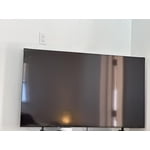
[This review was collected as part of a promotion.] First Samsung tv. I have several other high end brand tvs. As technology improves, I become more and more impressed. I would purchase another one.

Review from Samsung US
Helpful?519VMKO7QPOP17358505999
Mar 21, 2026
Reviewer name: Anonymous
5 out of 5 stars
5 out of 5 stars review

Great TV

[This review was collected as part of a promotion.] This is a great TV. Everything from the size, resolution, and price. I will definitely purchase a Samsung TV again im the future.

Review from Samsung US
Helpful?519VMKO7QPOP17358505999
May 2, 2026
Reviewer name: Pete
5 out of 5 stars
5 out of 5 stars review

Another great Samsung product

[This review was collected as part of a promotion.] I love my Samsung TV. Bright colors, clear picture Adjust for kids viewing. A lot nicer than my old one. I would definitely recommend this to other people. it's a great TV.

Review from Samsung US
Helpful?519VMKO7QPOP17358505999
Jan 27, 2026
Reviewer name: Madbuck
2 out of 5 stars
2 out of 5 stars review

Certain apps don' work. You Tube doesn't even open

Apps not working or even opening. Tried to update & no new updates found

Review from Samsung US
Helpful?519VMKO7QPOP17358505999
reply from Samsung Advisor

Hi Madbuck, Thank you for your feedback. If the latest firmware version 1132.0 is not yet available on your TV, you can download the update on a USB drive and manually update your TV: 1. On Samsung's website (upper right corner), go to: Support > Manual & Software > Find your TV model, and click on the Firmware – Upgrade File. 2. When the file has finished downloading, locate it and then unzip it. There is normally one folder inside but there may be multiple files. 3. Copy or move all of the files that were included in the zip file to a USB flash drive, but do not place them inside any other folders. If you place the software folders inside a folder on the USB flash drive, the TV or monitor will not find them. 4. Connect the USB drive containing the software upgrade into a USB port on your device. 5. Using your device's remote, navigate to and select Settings, then select All Settings, and then select Support. Select Software Update, select Update Now, and then select Yes if prompted. Your device will search the USB drive for update files. Follow the on-screen instructions to install the updated software. Updates usually take a few minutes; please do not turn off the TV until the update is complete. When the update is finished, it will restart automatically. If you continue to have issues, please call us at 1-800-SAMSUNG (8AM – 12AM EST, 7 days a week), or connect with a LiveChat agent by selecting ‘Support’ on our website. ~ Samsung Advisor

Jan 21, 2026
Reviewer name: Extraordinary
5 out of 5 stars
5 out of 5 stars review

Special Features

The meditation screen is on point especially a long day of work

Review from Samsung US
Helpful?519VMKO7QPOP17358505999
Jan 30, 2026
Reviewer name: cab15
3 out of 5 stars
3 out of 5 stars review

Not enough HDMI plug in

Not enough HDMI access plug in. Do you have a the one connect box for this.

Review from Samsung US
Helpful?519VMKO7QPOP17358505999
reply from Samsung Advisor

Hi Cab15, We appreciate your feedback on the inputs available on the U7900F TV. Although there is not a One Connect Box available for this TV Series, you can utilize an HDMI splitter to increase the amount of ports available. I hope this helps! If you have any questions or need help, we’re always here. Call 1-800-SAMSUNG from 8AM - 12AM EST, seven days a week, or connect with a LiveChat agent anytime by selecting ‘Support’ on our website. ~ Samsung Advisor