Skip to Main Content
Sam's Club
Sam's Club
All Departments
All Services
Customer reviews for SAMSUNG 70" Class U7900F Series 4K Crystal UHD Smart TV for
SAMSUNG 70" Class U7900F Series 4K Crystal UHD Smart TV
4.5 out of 5 stars
stars
4,092 ratings4,085 reviews
  1. 5 stars73% (3,000)
  2. 4 stars15% (617)
  3. 3 stars6% (252)
  4. 2 stars2% (100)
  5. 1 star3% (123)

Member photos

  • +1586 images
Sort by |
Showing 2,581-2,590 of 4,085 reviews
Oct 3, 2025
Reviewer name: Anonymous
5 out of 5 stars
5 out of 5 stars review

Great clear picture with smart features
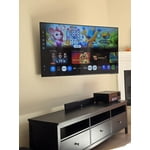
[This review was collected as part of a promotion.] We use our TV for streaming. The picture quality is great with bright vivid beautiful colors. Samsung interface is intuitive, with tons of options to choose from, including free streaming TV channels. The remote is very simple,minimalistic. If you own other Samsung devices, like a tablet or phone, you can control the TV using the Samsung app as well. Like any other modern TV, you get the usual HDMI and USB connections but iy lacks optical audio output and other composite connections. Overall, it is a great value with lots of entertainment options. Highly recommended.

Review from Samsung US
Helpful?519VMKO7QPOP17358505999
Sep 6, 2025
Reviewer name: Newtosamsung
5 out of 5 stars
5 out of 5 stars review

Absolutely love it!

[This review was collected as part of a promotion.] The only issue is I can’t figure out how to add my most used apps on my Home Screen instead of all the ones I never use. Picture is so clear and appreciate the entire delivery process and removing l the packaging! Great experience!

Review from Samsung US
Helpful?519VMKO7QPOP17358505999
Sep 16, 2025
Reviewer name: Kamikam211
5 out of 5 stars
5 out of 5 stars review

Kamikamnyc

[This review was collected as part of a promotion.] This smart TV is a must buy and Ultra Crystal Clear HD picture that all your streaming service plus Samsung TV for free new services also you can play all your favorite games by just connecting your Xbox at PlayStation controller you can pass the web anything you can imagine you can do on this this Samsung Crystal UHD Smart TV is a must buy.

Review from Samsung US
Helpful?519VMKO7QPOP17358505999
Sep 5, 2025
Reviewer name: Franks
4 out of 5 stars
4 out of 5 stars review

Good Picture

[This review was collected as part of a promotion.] The TV has a great picture and sound. We enjoy it very much. It was difficult for us to set up our YoutubeTv service but once we figured it out it was great. Internet connectivity is better than our previous brand. So very happy.

Review from Samsung US
Helpful?519VMKO7QPOP17358505999
Sep 22, 2025
Reviewer name: Giddle
3 out of 5 stars
3 out of 5 stars review

Jury is still out

[This review was collected as part of a promotion.] 1500 Character Maximum I have had the television for almost 1 month and debating whether to call and report a problem. Periodically, when I put on the television, the screen flickers. Have to shut off the television and restart it. Also, sometimes when I first put on the television, there is no sound / volume. Similarly, I have to shut down and restart it. Lastly, sometimes picture freezes and then reverts to Home Screen.

Review from Samsung US
Helpful?519VMKO7QPOP17358505999
reply from Samsung Advisor

Hi Giddle, Thank you for reaching out to us. Please try the steps below to resolve the flickering and sound issues you mentioned. If you're noticing flickering or unexpected changes in screen brightness, we recommend disabling the following energy-saving features: Settings > General & Privacy > Power and Energy Saving • Brightness Optimization • Motion Lighting • Energy Saving Solution You may also want to turn off Contrast Enhancer, which can cause brightness shifts during certain scenes: Settings > Picture > Expert Settings > Contrast Enhancer Lastly, make sure your TV is running the latest firmware: Settings > Support > Software Update > Update Now. Regarding sound issues: if you're not hearing sound from your TV, please try the following: • Check your volume and mute settings, and confirm external speakers are powered on. • If using HDMI ARC/eARC, make sure you’re using a certified HDMI cable and go to: Settings > All Settings > Sound > Expert Settings > HDMI eARC Mode = Auto. Also enable Anynet+ (HDMI-CEC) under External Device Manager. • For Optical, be sure the external audio device is on before connecting, and set Sound Output = Optical. • For Bluetooth, try unpairing and reconnecting: Settings > Sound > Sound Output > Bluetooth Speaker List • For Wi-Fi speakers, use: Sound Output > Wi-Fi Speaker Surround Setup and make sure both devices are on the same network. You can also try running a Sound Test: Settings > Support > Device Care > Self Diagnosis > Sound Test If your issue continues, we’re happy to help at 1-800-SAMSUNG, 8AM – 12AM EST, 7 days a week. Our LiveChat agents are also available by clicking the ‘Support’ link at Samsung.com. ~ Samsung Advisor

Oct 19, 2025
Reviewer name: 1SADSUNG
2 out of 5 stars
2 out of 5 stars review

THIS PRODUCT SHOULD BE SADSUNG

[This review was collected as part of a promotion.] it is quite frustrating with the use of such a small remote. the buttons dont light up and since my fios remote is not properly paired to the tv i am stuck having to use the small remote that came with the tv. i do not like how the tiles are all over the place which just makes things more difficult to find. the remote is not voice activated like most of the other newer ones i have seen and the volume is very awkwardly set up as well. to change channels and use the volume the buttons must be toggled a certain way which is also annoying. it makes the experience a lot more stressful than necessary. the tv also is constantly freezing and pixelating. it seems more blurry on multiple channels. it is not good for visually impaired or neurodivergent people who have disabilities.

Review from Samsung US
Helpful?519VMKO7QPOP17358505999
reply from Samsung Advisor

Hi 1SADSUNG, We appreciate your feedback on the U7900 TV. To ensure performance is optimized on your TV, please check the Firmware is up to date. Go to Settings> Support> Software Update. To further optimize performance, try running Device Care, which checks memory, clears unused cached data, and closes background apps: Home > left directional key > Settings > Support > Device Care > Start Device Care. If you still notice blurring or pixelating on your channels, the issue you’re encountering may be related to network strength or stability. We recommend the following steps: 1. Connect to a 5GHz Wi-Fi network, if available 2. Use a wired LAN connection for increased stability 3. Reposition your router to reduce obstacles between the TV and the router Finally, if you need help setting up a third-party remote or have any questions, please do not hesitate to reach out to us. Reach out by calling 1-800-SAMSUNG between 8AM - 12AM EST, any day of the week. You can also chat with us online by visiting the ‘Support’ section of our website. ~ Samsung Advisor

Sep 24, 2025
Reviewer name: Zampa26
5 out of 5 stars
5 out of 5 stars review

Awesome Product

[This review was collected as part of a promotion.] I was glad to purchase this Samsung TV . It was a great price and easy to set up . The remote takes some time to learn , but once you get the hang of it, it is easy to use . The picture quality is outstanding ,and very clear . I had 2 other Samsung TV's that lasted a long time , so buying another was with no hesitation . I would purchase this product again .

Review from Samsung US
Helpful?519VMKO7QPOP17358505999
Nov 8, 2025
Reviewer name: Themightyguy11
4 out of 5 stars
4 out of 5 stars review

It is a great product

[This review was collected as part of a promotion.] I think this product is a really good deal. The features you get for this price is good. I do think it could be a bit better. Like I did have it lag like 5 times, but other than that I don't have any complaints. This is a great product.

Review from Samsung US
Helpful?519VMKO7QPOP17358505999
Dec 20, 2025
Reviewer name: TechLoverNY
5 out of 5 stars
5 out of 5 stars review

Love the quality and features!

[This review was collected as part of a promotion.] My new Samsung has exceeded my expectations with great picture quality, built in Samsung TV Plus channels for free streaming entertainment, and a modern user interface. A great choice for any entertainment setup, and the sleek, lightweight, slim design is simply amazing.

Review from Samsung US
Helpful?519VMKO7QPOP17358505999
Sep 10, 2025
Reviewer name: TjVerner
5 out of 5 stars
5 out of 5 stars review

Great features and pictures
[This review was collected as part of a promotion.] I use my Samsung YV to watch over the air television, internet surfing, virtual doctor's visits, for watching movies/TV shows, listening to music and playing games with the Samsung game app and also with my PS3. Graphics, sound and color saturation is excellent. There are so many features that I have yet to crack the surface. Everyday, I'm learning something new. It sometimes seems as if I'm actually in the picture. I love my television and believe that this is one of the best television purchases I've ever made. The value is great,as well. I broke my ankle, leg and elbow, at the same time, all on the same side. I'm homebound so I decided to purchase a new television for my bedroom. I'd like to thank Samsung, for it has helped pass the time with wonderful entertainment and a great distraction learning what my television is capable of. I learn something new everyday. If you're researching and considering purchasing a new television, you can't go wrong, with Samsung.

Review from Samsung US
Helpful?519VMKO7QPOP17358505999