Skip to Main Content
Sams Club
Sams Club
Customer reviews for SAMSUNG 85" Class U7900F Series 4K Crystal UHD Smart TV for
SAMSUNG 85" Class U7900F Series 4K Crystal UHD Smart TV
4.7 out of 5 stars
stars1,535 ratings1,524 reviews
  1. 5 stars78% (1,204)
  2. 4 stars14% (212)
  3. 3 stars4% (64)
  4. 2 stars1% (23)
  5. 1 star2% (32)

Member photos

  • +548 images
Sort by |
Showing 591-600 of 1,524 reviews
Jul 23, 2025
beth
5 out of 5 stars review

Beautiful Picture

I just love the clear, bright picture. The sound is great. After getting it out of the box and powered on, I set up the TV settings. That took a bit. There is so much content that can be accessed through the TV that I just pushed buttons and clicked links just to see what I could see. Wow!! I might downgrade my streaming services for awhile since I have so many other options now

Review from Samsung US
Helpful?6Y0PENN834MD17304274076
Jul 20, 2025
Takira
5 out of 5 stars review

HD Visual , HD Sound , HD Gaming System

[This review was collected as part of a promotion.] Hi , I'm a very satisfied customer . I love how I can come home from work and play the game on a HD TV. Very good quality, I don't have to cut the lights off just to watch TV. The sound quality is outstanding. I love watching movies on it the kids love it . I have one in every room in the house , very food investment . Thank you guys for being able to provide good quality service .

Review from Samsung US
Helpful?6Y0PENN834MD17304274076
Jul 5, 2025
Samsung4Life
5 out of 5 stars review

Easy Set Up

[This review was collected as part of a promotion.] I use my Samsung for streaming only. I love all the apps that are available. The picture quality is excellent. This is the third Samsung TV that I have purchased my first one was not a smart TV, so that tells you how long I have owned each one. I have had a 32 inch, 47 inch, and have recently graduated to a 55 inch.

Review from Samsung US
Helpful?6Y0PENN834MD17304274076
Aug 1, 2025
RiceMice
5 out of 5 stars review

Great TV (last a long time)

[This review was collected as part of a promotion.] This is my first ever Samsung TV as my family was very much a Sony TV family but after getting this TV and having other Samsung products it converted us really quick. The sync with sound bars and cool features with our phones are amazing and overall the built in UI and features are good and TV picture quality is great for the price and yeah we are actually upgrading from this model to one of the new model because Samsung makes solid tvs and I've always been the "a TV is a TV" guy but now I see that no not all tvs are built the same and going back to our non Samsung tvs and they feel clunky and slow comparing them

Review from Samsung US
Helpful?6Y0PENN834MD17304274076
Jul 22, 2025
Stanlovesmedia
5 out of 5 stars review

Clear picture, responds well to most remote comman

[This review was collected as part of a promotion.] This is my first 55 inch smart TV from Samsung. I'm quite pleased with the clarity, the selection of TV , news, movie choices , because I have chosen a variety of apps. Most of the time the TV responds quickly to my remote commands other than Netflix delays.

Review from Samsung US
Helpful?6Y0PENN834MD17304274076
Sep 22, 2025
Giddle
3 out of 5 stars review

Jury is still out

[This review was collected as part of a promotion.] 1500 Character Maximum I have had the television for almost 1 month and debating whether to call and report a problem. Periodically, when I put on the television, the screen flickers. Have to shut off the television and restart it. Also, sometimes when I first put on the television, there is no sound / volume. Similarly, I have to shut down and restart it. Lastly, sometimes picture freezes and then reverts to Home Screen.

Review from Samsung US
Helpful?6Y0PENN834MD17304274076
reply from Samsung Advisor

Hi Giddle, Thank you for reaching out to us. Please try the steps below to resolve the flickering and sound issues you mentioned. If you're noticing flickering or unexpected changes in screen brightness, we recommend disabling the following energy-saving features: Settings > General & Privacy > Power and Energy Saving • Brightness Optimization • Motion Lighting • Energy Saving Solution You may also want to turn off Contrast Enhancer, which can cause brightness shifts during certain scenes: Settings > Picture > Expert Settings > Contrast Enhancer Lastly, make sure your TV is running the latest firmware: Settings > Support > Software Update > Update Now. Regarding sound issues: if you're not hearing sound from your TV, please try the following: • Check your volume and mute settings, and confirm external speakers are powered on. • If using HDMI ARC/eARC, make sure you’re using a certified HDMI cable and go to: Settings > All Settings > Sound > Expert Settings > HDMI eARC Mode = Auto. Also enable Anynet+ (HDMI-CEC) under External Device Manager. • For Optical, be sure the external audio device is on before connecting, and set Sound Output = Optical. • For Bluetooth, try unpairing and reconnecting: Settings > Sound > Sound Output > Bluetooth Speaker List • For Wi-Fi speakers, use: Sound Output > Wi-Fi Speaker Surround Setup and make sure both devices are on the same network. You can also try running a Sound Test: Settings > Support > Device Care > Self Diagnosis > Sound Test If your issue continues, we’re happy to help at 1-800-SAMSUNG, 8AM – 12AM EST, 7 days a week. Our LiveChat agents are also available by clicking the ‘Support’ link at Samsung.com. ~ Samsung Advisor

Jul 21, 2025
God2love
5 out of 5 stars review

My Samsung review

[This review was collected as part of a promotion.] I use my Samsung TV for watching through my cable and streaming services. I love the picture and color, much brighter and more vibrant than my old TV. I also went 5 inches bigger this time and just love the screen size it brings everything to life!

Review from Samsung US
Helpful?6Y0PENN834MD17304274076
Jun 30, 2025
VegasObsidian
5 out of 5 stars review

This product is phenomenal. Literally the best!s

[This review was collected as part of a promotion.] This product is literally the best television that I could ever ask for. When I watch a 4K Blu-ray on it, it feels like I'm in the movie. It is so crystal clear and the sound is immersing. I am literally blown away by this product.

Review from Samsung US
Helpful?6Y0PENN834MD17304274076
Aug 24, 2025
Samsungbro
5 out of 5 stars review

Been a great purchase!

[This review was collected as part of a promotion.] At first I was a little worried because it is so large, but the crystal clear picture makes it so after a while, you want to go bigger! The picture along with my Samsung sound bar and subwoofer are an incredible pairing!!

Review from Samsung US
Helpful?6Y0PENN834MD17304274076
Jul 24, 2025
Atapap
2 out of 5 stars review

Mediocre tv. Okay for the price

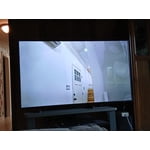
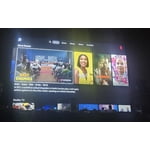
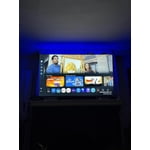
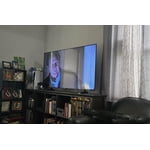
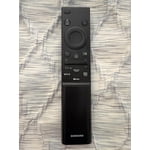
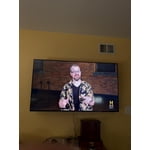
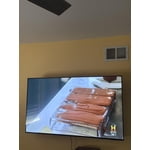
[This review was collected as part of a promotion.] Brightness is quite low. You can see in the image it's not a very brightly lit room but lots of reflections on the screen and poor brightness (max'd out here). Tizen is a stuttering mess, the menus and UX are poorly designed. The remote however is good. Really like the volume up and down toggle. For the price I think it's reasonable, just wish they'd use Google tv instead of tizen.

Review from Samsung US
Helpful?6Y0PENN834MD17304274076
reply from Samsung Advisor

Hi Atapap, Thank you for your feedback. We’re sorry to hear you’re not fully satisfied with the picture quality on your Samsung U7900F TV. If the image appears too dark, we suggest disabling certain energy-saving features, which can automatically adjust brightness and affect how the screen looks. Go to: Settings > All Settings > General & Privacy > Power and Energy Saving, then turn off Brightness Optimization, Energy Saving Solution, Motion Lighting, and/or Contrast Enhancer. You can also adjust the Picture Mode to better suit your environment: Settings > All Settings > Picture > Picture Mode • Standard – Default mode for general viewing • Dynamic – Brighter and clearer, ideal for well-lit rooms • Movie – Best for dark room viewing • Eco – Energy-saving mode • Filmmaker Mode – Preserves content as intended by creators To fine-tune brightness, go to: Home > left directional key > Settings > All Settings > Picture > Expert Settings, then adjust the Brightness level (0–50) to your preference. Lastly, please make sure your TV is running the latest firmware: Home > Home > left directional key > Settings > Support > Software Update > Update Now We hope these tips help improve your viewing experience. If you need further support, feel free to contact us at 1-800-SAMSUNG, 8AM – 12AM EST, 7 days a week. LiveChat is also available via the ‘Support’ link on our website. ~ Samsung Advisor