Skip to Main Content
Sam's Club
Sam's Club
All Departments
All Services
Customer reviews for SAMSUNG 70” Class U8000F Series 4K Crystal UHD Smart TV for
SAMSUNG 70” Class U8000F Series 4K Crystal UHD Smart TV
4.5 out of 5 stars
stars
3,124 ratings3,118 reviews
  1. 5 stars71% (2,214)
  2. 4 stars16% (497)
  3. 3 stars7% (206)
  4. 2 stars3% (96)
  5. 1 star4% (111)

Member photos

  • +967 images
Sort by |
Showing 2,871-2,880 of 3,118 reviews
Jul 30, 2025
Reviewer name: BrentwoodBobby
4 out of 5 stars
4 out of 5 stars review

Samsung U8000F Crystal UHD TV (2025) Review
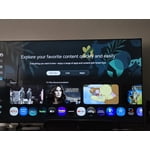
[This review was collected as part of a promotion.] After several weeks with the Samsung U8000F Crystal UHD TV, I'm genuinely impressed with what this set delivers for the price point. The standout feature is undoubtedly the picture quality – the crystal-clear display produces incredibly crisp images that make everything from streaming shows to gaming look fantastic. Colors are vibrant and details are sharp, exactly what you'd expect from Samsung's display technology. The TV's lightweight design is another pleasant surprise. Moving and mounting it was refreshingly easy compared to other TVs in this size range, and it doesn't dominate the room with bulk. Audio quality exceeded my expectations too – the built-in speakers deliver clear, well-balanced sound that eliminates the immediate need for a soundbar. From a value perspective, this TV hits the sweet spot. You're getting premium picture quality and solid build quality without the premium price tag of Samsung's flagship models. However, the user interface needs work. The home screen feels cluttered with too many icons and promotional content, and Samsung doesn't provide enough customization options to clean it up. Navigation can feel overwhelming, especially for less tech-savvy users. My biggest practical complaint is the short power cord. For a TV this size, the cord length seems inadequate and limits placement options unless you're right next to an outlet. The U8000F delivers where it matters most – excellent picture quality at a reasonable price. It's a solid choice!

Review from Samsung US
Helpful?340LGBQNMBLF16007967994
Jul 17, 2025
Reviewer name: MuzzafuzzaGaming
5 out of 5 stars
5 out of 5 stars review

Fantastic TV Viewing Experience
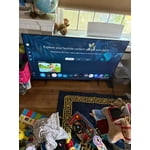
[This review was collected as part of a promotion.] It has been over 10 years since I’ve bought a new TV. I got an email from the insiders saying they have these new Samsung models and after further inspection, I decided to jump back in and bought the 65”. Turns out I made the right choice. This is the best TV I’ve ever watched for movies, shows, streaming, YouTube, video games & more. The picture and audio quality are top-tier. The setup was easy. The remote and Home Screen navigation is very user friendly. I would recommend this TV and brand to anyone looking for a new Home Screen setup.

Review from The Insiders
Helpful?340LGBQNMBLF16007967994
Jun 23, 2025
Reviewer name: Martymcfly
5 out of 5 stars
5 out of 5 stars review

Best TV Ever!

[This review was collected as part of a promotion.] I love how responsive these TV's are. Press a button and instantly acts. Another thing is the adaptive quality when gaming or watching certain TV shows or movies... it is fantastic and I won't ever be getting another TV unless it's Samsung. Plus it was very affordable!

Review from Samsung US
Helpful?340LGBQNMBLF16007967994
Apr 28, 2025
Reviewer name: GxDsChild
4 out of 5 stars
4 out of 5 stars review

Great Television and interface

[This review was collected as part of a promotion.] I use mine as a screen for work as well as for pleasure when I'm just watching TV in my study. This is a great TV to have and my only wish is that I could connect all my cameras not just the personally purchased ones, even those that were purchased through my security company. I also wish I had bought a bigger one lol.

Review from Samsung US
Helpful?340LGBQNMBLF16007967994
Sep 3, 2025
Reviewer name: Mike0001
5 out of 5 stars
5 out of 5 stars review

This product has great color quality

[This review was collected as part of a promotion.] This product has great color quality and makes even the smallest of colors pop. Its vibrant color and great frame rate mixes well together to give you an outstanding experience when when watching you favorite shows or movies.

Review from Samsung US
Helpful?340LGBQNMBLF16007967994
Aug 22, 2025
Reviewer name: Dabking
4 out of 5 stars
4 out of 5 stars review

Love the resolution and Features
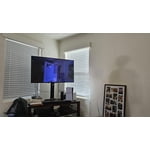
[This review was collected as part of a promotion.] The Samsung U8000F Crystal UHD (2025) isn’t the flashiest or brightest TV out there, but it nails what it sets out to do: provide a great-looking 4K smart TV at an affordable price. For everyday streaming, casual gaming, and family use, it’s an excellent choice. The design feels high-end, the smart features are packed with content, and the picture quality is more than enough for most living rooms. If you’re a cinephile who demands perfect blacks and blistering HDR, or a competitive gamer chasing 120Hz, you’ll probably want to spend more on a QLED or OLED. But if you just want a reliable, modern smart TV that won’t break the bank, the U8000F is a strong buy. Would I recommend it? ✅ Yes, especially if you’re upgrading from an older Full HD or early 4K set. ✅ Great for families, streaming lovers, and casual gamers. ❌ Probably not for hardcore gamers or those who watch mostly in bright sunlit rooms. Overall: 4/5 stars – an excellent budget-friendly 4K TV with just a few compromises.

Review from Samsung US
Helpful?340LGBQNMBLF16007967994
Aug 20, 2025
Reviewer name: Davidpuddy
1 out of 5 stars
1 out of 5 stars review

Most complicated TV to use.

[This review was collected as part of a promotion.] Always had Samsung TVs. Got this one home and it was a nightmare from the time I turned it on. The remote is a little black stick with only a few buttons and symbols and you can't tell what any are for. The set-up was complex, and it took forever to get through the confusing registration process. Then the remote would bounce around the apps from left to right and back again and not stop. I finally boxed it up and took it back.

Review from Samsung US
Helpful?340LGBQNMBLF16007967994
reply from Samsung Advisor

Hi Davidpuppy, Thank you for your feedback. We hope you’ll consider Samsung again in the future. If you do, we’re always here to help with setup and support. Reach us at 1-800-SAMSUNG (8AM – 12AM EST, 7 days a week), or visit our website to chat live and access manuals or software. ~ Samsung Advisor

Sep 17, 2025
Reviewer name: MJChatesHub
1 out of 5 stars
1 out of 5 stars review

Smart Hub Bad

We have had this TV for quite some time now and I like it for the picture quality. The home screen "Smart Hub" is the absolute worst and it makes me hate this TV. In fact, I loathe it with a passion. The hub is cluttered and full of recommendations that I cannot remove. I want to see my downloaded apps so that I can launch them as needed. I do not want recommendations. I do not want banners with inappropriate content at 85" up for my children when we just turn on the TV. I can set parental parameters, but then I've got boxes with a stock photo of a lock. The navigation for settings is clunky and things are buried in miles of tiles that I just don't care about. I wish we hadn't bought it. I wish we had returned it. Do not leave LG for a Samsung.

Review from Samsung US
Helpful?340LGBQNMBLF16007967994
reply from Samsung Advisor

Hi MJChatesHub, Thank you for sharing your experience. Please know that you can customize your Home screen by installing, removing or adding your favorite apps to the Home screen. Here's how: Searching for & Installing Apps 1. From the Home screen, press left on the remote’s directional pad. 2. Navigate to and select Search. 3. Using the search bar, enter the content or app you’d like to find. 4. Navigate to and select the app you’d like to install, then select Install. Note: Previously installed apps can be accessed on the Settings screen. Adding & Managing Apps on Home Screen 1. Go to App Settings (these can be found at the bottom of the Apps screen) and select the app you want to move. The following options will be available: a. Add to Home: Move the app to your desired location on the Home screen. b. Delete: Delete app. c. Lock/Unlock: Lock the app with a PIN so only you can use it. When the app is selected again, you will be prompted to enter the PIN to unlock it. d. Reinstall: Reinstall the app. e. View Details: View the app’s information and details. If you need more help with app management, please don’t hesitate to reach Samsung Support at 1-800-SAMSUNG, available daily from 8AM - 12AM EST. You can also visit the Samsung website and click on ‘Support’ for: • Live Chat • Manuals, Software, & Warranty Info ~ Samsung Advisor

Jul 30, 2025
Reviewer name: VirgoSamsungLover
5 out of 5 stars
5 out of 5 stars review

Awesome tv

[This review was collected as part of a promotion.] The TV was a purchase for my son. He needed an upgrade and since we love all things Samsung. We have them.all throughout the house. So he said he wants one since his room.was the only one without one.He is heavily into gaming and he said how the games look better on this TV compared to his old one.

Review from Samsung US
Helpful?340LGBQNMBLF16007967994
May 22, 2025
Reviewer name: David
5 out of 5 stars
5 out of 5 stars review

Samsung Crystal Series TV's FTW!!

I've owned several of the Crystal series TV's, and am going now on my third one which will arrive to me next week. I love the picture quality of the Crystal series TV's, and also the price which is very affordable for me. Sure, I've considered QLED or OLED, but they are way out of my price range, and would they be that much different as far as picture quality? Perhaps. But what I do know is the Crystal series has a brilliant picture, and makes everything on screen seem REAL, like the viewer is a part of what they're watching. The colors are true to life, and just extraordinary to see. This series of TV is very budget-friendly, as well, and I highly recommend it to those who need to keep their purse strings tight. As long as Samsung continues making the Crystal TV's, I'll keep buying them. I've also purchased multiple Samsung soundbars, and own a Q600C, I think it's called. Samsung soundbars pair quite nicely to these TV's, too. Go ahead, and pull the trigger on this one; you will have no regrets I think.

Review from Samsung US
Helpful?340LGBQNMBLF16007967994