Skip to Main Content
Sam's Club
Sam's Club
All Departments
All Services
Customer reviews for SAMSUNG 50" Class U8000F Series 4K Crystal UHD Smart TV for
SAMSUNG 50" Class U8000F Series 4K Crystal UHD Smart TV
4.5 out of 5 stars
stars
1,733 ratings1,681 reviews
  1. 5 stars73% (1,262)
  2. 4 stars15% (261)
  3. 3 stars6% (104)
  4. 2 stars3% (51)
  5. 1 star3% (55)

Member photos

  • +488 images
Sort by |
Showing 541-550 of 1,681 reviews
Jul 7, 2026
Reviewer name: ReviewedThings
4 out of 5 stars
4 out of 5 stars review

Great features and quality!

[This review was collected as part of a promotion.] It's a nice TV, especially for the price. It's quick and lets me enjoy content at 4K. The colors and brightness is great for the price.

Review from Samsung US
Helpful?0U87HKRK7K5R15580452247
Jun 22, 2026
Reviewer name: Jb1977
5 out of 5 stars
5 out of 5 stars review

Great TV

This product has been great over the years. I've had it for 3 years now no problems. The only issue is that it's fairly slow when it comes to switching the inputs. It's like a hesitates and then finally switches.

Review from Samsung US
Helpful?0U87HKRK7K5R15580452247
Jun 20, 2026
Reviewer name: Anonymous
5 out of 5 stars
5 out of 5 stars review

Great TV

[This review was collected as part of a promotion.] Very happy with the TV. Never had one this large before. Very clear picture and easy to navigate between the apps.

Review from Samsung US
Helpful?0U87HKRK7K5R15580452247
Jun 5, 2026
Reviewer name: iversonhof
3 out of 5 stars
3 out of 5 stars review

SLOWEST TV

[This review was collected as part of a promotion.] This TV is terrible. I think its probably the worst TV I got. Its so slow like it 20 years old. After this TV I may not buy another samsung.

Review from Samsung US
Helpful?0U87HKRK7K5R15580452247
reply from Samsung Advisor

Hi iversonhof, We appreciate your feedback regarding response time. For optimal performance, please ensure your TV is running the latest firmware. You can check this by going to: Home > left directional key > Settings > Support > Software Update To further optimize performance, try running Device Care, which checks memory, clears unused cached data, and closes background apps: Home > left directional key > Settings > Support > Device Care > Start Device Care If issues continue, please reach Samsung Support at 1-800-SAMSUNG (8AM – 9PM EST Mon – Fri, 8AM – 6PM Sat – Sun). LiveChat is also available via the ‘Support’ link on our website. ~ Samsung Advisor

Jun 21, 2026
Reviewer name: Franny
5 out of 5 stars
5 out of 5 stars review

My 70” Samsung TV

[This review was collected as part of a promotion.] I am very happy with my first 70” Samsung TV. I always had an old school TV and I cannot believe the difference and the quality! I highly recommend.

Review from Samsung US
Helpful?0U87HKRK7K5R15580452247
Jul 20, 2026
Reviewer name: Red barron
5 out of 5 stars
5 out of 5 stars review

Every night is movie night
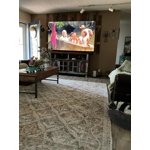
[This review was collected as part of a promotion.] 85” tv is like being at the movie theatre it's really awesome we went from a70” to 85” bid difference all u need is a bowl of popcorn and you at the movies.

Review from Samsung US
Helpful?0U87HKRK7K5R15580452247
Jul 20, 2026
Reviewer name: Boris
5 out of 5 stars
5 out of 5 stars review

Exceptional Quality After One Year In Use

[This review was collected as part of a promotion.] After one year of use, this Samsung continues to produce exceptional clear images. Easy to use switching between various streaming services. Would buy it again.

Review from Samsung US
Helpful?0U87HKRK7K5R15580452247
Jun 20, 2026
Reviewer name: PamPam
3 out of 5 stars
3 out of 5 stars review

Average

[This review was collected as part of a promotion.] It seems that I'm having trouble with the tv cutting off suddenly. And I think there's something wrong with the speakers

Review from Samsung US
Helpful?0U87HKRK7K5R15580452247
reply from Samsung Advisor

Hi PamPam, Thank you for sharing your experience. If you've turned on your TV and hear sound but see no picture - or if the image is cutting in and out - there are a few common possibilities to consider: 1. Connection Issue – This is the most frequent cause. Check for loose, faulty, or improperly installed cables between the TV and any connected devices. 2. External Device Issue – The problem may lie with the device connected to your TV (e.g., cable box, game console). Be sure the device is powered on and using compatible video output settings. 3. TV Hardware Issue – If connections and external devices have been ruled out, the issue may be internal and could require technician support. We’d appreciate the opportunity to assist you further. Please contact Samsung Support at 1-800-SAMSUNG (8AM – 9PM EST Mon – Fri, 8AM – 6PM Sat – Sun). LiveChat with an agent, along with manuals, software, and warranty information, is also available through the ‘Support’ section on our website. ~ Samsung Advisor

Jul 6, 2026
Reviewer name: Tlc10
5 out of 5 stars
5 out of 5 stars review

Great picture!
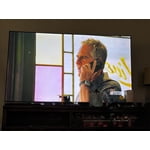
[This review was collected as part of a promotion.] This tv is giant and has a beautiful picture! Offers many apps and free tv options with WiFi! I love it!

Review from Samsung US
Helpful?0U87HKRK7K5R15580452247
Jul 4, 2026
Reviewer name: Tv review guy
5 out of 5 stars
5 out of 5 stars review

Best tv

[This review was collected as part of a promotion.] TV has awesome brightness to contrast is so good screen time is super responsive. It's uniformity has amazing upscaling, overall awesome t v

Review from Samsung US
Helpful?0U87HKRK7K5R15580452247