Skip to Main Content
Sam's Club
Sam's Club
All Departments
All Services
Customer reviews for SAMSUNG 50" Class U8000F Series 4K Crystal UHD Smart TV for
SAMSUNG 50" Class U8000F Series 4K Crystal UHD Smart TV
4.5 out of 5 stars
stars
1,733 ratings1,681 reviews
  1. 5 stars73% (1,262)
  2. 4 stars15% (261)
  3. 3 stars6% (104)
  4. 2 stars3% (51)
  5. 1 star3% (55)

Member photos

  • +488 images
Sort by |
Showing 371-380 of 1,681 reviews
Apr 1, 2026
Reviewer name: Megshh
5 out of 5 stars
5 out of 5 stars review

Great tv!

[This review was collected as part of a promotion.] This TV gets a bad rap, and I have no clue why. The picture resolution, color, and brightness are beautiful. It's easy to access all my apps to watch things. The picture contrast on all live events is amazing, and it works really fast with my Wi-Fi. The only thing that is bad about it is the standard TV remote it comes with. You have to point it directly at the eye on the bottom left of the TV to get it to work. But we have other remotes that work better and have no issues with, so it's refreshing to know I can use other remotes. That's my only qualm, I guess, is the remote, but that's an easy fix.

Review from Samsung US
Helpful?0U87HKRK7K5R15580452247
May 19, 2026
Reviewer name: Chingon187
5 out of 5 stars
5 out of 5 stars review

Fast update

[This review was collected as part of a promotion.] TV has many picture modes. It has many features any app you can think of and makes it very convenient. Really like the chromeccast option as it helps use my cellphone and watch my phonescreen on TV screen. 5 stars for sure.

Review from Samsung US
Helpful?0U87HKRK7K5R15580452247
Mar 23, 2026
Reviewer name: Bull903
5 out of 5 stars
5 out of 5 stars review

Great Tv

[This review was collected as part of a promotion.] This model right here is what I buy I upgrade every year. The clarity of the TV is great sounds good too but I always add a sound bar witch is Samsung as well. The price on this model is very affordable. You want go wrong buy this Samsung model.

Review from Samsung US
Helpful?0U87HKRK7K5R15580452247
Apr 27, 2026
Reviewer name: Annelglez
5 out of 5 stars
5 out of 5 stars review

Exelente

[This review was collected as part of a promotion.] Product exceeds expectations. The picture quality is sharp, colors are vibrant, and the brightness looks great even in a well-lit room. Setup was quick and easy, and the smart features are smooth and responsive. Sound quality is clear, though adding a soundbar makes it even better. Overall, an excellent TV for movies, sports, and everyday streaming. Highly recommended.

Review from Samsung US
Helpful?0U87HKRK7K5R15580452247
May 11, 2026
Reviewer name: DebatingSole
5 out of 5 stars
5 out of 5 stars review

Love my tvs

[This review was collected as part of a promotion.] the TVs are absolutely amazing I love that I can talk to my remote and have it do what I need those are simple the very versatile the features that has being able to connect into all my devices and then also having Samsung TV is it's like having TV without having to purchase it I love it nothing about these TV that I don't love

Review from Samsung US
Helpful?0U87HKRK7K5R15580452247
Apr 27, 2026
Reviewer name: Anonymous
3 out of 5 stars
3 out of 5 stars review

Samsung tv

[This review was collected as part of a promotion.] The picture is great as is the sound the App Store is ok it take a while to get used to the navigation if your not used to Samsung. Other than that I'm having trouble with the tv no holding internet connection. Honest opinion great tv with great quality

Review from Samsung US
Helpful?0U87HKRK7K5R15580452247
reply from Samsung Advisor

Hi TerryWayne, Thank you for sharing your experience with Wi-Fi connectivity. If your TV is having trouble connecting to the network, the following steps may help resolve the issue: Signal & Setup Tips: 1. Check TV-to-router distance – Your TV should be within 50 feet of the modem or access point for reliable signal strength. 2. Minimize interference – Turn off nearby wireless devices and make sure there are no physical barriers (stone walls, fireplaces, appliances) between the TV and router. Power Cycle Devices: 3. Restart both your TV and router – Unplug both devices for at least 30 seconds, then plug them back in and allow them to reboot fully. Connection Type: 4. Evaluate your connection method – o If using Wi-Fi, move your router closer to the TV and eliminate any obstructions. o For a more stable connection, we strongly recommend using a wired Ethernet cable. o If already using Ethernet, verify the cable is working by testing it with another device. Run Built-In Diagnostic Tools: 5. Network Test: Settings > Support > Device Care > Self Diagnosis > Smart Hub Connection Test 6. Wi-Fi Check: Settings > Support > Device Care > Self Diagnosis > Wi-Fi Last Resort: 7. Perform a Factory Reset (if issues persist): Settings > All Settings > General & Privacy > Reset > Factory Data Reset. Note that this will return all settings to their original defaults. If these steps don’t resolve the issue, please reach out to Samsung Support at 1-800-SAMSUNG, available 8AM – 9PM EST Mon – Fri, 8AM – 6PM Sat – Sun. LiveChat support and additional help are available at the ‘Support’ link on our website. ~ Samsung Advisor

Feb 17, 2026
Reviewer name: LIVING ROOM
4 out of 5 stars
4 out of 5 stars review

Affordable

[This review was collected as part of a promotion.] The screen has served well. If I had to critique one thing it would be to place/view in a space not directly impacted by lightning artificial or natural as the screens contrast/brightness is a bit low. Other than that great TV for the cost

Review from Samsung US
Helpful?0U87HKRK7K5R15580452247
May 20, 2026
Reviewer name: Granny P
2 out of 5 stars
2 out of 5 stars review

Not up to Samsung quality.

[This review was collected as part of a promotion.] my biggest complaint is that it comes on in the Samsung TV and it takes two or three minutes to be able to switch it my cable my old one came on in the cable . my second complaint is that it routinely shuts off the sound. The only way I can get it to come back on is to unplug it from the wall it is extremely difficult because I am somewhat disabled so no I am not happy with this TV and I also cannot add apps to it. I pay for subscription to Angel Network was not able to download the app.

Review from Samsung US
Helpful?0U87HKRK7K5R15580452247
reply from Samsung Advisor

Hi Granny P, Thank you for reaching out to us regarding the sound issues you are experiencing. If you're experiencing sound dropouts, the steps below are designed to help you troubleshoot across different connection types. HDMI ARC / eARC Connection 1. Use a certified High-Speed HDMI cable with Ethernet and ensure it's firmly connected to the HDMI eARC ports on both the TV and soundbar/receiver. 2. Enable ARC/eARC settings on your TV: o Settings > All Settings > Sound > Expert Settings > HDMI eARC Mode = Auto o Settings > All Settings > General & Privacy > External Device Manager > Anynet+ (HDMI-CEC) = On 3. Adjust Digital Output Audio Format: o Settings > All Settings > Sound > Expert Settings > Digital Output Audio Format o Set this to Auto unless you're using a device that specifically requires Pass-Through. 4. Cold boot your TV by holding the power button on your remote for 5+ seconds. Bluetooth Connection 1. Bluetooth connections can be sensitive to distance and interference. Keep the Bluetooth device close to the TV, and remove nearby sources of interference (e.g., wireless routers or other Bluetooth devices). 2. For improved stability, use a 5GHz Wi-Fi network if available. 3. If issues persist, we recommend switching to a wired connection (HDMI ARC or Optical) for a more reliable audio experience. Wi-Fi / Wireless Speaker Connections 1. Make sure both your TV and audio device are on the same network band (5GHz is ideal for stability). 2. If you're using Samsung’s Wireless Audio features (e.g., Wi-Fi Speaker Surround Setup), ensure your speaker system is properly added in: Settings > All Settings > Sound > Sound Output > Wi-Fi Speaker Surround Setup 3. If signal issues continue, disconnect and reconnect the speaker from the network and re-add it to the TV. Also Try: • Update your TV's firmware: Settings > Support > Software Update > Update Now • Run a Sound Test to verify internal sound functions: Settings > Support > Device Care > Self Diagnosis > Sound Test If you continue to have issues, please call us at 1-800-SAMSUNG, available daily from 8AM – 9PM EST Mon – Fri, 8AM – 6PM Sat – Sun. You can also visit the Samsung website and click on ‘Support’ for: • Live Chat • Manuals, Software, & Warranty Info ~ Samsung Advisor

Apr 29, 2026
Reviewer name: Nep1
4 out of 5 stars
4 out of 5 stars review

Great features
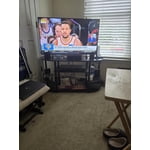
[This review was collected as part of a promotion.] I found out that this TV is very very very great picture the brightness and the settings all accessible very good device for being a UHD TV I like the I care I like the device care feature on there where you can maintenance on the TV Great TV thanks stop

Review from Samsung US
Helpful?0U87HKRK7K5R15580452247
Apr 20, 2026
Reviewer name: JakeHutch
4 out of 5 stars
4 out of 5 stars review

Hard working for a low price

[This review was collected as part of a promotion.] This affordable tv easily met my priorities in a display, which are Minimum of 60Hz refresh rate, true 4k resolution, 7.1ch Dolby Atmos compatibility with my PC and Nakamichi sound bar and interoperability with all my devices including my Samsung ZFold 3, able to cast wirelessly anytime I need. If you can offer me a TV that improves on any of these feature, I'll be in heaven.

Review from Samsung US
Helpful?0U87HKRK7K5R15580452247