Skip to Main Content
Sam's Club
Sam's Club
All Departments
All Services
Customer reviews for SAMSUNG 77" Class S90FD Series 4K OLED Smart TV for
SAMSUNG 77" Class S90FD Series 4K OLED Smart TV
4.7 out of 5 stars
stars
469 ratings458 reviews
  1. 5 stars80% (377)
  2. 4 stars13% (59)
  3. 3 stars3% (15)
  4. 2 stars2% (11)
  5. 1 star1% (7)

Member photos

  • +131 images
Sort by |
Showing 51-60 of 458 reviews
Jul 27, 2026
Chacha
5 out of 5 stars review

Beautiful picture/color

Best tv I have owned, the picture is so crisp and clear, the colors are vibrant, the blackest of black and the reddist of reds. Couldn't believe how thin it is.

Review from Samsung US
Helpful?2IHY5YB7UM0015576170234
Jul 6, 2026
robylou
5 out of 5 stars review

Perfect picture

Samsung is awesome. The picture quality is fantastic. The Contrast and Brightness is perfect. I didn't need to adjust anything but if you do it is very responsive. I am very glad that I stuck with Samsung, it is the best by far.

Review from Samsung US
Helpful?2IHY5YB7UM0015576170234
Jul 5, 2026
Baxter S
1 out of 5 stars review

Lyons in the picture.

We have had to return this TV because five lines showed up in the picture while we were watching it. No matter what feed we used whether it be Netflix or any other application, the lines remain the same.

Review from Samsung US
Helpful?2IHY5YB7UM0015576170234
reply from Samsung Specialist

Thank you for your review. If there’s anything we can assist with, please don’t hesitate to call us at 1-800-SAMSUNG (8AM – 9PM EST Mon – Fri, 8AM – 6PM Sat – Sun), or reach us via text anytime. You can also visit ‘Support’ on our website for: • Live Chat • Manuals, Software, & Warranty Info ~ Samsung Specialist

Jul 28, 2026
MamaC70
5 out of 5 stars review

Great features!

I love the brightness and contrast when watching my movies. Much better than old technology. Also love the way the Apps are laid out and the games that can be played. I give this a heavy five star rating.

Review from Samsung US
Helpful?2IHY5YB7UM0015576170234
Jul 20, 2026
MIKEM
5 out of 5 stars review

Overall great purchase
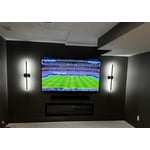
The overall picture quality is amazing. I am really happy with operating system, and ease of use on this TV. The brightness levels are great. I have the TV in a room with no windows and love how it is responding. Very happy with this purchase.

Review from Samsung US
Helpful?2IHY5YB7UM0015576170234
Jul 21, 2026
Debbie from Charleston
5 out of 5 stars review

Great brightness with the new TV

We are quite happy with our new 65” Samsung… we took the old one and put on the patio… lots of difference in the picture… very noticable…. Glad we made the switch…

Review from Samsung US
Helpful?2IHY5YB7UM0015576170234
Jul 27, 2026
Bhair
5 out of 5 stars review

Best bang for your buck

This tv has been nothing but amazing. The responsiveness of the hub app os impressive, and never lags. The picture quality is like your really there, full immersion.

Review from Samsung US
Helpful?2IHY5YB7UM0015576170234
Jul 6, 2026
TVLover
3 out of 5 stars review

Could be easier to operate

I do not like the fact that it will turn on by itself, I have attempted to trun off every feature in order to make the tv stay off when I turn it off.

Review from Samsung US
Helpful?2IHY5YB7UM0015576170234
reply from Samsung Advisor

Hi TVLover, Thanks for sharing your experience. If your TV is powering on by itself, there are a few settings and external triggers to review: 1. Power On with Mobile – Your TV may be connected to the SmartThings app or other networked devices. To stop wake signals, turn this feature off: Settings > All Settings > Connection > Network > Expert Settings > Power On with Mobile = Off 2. Check for Active Timers – Go to Settings > All Settings > General & Privacy > System Manager > Time > Timer Settings, then disable any On Timers or Sleep Timers 3. Anynet+ (HDMI-CEC) – If your TV is connected to external HDMI devices, one of them may be triggering power-on behavior. To disable this feature: Settings > All Settings > General & Privacy > External Device Manager > Anynet+ (HDMI-CEC) = Off 4. Software Update – Make sure your TV is up to date: Settings > Support > Software Update > Update Now If you’ve ruled out all the above and your TV still powers on unexpectedly, try unplugging it for 30 seconds. Should the issue continue, please call Samsung Support at 1-800-SAMSUNG, (8AM – 9PM EST Mon – Fri, 8AM – 6PM Sat – Sun). LiveChat is also available via the ‘Support’ link on our website. ~ Samsung Advisor

Jul 5, 2026
Mevissenj
5 out of 5 stars review

Meets or exceeds expectations
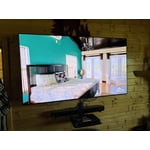
Beautiful picture, upgraded from 65” to this 77” and we thought it would take some time to get used to but nope perfect from day one. The platform for streaming works well and is easy to use. Definitely would buy again.

Review from Samsung US
Helpful?2IHY5YB7UM0015576170234
Jul 6, 2026
Daniel D
4 out of 5 stars review

So far so good

So far it's been pretty good, easy set up picture is great the only thing I can't figure is the right picture mode when I get time I'll do some more research

Review from Samsung US
Helpful?2IHY5YB7UM0015576170234