Skip to Main Content
Sam's Club
Sam's Club
All Departments
All Services
Customer reviews for SAMSUNG 98" Class Q80 Series 4K QLED Smart TV for
SAMSUNG 98" Class Q80 Series 4K QLED Smart TV
4.8 out of 5 stars
stars
458 ratings456 reviews
  1. 5 stars83% (380)
  2. 4 stars13% (61)
  3. 3 stars1% (6)
  4. 2 stars1% (3)
  5. 1 star2% (8)

Member photos

  • +162 images
Sort by |
Showing 441-450 of 456 reviews
May 17, 2025
Reviewer name: Mediaroom
5 out of 5 stars
5 out of 5 stars review

Beautiful

[This review was collected as part of a promotion.] We bought this TV for our new media room and it's perfect! We love everything about it.

Review from Samsung US
Helpful?54SUNRPK6N4013927409063
Jun 21, 2025
Reviewer name: ReviewGuy
4 out of 5 stars
4 out of 5 stars review

Q80C QLED 4K TV (2023)

[This review was collected as part of a promotion.] This is a great monitor with amazing picture quality. No complaints at all

Review from Samsung US
Helpful?54SUNRPK6N4013927409063
Jul 1, 2024
Reviewer name: Forprivate
5 out of 5 stars
5 out of 5 stars review

Great tv for the price

[This review was collected as part of a promotion.] This is a great TV for the price, and it is easy to setup.

Review from Samsung US
Helpful?54SUNRPK6N4013927409063
Jul 2, 2024
Reviewer name: Sansung24
5 out of 5 stars
5 out of 5 stars review

Excellent picture and sound

[This review was collected as part of a promotion.] Easy to set up and use Excellent picture and sound

Review from Samsung US
Helpful?54SUNRPK6N4013927409063
Feb 9, 2025
Reviewer name: Nickrhestud
4 out of 5 stars
4 out of 5 stars review

Great features!

How about this a month ago?And i'm glad I did, it's worked great.

Review from Samsung US
Helpful?54SUNRPK6N4013927409063
Aug 2, 2024
Reviewer name: kb8462
5 out of 5 stars
5 out of 5 stars review

Awesome TV

Just bought this TV and it is amazing. The picture quality is so crisp and the size is awesome.

Helpful?54SUNRPK6N4013927409063
Feb 5, 2025
Reviewer name: Coleman
5 out of 5 stars
5 out of 5 stars review

98" TV

So far I have no complaints, the entire family loves watching sporting events and movies.

Review from Samsung US
Helpful?54SUNRPK6N4013927409063
Jul 23, 2024
Reviewer name: MFluer
5 out of 5 stars
5 out of 5 stars review

Great!

i have been using this products for a while and love this product.

Review from Samsung US
Helpful?54SUNRPK6N4013927409063
Feb 13, 2025
Reviewer name: Lucketts
5 out of 5 stars
5 out of 5 stars review

Amazing Picture

Beautiful picture and great sound. No issues with the tv at all

Review from Samsung US
Helpful?54SUNRPK6N4013927409063
Oct 11, 2023
Reviewer name: Derolf
1 out of 5 stars
1 out of 5 stars review

Terrible picture - Blue patches
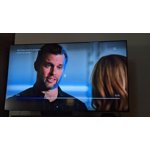
Terrible picture - Blue bleed through especially on faces.

Review from Samsung US
Helpful?54SUNRPK6N4013927409063
reply from Samsung Specialist

Derolf, Thank you for sharing your thoughts on the picture quality of your Q80C TV. To ensure you’ve got the latest image quality updates, please confirm that your TV is up to date with the latest firmware version. You can check by going to: Home > Menu > Settings > Support > Software Update. If the picture you’re seeing is still not to your liking after updating firmware, there are several picture settings you may want to try adjusting. Go to Home > Menu > Settings > All Settings > Picture > Picture Mode ...and select the mode that best fits your usage: 1. Standard: Is the default mode suitable for general viewing environments 2. Dynamic: Makes the picture brighter and clearer in bright viewing environments 3. Eco: Provided to save energy 4. Movie: Suitable for watching TV or movies in a dark room 5. Filmmaker Mode: Provides source content just as the creators intended. If the image is defined as Filmmaker Mode, it’ll automatically switch to Filmmaker Mode while watching. Intelligent Mode enables the TV to recognize and analyze the surroundings, noise, content, and your usage patterns to provide the best viewing experience. You can enable Intelligent Mode by going to Menu > Settings > All Settings > General & Privacy > Intelligent Mode Settings > Intelligent Mode. You may also want to fine-tune your picture with expert settings such as brightness, contrast, sharpness and more (All Settings > Picture > Expert Settings). If adjusting image settings does not improve your picture, please contact Samsung Customer Support at 1-800-SAMSUNG, 8AM - 12AM EST, 7 days a week. Or visit us on the Samsung website and click on the ‘Support’ link for: • LiveChat • Manuals, Software, & Warranty Info ~ Samsung Specialist