DYMO LabelWriter - 450 Twin Turbo High Speed Postage & Label Printer

Item # 163169
Current price is $274.00
Prices may vary in club and online
How do you want your item?

Shipping

Free for Plus on eligible orders over $50
Columbus, 43215
Return or replace within 90 days.
Sam's credit card
Get a $30 statement credit when you open an account and use it to make $30 in eligible Sam's Club purchases within 30 days¹.

Smart summary

Generated by AI
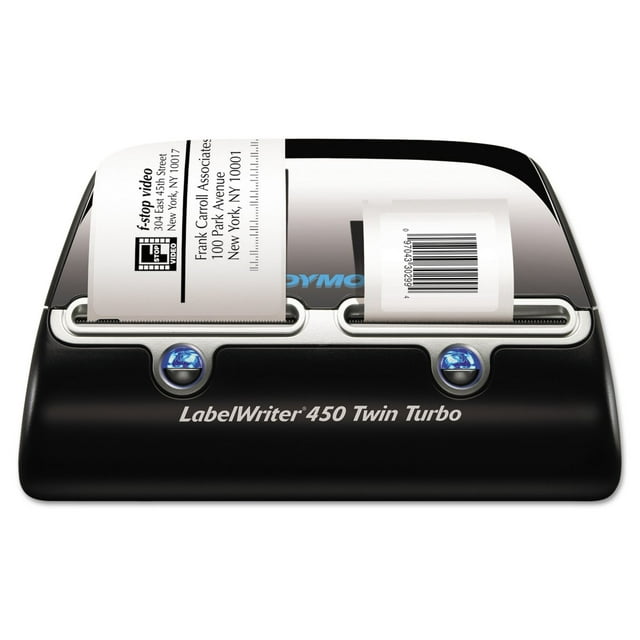
  • Efficient Office Solution: The DYMO LabelWriter 450 Twin Turbo offers an efficient solution for professional labeling, filing, and mailing, saving time and money by eliminating traditional sheet label printing hassles.
  • Seamless Program Integration: Connects to PC or Mac (Windows 7+, OS X v10.8+) for direct label printing from Microsoft Word, Outlook, QuickBooks, CardScan, Mac Address Book, and other popular programs.
  • Versatile Labeling Capabilities: Prints various labels including address, file folder, name badges, envelopes, and packages. Also creates barcodes and USPS approved postage labels with Address Fixer.
  • Rapid Ink-Free Printing: Utilizes thermal printing technology, eliminating ink/toner costs. Achieves high-speed output of 71 labels per minute for rapid task completion.
  • Compact Design Package: Features a compact design suitable for modern workspaces. The package includes proprietary software, USB cable, cleaning card, power adapter, user guides, and starter rolls of address and DYMO Stamps labels.
DYMO LabelWriter - 450 Twin Turbo High Speed Postage & Label Printer
Hero image 0 of DYMO LabelWriter - 450 Twin Turbo High Speed Postage & Label Printer, 0 of 7

About this item

Product details

The most efficient solution for your professional labeling, filing and mailing needs, the LabelWriterĀ® 450 saves you time and money at the office. Connect a LabelWriterĀ® 450 to your PC or MacĀ® and you’re ready to print labels directly from MicrosoftĀ® Word or OutlookĀ®, QuickBooksĀ®, CardScanĀ®, MacĀ® Address Book and other popular programs. Print impressive address, file folder labels, name badges and more without the extra work and hassle of printing sheet labels on a standard desktop printer. Thermal printing technology eliminates the cost of ink or toner and the printer’s compact design makes it an easy and attractive addition to any modern workspace. 

Compatible with WindowsĀ® 7 or later and Mac OSĀ® X v10.8 or later. 

Package Includes: Software; USB Cable; Cleaning Card; AC Power Adapter and Cable; User Guide; Quick Start Guide; Starter Roll of Address Labels; Starter Roll of DYMO Stamps Labels.

info:
If the item details above aren't accurate or complete, we want to know about it.Ā 

Specifications

Global Product Type: PC Connectable Label Makers

Machine Width: 5.5"

Maximum Tape/Label Width: 2.3"

Maximum Resolution (Dpi): 600 dpi

Number of Printed Lines: 4

Label Maker Type: Printer

Operating System Compatibility: MacĀ® OS X 10.5 and Later; WindowsĀ® XP, Vistaā„¢, 7, 8

Connector/Port/Interface: USB

Tape Type: LW

Power Source(s): AC Adapter (Included)

Prints Barcodes: Yes

Prints Postage: Yes

Printing Speed: 71 Labels/min

Model Name/Number: LabelWriterĀ® 450 Twin Turbo

Machine Height: 7.4"

Machine Depth: 8.4"

Warnings and disclaimers

Disclaimer

"Membership is required to complete an in-club or curbside pickup purchase at Sam's Club."

Member ratings & reviews

Filtered and sorted results would be available on the new 'Customer ratings & reviews' page.
Sort by |

Showing 1-3 of 165 reviews

Jan 16, 2017
WalmartCustomer
5 out of 5 stars review

Verified Purchase

Bought as a Replacement

I already had one of these for about 10 years and it just recently stopped working. It has the same features as my old one, which I already loved. The Dymo label site is the software used to make address labels, and you can also make shipping labels with Dazzle software included. To make stamps you need to use Endicia. It's all very easy and self-explanatory. I love my labeler and highly recommend it for anyone who needs it for personal or small business.

Review from walmart.com
Helpful?57FII27QW6D313879664629
Jun 20, 2019
ShellOffAdmin
5 out of 5 stars review

Verified Purchase

So happy I purchased!!

I have been using LabelWriter 450 Twin Turbo for a couple of weeks now, daily at my job. It does exactly what we needed to and more. There are a few things I would personally update on the software, however I am thoroughly pleased with the functions it performs.

Review from Dymo.com
Helpful?57FII27QW6D313879664629
Feb 17, 2013
theprez3
5 out of 5 stars review

Verified Purchase

Good product, love the postage

This is a very good product. Prints fast and almost the instant you push the print button. Even though I was only looking for a single printer for printing postage, I opted for the twin as I figured I would find many more uses of this product after owning it for a while since there are so many label choices available and didn't want to be bothered changing label rolls all the time. It didn't take long to realize I made the right choice. I've already found many more uses than I anticipated and the list is growing. Having the second side makes it easier since I can leave the stamps in one side and other labels in the other side. I've read the complaints from others about the dymo stamps postage options for this printer so I will shed some light on it. Dymo stamps offer a free account with no monthly service charge that allows you to print stamps and postage for flat rate boxes, packages up to 13oz, large envelopes, letters and postcards. It works very well, the free account just doesn't allow you to print specific amounts for packages weighing over 13oz unless you are using flat rate boxes. So it's a basic postage service. If you upgrade to the Standard account, which carries a monthly charge, you may print variable amounts and also add tracking information plus some other features. Personally, the free account works perfect for me. For the basic dymo stamps account you may only print postage on the smaller stamps labels and the paid accounts allow you to print postage on any shipping label as well. When purchasing stamp labels for the free account, only purchase dymo brand as they now require you to register each roll of stamp labels with your account and the dymo brand have the registration number printed on the backing paper from the roll. So stay away from the cheaper replacements. Plus, if you misprint a stamp, dymo will refund your account for the postage used and they only do this with authentic dymo stamp labels. The printer comes with a stamp starter roll of 50 and address labels. The roll that came with my machine didn't have a registration number on the back even though they are dymo, but a quick call to dymo stamps and they took care of it by allowing me to print 50 before being prompted for a registration number. I purchased a new roll that has it on there so when I run out of the starters, I'll be good to go. Be aware that some of the previous model printers such as the labelwriter 400 can be found at a decent price but require a software upgrade costing $50 to print postage. So I recommend sticking with the newer models like this one. There is no off button on the printer, so be aware that there are blue lights on the front that illuminate all the time, which I find annoying but not a big deal unless the printer is in your bedroom. I love the fact that it doesn't use any ink, which is a big plus. The software for the printer is very simple and easy to learn in just a few minutes but also has many features, allowing you to even customize your labels with pictures or logos and different fonts. It even has an option to click on that will check to make sure the address you typed in is accurate and will correct it for you. It will add that funny postal barcode to the label so that it goes through the mail system more accurately. When you use a roll of labels for the first time, make sure you pull off and discard the first few labels that have adhesive from the tape on them to avoid gumming up the printer. All in all, I am very impressed with this product and hope it continues to serve us well.

Review from walmart.com
Helpful?57FII27QW6D313879664629