Skip to Main Content
Sam's Club
Sam's Club
Customer reviews for SAMSUNG 70" Class U7900F Series 4K Crystal UHD Smart TV for
SAMSUNG 70" Class U7900F Series 4K Crystal UHD Smart TV
4.6 out of 5 stars
stars2,325 ratings2,318 reviews
  1. 5 stars76% (1,768)
  2. 4 stars15% (339)
  3. 3 stars5% (117)
  4. 2 stars2% (41)
  5. 1 star3% (60)

Member photos

  • +915 images
Sort by |
Showing 61-70 of 2,318 reviews
Jun 8, 2026
Pet Owner
1 out of 5 stars review

No outstanding featues - it doesn't work

[This review was collected as part of a promotion.] After 8 months of ownership, (purchased Oct, 2, 2025) the TV is dead - Not working at all. Would not want a samsung TV if we won one. If there was an overall rating of zero, that would be a more accurate rating than a one star. Second Samsung product we have owned and nothing but problems, problems, problems.

Review from Samsung US
Helpful?519VMKO7QPOP17358505999
reply from Samsung Advisor

Hi Pet Owner, It’s unfortunate to hear about your experience with Samsung’s U7900FD TV. We’re committed to delivering quality, value, and the best possible product experience. This TV is backed by a 1-year limited manufacturer’s warranty, which includes authorized repair for eligible defects when purchased brand-new from an authorized retailer. To review full warranty terms, you can enter your model number here: https://www.samsung.com/us/support/warranty/ We’d appreciate the opportunity to assist further. Please contact Samsung Customer Support at 1-800-SAMSUNG (8AM – 9PM EST Mon – Fri, 8AM – 6PM Sat – Sun)or connect with a LiveChat agent by clicking the ‘Support’ link on our website. ~ Samsung Advisor

Jun 1, 2026
Samsung4life
5 out of 5 stars review

Beautiful picture and great quality

[This review was collected as part of a promotion.] This television has the most beautiful picture and vibrancy quality! The resolution doesn't disappoint! I didn't get the chance to see it in action prior to getting it. I also love that I am able to sign into my Samsung account and have all of it right there at my fingertips! I have all of the things I love about samsung plus the amazing security, i will gladly purchase another tv!

Review from Samsung US
Helpful?519VMKO7QPOP17358505999
May 20, 2026
FrancisEM
5 out of 5 stars review

Good Value
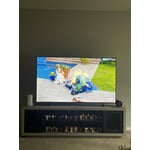
[This review was collected as part of a promotion.] Our Samsung 65-inch TV has been amazing so far. The picture quality is super clear and vibrant, especially when watching movies and sports. The sound is decent, and the smart TV features are easy to use. Definitely a great upgrade for our living room and worth the purchase.

Review from Samsung US
Helpful?519VMKO7QPOP17358505999
Jun 5, 2026
Ha2026
2 out of 5 stars review

Samsung 65 questionable

[This review was collected as part of a promotion.] This particular product does not seem to line up with the Samsung standard. We gpt this product in December 2025 and constantly have to unplug so it resets as the screen keeps going black but still playing sound

Review from Samsung US
Helpful?519VMKO7QPOP17358505999
reply from Samsung Advisor

Hi Ha2026, Thanks for reaching out about the intermittent black screen issue. If you're not using any external devices and the TV randomly cuts to black, it’s usually related to settings, signal, or internal software. Here are a few steps to help narrow it down and get things stable again. 1. Start with Power & Source Checks • Confirm the source: Even without external devices, it's worth confirming the TV is on the correct internal source (like TV/Live TV or a streaming app). Go to: Home > Left directional key > Connected Devices > Sources • Power cycle the TV: Unplug the TV from the power outlet for at least 60 seconds, then plug it back in. This can help reset any temporary glitches. • Check the power outlet: If you're using a power strip or surge protector, try plugging the TV directly into the wall to rule out inconsistent power delivery. 2. Update Your TV Software: Software updates often resolve bugs that can cause screen flickers or blackouts • Make sure the TV has the latest firmware version installed: Home > Left directional key > Settings > Support > Software Update 3. Run Built-In Diagnostics • Perform a Picture Test: Home > Left directional key > Settings > Support > Device Care > Self Diagnosis > Picture Test. This helps determine if the issue is hardware- or software-related. • Run the HDMI Test (optional): Even without HDMI devices connected, this can help verify that internal ports are functioning properly: Home > Left directional key > Settings > Support > Device Care > Self Diagnosis > HDMI Test 4. Review Energy & Picture Settings • Turn off Power Saving Mode or Eco Solution settings—they can dim or turn off the screen during periods of inactivity: Settings > All Settings > General & Privacy > Power & Energy Saving • Turn off Auto Power Off (if enabled): Settings > All Settings > General & Privacy > System Manager > Auto Power Off • Adjust Picture Mode settings: If the current mode is overly dynamic (like “Dynamic” or “Vivid”), try switching to “Standard” or “Movie” and observe if the screen behavior changes. 5. Factory Reset (if needed): If the problem persists after all checks, consider resetting the TV to default settings. (Heads-up: this will erase your installed apps and personal settings.) If none of these steps resolve the intermittent blackout, please reach out to Samsung Support for further troubleshooting or possible service options at 1-800-SAMSUNG (8AM – 9PM EST Mon – Fri, 8AM – 6PM Sat – Sun), or reach us via text anytime. You can also visit ‘Support’ on our website for: • Live Chat • Manuals, Software, & Warranty Info ~ Samsung Advisor

May 27, 2026
Frustrated Gpa
1 out of 5 stars review

Frustrated with set up

[This review was collected as part of a promotion.] picture good - sound good. Gave this 1 star because set-up was very frustrating! 1st prob was could not set up without creating a Samsung account, Did not want to do that but required. Followed all on screen instructions which were wrong. Nothing worked until used QR. Once into set up process, most instructions were wrong of incomplete. On-line instructions for getting to items in settings were wrong - one step left out. Only got to settings by accident. Spent 1 to 1 1/2 hours each day over a one week period until I got what I wanted. Final frustration was TV lost the internet connection. It did not save the PW for my router - had to reenter. Took several tries - kept timing out cause I could not enter PW fast enough - 1st time I've ever been required to enter a PW quickly while setting up anything. Bottom line - I have not and will not recommend this TV to a friend - or anyone else for that matter. Done with Samsung if product has to be set up

Review from Samsung US
Helpful?519VMKO7QPOP17358505999
reply from Samsung Advisor

Hi Frustrated Gpa, We are very sorry to hear about the issues you experienced while setting up your TV. Please know we appreciate all of your patience, and we are here for you if you have issues in the future. Reach out by calling 1-800-SAMSUNG from 8AM – 9PM EST Mon – Fri, 8AM – 6PM Sat – Sun, any day of the week. You can also chat with us online by visiting the ‘Support’ section of our website. ~ Samsung Advisor

May 17, 2026
Ole1Kenobi
4 out of 5 stars review

Overall Good Television
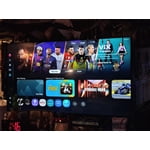
[This review was collected as part of a promotion.] This TV has great picture and great sound. Comes with a mass selection of download able apps and games. It is able to connect to the stereo system, wireless headphones, PS4 controllers, and computers speaking from experience. You're able to jump on the internet browser, just as you would a regular computer. Doesn't have much for connection ports. This particular model doesn't come with a built-in remote microphone, which is disappointing.

Review from Samsung US
Helpful?519VMKO7QPOP17358505999
May 21, 2026
Samsung
5 out of 5 stars review

Love the feature

[This review was collected as part of a promotion.] I love Samsung I am particularly fond of Samsung products, as they offer seamless connectivity through their dedicated app, enabling me to conveniently control and monitor my technological devices. products I can connect to the app to control and monitor my tech products

Review from Samsung US
Helpful?519VMKO7QPOP17358505999
May 17, 2026
Anonymous
5 out of 5 stars review

Sam-Sung a perfect pitch with this TV

[This review was collected as part of a promotion.] This Samsung was an amazing replacement to a similar Vizio unit that barely lasted a few years. Resolution is so much better and even the menu controls are easier and smoother to use. Would recommend this model to anyone else looking for a great, reliable and trusted name in televisions.

Review from Samsung US
Helpful?519VMKO7QPOP17358505999
May 20, 2026
Joe NWA
2 out of 5 stars review

Some Issues

[This review was collected as part of a promotion.] I'm having an issue with the TV - automatically turns itself on, automatically pauses, automatically unpauses, automatically unmutes itself. Samsung replaced the main board, but the issue still persists. Other than that, the picture and sound are great.

Review from Samsung US
Helpful?519VMKO7QPOP17358505999
reply from Samsung Advisor

Hi Joe NWA, We're very sorry you are experiencing issues with your TV turning itself on and freezing. To best assist you, please call us at 1-800-SAMSUNG, 8AM – 9PM EST Mon – Fri, 8AM – 6PM Sat – Sun. LiveChat is also available via the ‘Support’ link on our website. ~ Samsung Advisor

Jun 1, 2026
SphinxOneSon
5 out of 5 stars review

Excellent for the price, short on a few features
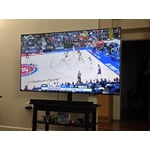
[This review was collected as part of a promotion.] I am having a great experience with this new smart TV! It only comes with two HDMI ports (and one of them is being used for eARC for my subwoofer and there is no optical port for sound either) so you may run into issues if you have multiple gaming systems to plug in. I only have one so it isn't a problem for me. I works well for streaming video when connected to cellular internet solutions over wireless, but I still use the ethernet port just in case. It was easy to set up and most popular video apps are supported.

Review from Samsung US
Helpful?519VMKO7QPOP17358505999