
 Customer reviews for SAMSUNG 70" Class U7900F Series 4K Crystal UHD Smart TV for
Member photos
 +915 images
Perfect Size and Price
[This review was collected as part of a promotion.] We thought we wanted a bigger TV to follow the trend, but getting a 50 inch has the same picture and sound as the bigger TVs. We also loved the price compared to other brands with the same abilities.
Nice picture
[This review was collected as part of a promotion.] I expected to be able to use voice commands and it doesn't have that feature in 2026. Also I expected the tv to have the time of day available on the tv and I was surprised that it didn't have that feature. It is a beautiful tv even without those features but I would like those simple features
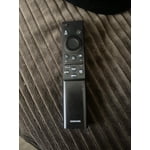
Hi Jody, Thank you for sharing your review. Your TV Works With Alexa, meaning you’ll need to connect a standalone Alexa device such as an Echo speaker, to control compatible smart home devices and some experiences on your TV. Here are the steps: 1. Download both the Amazon Alexa and Samsung SmartThings apps, if you don't already have them. Both are available for iOS or Android devices. 2. Make sure your Alexa device and TV are both connected to the same Wi-Fi network. 3. Your TV must be enabled within the SmartThings app. If not, make sure you are signed in with your Samsung account on the TV: Settings > All Settings > Samsung Account 4. Log in to the SmartThings app with the same Samsung account. Tap Devices, and if your TV isn’t already shown, tap + to add it to the app. 5. In the Alexa app, enable the SmartThings skill and sign into your Samsung account. This will automatically connect your Samsung TV to Alexa and let you use voice commands to control your television. If you need more help, we’re here. Give us a call at 1-800-SAMSUNG (8AM – 9PM EST Mon – Fri, 8AM – 6PM Sat – Sun). You can also connect with a LiveChat agent through the Support link on our website. ~ Samsung Advisor
Meets the bare minimum
[This review was collected as part of a promotion.] The remote doesn't work well. I've already had to replace it twice. And there are no input ports to hook up additional speakers. The picture is decent, but the sound quality is low and without the ability to hook up a better sound bar, this TV barely meets the bare minimum of quality. Will be getting a different TV within the year
NOLA, Thank you for purchasing Samsung’s U7900FD TV and for sharing your feedback on the sound quality. To ensure you’re experiencing the best possible audio, we first recommend checking that your TV is running the latest firmware. To do this, navigate to: Home > left directional key > Settings > Support > Software Update If the sound still doesn’t meet your expectations, there are a few settings you can try adjusting: Go to: Settings > All Settings > Sound > Sound Mode • Standard: Balanced sound without emphasis on any one range • Optimized: Enhanced effects and spacious sound • Amplify: Boosts mid and high tones to make dialogue clearer You can also explore Expert Settings to fine-tune options such as Balance, Equalizer, Auto Volume, and more to match your personal preferences. If you're considering expanding your setup, Samsung’s Q- and S-Series Soundbars (like the HW-Q600F) support Q-Symphony, a feature that synchronizes your TV and soundbar speakers for an immersive 3D audio experience. For further help adjusting your sound settings or finding the right soundbar for your space, feel free to reach Samsung Support at 1-800-SAMSUNG (8AM – 9PM EST Mon – Fri, 8AM – 6PM Sat – Sun) or visit the Support link on our website for: • LiveChat • Manuals, Software, & Warranty Info ~ Samsung Specialist
Disappointed with screen reliability
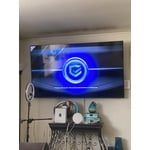
[This review was collected as part of a promotion.] I am very disappointed with this Samsung 75" Crystal UHD TV. The screen developed a visible defect, and this has made the TV frustrating to use. For a Samsung product, especially a 75" TV, I expected better long-term quality and reliability. The TV looked good when it was working properly, but the screen failure is a serious concern. A television should last more than a short period without developing this kind of issue. I am including a photo so other customers can see the defect before deciding whether to buy this model
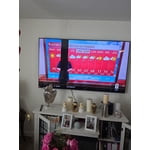
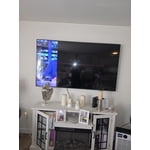
Hi JoseR, Thank you for your feedback regarding the screen abnormalities you’re seeing on your Samsung U7900F TV. To determine whether the issue is related to the TV itself, we recommend running a Picture Test, which displays a high-definition test image for you to examine. Go to: Settings > Support > Device Care > Self Diagnosis > Picture Test If the issue appears on all sources and during the Picture Test, the TV may require service. For help setting up a service appointment, please contact Samsung Support at 1-800-SAMSUNG (8AM – 9PM EST Mon – Fri, 8AM – 6PM Sat – Sun), or reach us via text anytime. You can also visit ‘Support’ on our website for: • Live Chat • Manuals, Software, & Warranty Info ~Samsung Advisor
Great clarity!
[This review was collected as part of a promotion.] This television has been a literal eye opener! The clarity is incredible! I can easily read all of the fine print disclaimers hidden in the advertisements. Just imagine how that clarity affects your pleasurable watching!
Good but Some improvements be nice
[This review was collected as part of a promotion.] Good picture quality both OTA and streaming. Program GUID instant info is skechy or non existent. Fire TV's does a better Job of Program guid info and layout. I still like the old DirectTV HNS layout for instant ch info but that's long been forgotten. Use extended Phillips remote with full feature buttons much better than Samsung remote. Had a Previous STV with remote that was configured with circle control which I liked better but case broke in half not to sturdy. Sound is good but playing Streaming content say from Prime I find the CEC HDMI wont allow u to do extend sound equalization between my audio amp/rec and TV GUI. The only audio options are fixed Audio format types selections. The new STV start up dash board is now improved after last update.
Weary
[This review was collected as part of a promotion.] I was a little weary about buying another Samsung tv. In 11/2022 we purchased one and around 12/2025 it turned into a complete black screen and never worked again. We tried rebooting it, but it kept the black screen with no picture. The kids bought this 85' Samsung tv because they wanted a theatre experience at home. I do like the brightness and the smart tv components in it. It sometimes lags when it turns on but it's probably trying to gather all the apps downloaded.
Fine but not great.
[This review was collected as part of a promotion.] It's fine but sometimes the sound cuts out and you have to power cycle the tv to get it to work again. Also kind of annoying that only the remote that came with it can click the update buttons. Overall a decent tv, but I don't think I'd buy it again.
Hi Daniel, For optimal performance, please ensure your TV is running the latest firmware. You can check this by going to: Home > left directional key > Settings > Support > Software Update To further optimize performance, try running Device Care, which checks memory, clears unused cached data, and closes background apps: Home > left directional key > Settings > Support > Device Care > Start Device Care If issues continue, please reach Samsung Support at 1-800-SAMSUNG (8AM – 9PM EST Mon – Fri, 8AM – 6PM Sat – Sun). LiveChat is also available via the ‘Support’ link on our website. ~ Samsung Advisor
New customer
[This review was collected as part of a promotion.] I just got it so far so far is is good I just got it so far so far it's it's good I like to screenshot by losing your hand she needed to stay with all three to follow three just let she needed to stay with all three to follow three just got to do it oh okay okay she needs to be with her in the afternoon too yeah so nobody going to be telling on them yeah cuz she said she's a different she got no Pre-K safely since she's a different type of monitor she told me yeah I don't know but she's not no Pre-K
Fantastic picture
[This review was collected as part of a promotion.] Tv is lightweight and has an amazing picture quality. I also love that i can download apps and games on my tv. It is very easy and simple to use, as well as setup for first time use. The price was pretty decent as well .