Skip to Main Content
Sam's Club
Sam's Club
Customer reviews for SAMSUNG 70" Class U7900F Series 4K Crystal UHD Smart TV for
SAMSUNG 70" Class U7900F Series 4K Crystal UHD Smart TV
4.6 out of 5 stars
stars2,311 ratings2,304 reviews
  1. 5 stars76% (1,757)
  2. 4 stars15% (340)
  3. 3 stars5% (115)
  4. 2 stars2% (41)
  5. 1 star3% (58)

Member photos

  • +895 images
Sort by |
Showing 1,691-1,700 of 2,304 reviews
Oct 2, 2025
William
5 out of 5 stars review

“Samsung 75″ U7900FD: Big-Screen Crystal UHD for L

[This review was collected as part of a promotion.] If you want a large 4K display for general TV viewing, streaming, sports, or casual movie watching without paying premium prices, the Samsung 75″ U7900FD is a compelling option. It delivers excellent value and performance for everyday use, though serious HDR lovers or users in very bright rooms might want to consider stepping up to higher-end models with better contrast and peak brightness. Would you like a shorter “consumer review” version or a comparison against competitors in the same price class?

Review from Samsung US
Helpful?519VMKO7QPOP17358505999
Oct 8, 2025
Azitokbl
3 out of 5 stars review

Still Figuring It Out

[This review was collected as part of a promotion.] So far, I'm in the fence about this TV. The picture is amazing, but the functions are confusing and, at times, inconvenient. I don't like how downloading an app doesn't automatically bring it to the home page. I don't like how, on the remote, the left volume button has so many functions, so trying to mute the TV will bring up an avatar doing sign language. I don't like how I need to but a soundbar to utilize Bixby. The volume isn't that great either. I do, however, like that it's a Samaung TV and I'm able to watch Roku TV. As mentioned, picture is beautiful. I really feel like I need too many spent gadgets to fully appreciate what this TV is capable of, so I'll hold on to it until I unlock it's full potential. Overall, I'd buy again... so far.

Review from Samsung US
Helpful?519VMKO7QPOP17358505999
reply from Samsung Advisor

Hi Azitokbl,\n\nWe appreciate your feedback and have a few tips that may improve your experience. \n\nFirst, to customize your Home Screen: \n1. Go to App Settings (these can be found at the bottom of the Apps screen) and select the app you want to move. The following options will be available:\na. Add to Home: Move the app to your desired location on the Home screen.\nb. Delete: Delete app (applicable for manually installed apps only)\n\nNext, to disable the accessibility feature you mentioned go to Menu > Settings > All Settings > General & Privacy > Accessibility.\n\nFinally, please know you do not need a soundbar to utilize Bixby. You can access Bixby via the Samsung SmartThings app. \n\nIf you need additional support, Samsung is here to help. Please call us at 1-800-SAMSUNG, available daily from 8AM - 12AM EST. You can also chat with a LiveChat agent by clicking the ‘Support’ link on our website for:\n• Live Chat\n• Manuals, Software, & Warranty Info\n• Creating a Service ticket\n\n~ Samsung Advisor\n

Sep 24, 2025
Zampa26
5 out of 5 stars review

Awesome Product

[This review was collected as part of a promotion.] I was glad to purchase this Samsung TV . It was a great price and easy to set up . The remote takes some time to learn , but once you get the hang of it, it is easy to use . The picture quality is outstanding ,and very clear . I had 2 other Samsung TV's that lasted a long time , so buying another was with no hesitation . I would purchase this product again .

Review from Samsung US
Helpful?519VMKO7QPOP17358505999
Jul 5, 2025
ja4atlanta
5 out of 5 stars review

I've Missed Samsung TVs

[This review was collected as part of a promotion.] It's been awhile since I treated myself to Samsung TV and they're better than ever. Set up is basically automated - although, there were a lot of times I had the new remote, my TV AND my Samsung tablet in my hands as I had to get through the various checks, even though I have a Samsung account. But - it worked, I got through it, and it's easy to use. I had trouble figuring out the app selection/deletion - but basically I already had a FireTV Stick and decided to just use that, so there was little set-up beyond the basics.

Review from Samsung US
Helpful?519VMKO7QPOP17358505999
Aug 20, 2025
Teachit
1 out of 5 stars review

Not the Samsung I’m used to!

Bought this tv yesterday. Did the setup and it was confusing to say the least. I’ve set up many TVs and most are straightforward and intuitive. I’ve even set up other Samsungs and this was by far the worst for set up. Now for the actual picture. Right out of the box the picture was not very good. Picture was “washed out” and just didn’t look right compared to our other TVs. Tried online suggestions for correcting colors and sharpness of image. Nothing improves the picture. So disappointed in this Samsung!!! Our cheapy TV, all our other TVs (all 6) are so much better. Our other Samsung (older set) is fine. Plus it has a mind of its own. After turning it off and then returning to watch tv it goes into Samsung plus instead of our satellite provider. This issue just started. At first at least when set was turned on we had our satellite on. And I HATE the remote. Even had our son over to help with adjustments and settings with no luck. Very disappointing product!

Review from Samsung US
Helpful?519VMKO7QPOP17358505999
reply from Samsung Advisor

Hi Teachit, We appreciate your feedback and are glad you reached out to us. There are a few adjustments you can make that may improve your experience. First, let's ensure you are running the latest Firmware. Go to Settings> Support> Software Update. If the picture appears unclear, dull, or lacks definition, there are several settings you can adjust to improve clarity and overall image quality. Go to: Settings > All Settings > Picture > Expert Settings, and review these key settings: Picture Clarity Settings: While originally intended for motion handling, these can also impact overall clarity • Off: Disables motion enhancements • Auto: Automatically adjusts based on content • Custom: Lets you fine-tune: o Judder Reduction – Helps smooth out uneven motion o LED Clear Motion – Boosts sharpness in fast-moving content o Noise Reduction – Reduces distortion and enhances detail in lower-resolution sources Core Picture Settings • Brightness – Controls overall screen brightness • Contrast – Enhances the difference between bright and dark areas • Sharpness – Adjusts edge definition; closer to 20 increases detail • Color – Enhances depth and intensity of colors Finally, while your TV may currently default to Samsung TV Plus when powered on, you can customize what your TV does at startup by adjusting the Start Screen Options. To do this, navigate to: Settings > All Settings > Advanced Features > Start Screen Option and choose from the following: 1. Start with Smart Hub Home – Automatically launches Smart Hub when the TV is turned on. You can enable or disable this option based on your preference. 2. Autorun Multi View Casting – If you cast YouTube content from your mobile device, the TV will automatically display the content using Multi View. 3. Autorun Multi View Mirroring – When you screen mirror your mobile device, Multi View will automatically open to show your device’s screen. If you need help adjusting these settings or have any other questions, please contact Samsung Support at 1-800-SAMSUNG, 8AM – 12AM EST, 7 days a week. LiveChat agents are also available by clicking on the ‘Support’ link on our website. ~ Samsung Advisor

Aug 21, 2025
Lockonator
5 out of 5 stars review

Features and screen are amazing

[This review was collected as part of a promotion.] This TV has amazing screen quality.I stream videos and games alot and the interface makes it a breeze to also link up with my galaxy s25 ultra to share and to use my phone to navigate my tv.I forget it came with a remote sometimes.love all the features and apps it comes with and samsung makes everything easy to find and use.Thanks Samsung

Review from Samsung US
Helpful?519VMKO7QPOP17358505999
Aug 22, 2025
Juanchos12
5 out of 5 stars review

This TV is awesome, it works fast and versatile.
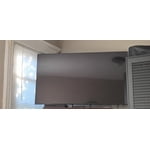
[This review was collected as part of a promotion.] I use my Samsung TV in many ways, first to watch series, is very good, there are never any failures, it has good lighting and resolution, I also use it in computer, very good and I like its functions, I also use it with video games that connect with my PS4, I love this product.

Review from Samsung US
Helpful?519VMKO7QPOP17358505999
Jul 20, 2025
Takira
5 out of 5 stars review

HD Visual , HD Sound , HD Gaming System

[This review was collected as part of a promotion.] Hi , I'm a very satisfied customer . I love how I can come home from work and play the game on a HD TV. Very good quality, I don't have to cut the lights off just to watch TV. The sound quality is outstanding. I love watching movies on it the kids love it . I have one in every room in the house , very food investment . Thank you guys for being able to provide good quality service .

Review from Samsung US
Helpful?519VMKO7QPOP17358505999
Jul 21, 2025
God2love
5 out of 5 stars review

My Samsung review
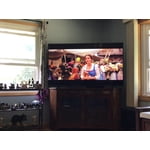
[This review was collected as part of a promotion.] I use my Samsung TV for watching through my cable and streaming services. I love the picture and color, much brighter and more vibrant than my old TV. I also went 5 inches bigger this time and just love the screen size it brings everything to life!

Review from Samsung US
Helpful?519VMKO7QPOP17358505999
Oct 13, 2025
Lov2shop
4 out of 5 stars review

Great TV.

[This review was collected as part of a promotion.] Tv has a great picture, and the sound is pretty good too. Which is good because there is no optical audio out, the only way to connect is by Bluetooth, which is mind of a pain. But overall a good tv.

Review from Samsung US
Helpful?519VMKO7QPOP17358505999