Skip to Main Content
Sam's Club
Sam's Club
Customer reviews for SAMSUNG 70” Class U8000F Series 4K Crystal UHD Smart TV for
SAMSUNG 70” Class U8000F Series 4K Crystal UHD Smart TV
4.6 out of 5 stars
stars1,559 ratings1,553 reviews
  1. 5 stars75% (1,162)
  2. 4 stars15% (234)
  3. 3 stars5% (77)
  4. 2 stars3% (42)
  5. 1 star3% (44)

Member photos

  • +456 images
Sort by |
Showing 331-340 of 1,553 reviews
May 20, 2026
BLCass
5 out of 5 stars review

Samsung Dominates

[This review was collected as part of a promotion.] Samsung has perfected TV viewing... THE best picture along with typical smart device options. Great buy for your dollar.

Review from Samsung US
Helpful?340LGBQNMBLF16007967994
Jun 10, 2026
Dandy Don
5 out of 5 stars review

MyTV

[This review was collected as part of a promotion.] Great TV. Wall to wall picture. Bright, crystal clear picture. Easy menu selections. Definitely a winner. Samsung fan forever.

Review from Samsung US
Helpful?340LGBQNMBLF16007967994
May 20, 2026
AlexV
5 out of 5 stars review

The Best TV I’ve owned
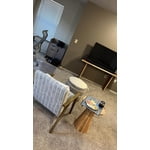
[This review was collected as part of a promotion.] This is the best TV I ever own Great resolution And really nice sound When paired to My Samsung Sound bar I like it a lot I use it To watch movies TV and listen To music

Review from Samsung US
Helpful?340LGBQNMBLF16007967994
Jun 5, 2026
Mytv
2 out of 5 stars review

Samsung

[This review was collected as part of a promotion.] I have issues with the TV and the wifi connection. It's only on this tv which is the main tv. It always goes in and out. I have updated and all but still does it. Love everything else about it thgh

Review from Samsung US
Helpful?340LGBQNMBLF16007967994
reply from Samsung Advisor

Hi Mytv, Thank you for sharing your experience with Wi-Fi connectivity. If your TV is having trouble connecting to the network, the following steps may help resolve the issue: Signal & Setup Tips: 1. Check TV-to-router distance – Your TV should be within 50 feet of the modem or access point for reliable signal strength. 2. Minimize interference – Turn off nearby wireless devices and make sure there are no physical barriers (stone walls, fireplaces, appliances) between the TV and router. Power Cycle Devices: 3. Restart both your TV and router – Unplug both devices for at least 30 seconds, then plug them back in and allow them to reboot fully. Connection Type: 4. Evaluate your connection method – o If using Wi-Fi, move your router closer to the TV and eliminate any obstructions. o For a more stable connection, we strongly recommend using a wired Ethernet cable. o If already using Ethernet, verify the cable is working by testing it with another device. Run Built-In Diagnostic Tools: 5. Network Test: Settings > Support > Device Care > Self Diagnosis > Smart Hub Connection Test 6. Wi-Fi Check: Settings > Support > Device Care > Self Diagnosis > Wi-Fi Last Resort: 7. Perform a Factory Reset (if issues persist): Settings > All Settings > General & Privacy > Reset > Factory Data Reset. Note that this will return all settings to their original defaults. If these steps don’t resolve the issue, please reach out to Samsung Support at 1-800-SAMSUNG (8AM – 9PM EST Mon – Fri, 8AM – 6PM Sat – Sun). LiveChat support and additional help are available at the ‘Support’ link on our website. ~ Samsung Advisor

May 21, 2026
Music Lover
5 out of 5 stars review

We love our new Samsung TV!

[This review was collected as part of a promotion.] We are very glad we replaced our old Samsung TV with a new Samsung smart TV. It’s a large size for the great price. Beautiful contrast, pictures and great sound. A joy to watch.

Review from Samsung US
Helpful?340LGBQNMBLF16007967994
Jun 1, 2026
Doug
5 out of 5 stars review

LOVE IT
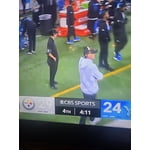
[This review was collected as part of a promotion.] Great product with awesome clarity brightness. Contrast is great. Viewing is refreshing watching sports.

Review from Samsung US
Helpful?340LGBQNMBLF16007967994
Jun 5, 2026
Jax24
3 out of 5 stars review

Sound is terrible!

[This review was collected as part of a promotion.] Picture is good. Easy to use. The sound is terrible you have to thrn up during show and then down because commercials are to loud!

Review from Samsung US
Helpful?340LGBQNMBLF16007967994
reply from Samsung Advisor

Hi Jax24, Thank you for sharing your experience with volume fluctuations on your Samsung U8000F TV. Sudden changes in volume can often be related to audio settings or content differences between sources or apps. Please try the following adjustments to help stabilize your TV's audio: 1. Enable Auto Volume. Go to: Settings > All Settings > Sound > Expert Settings > Auto Volume. This feature helps maintain a consistent volume level when switching channels or apps. 2. Change 3. . Try a different sound mode to see if one offers a more stable output: Settings > All Settings > Sound > Sound Mode (We recommend Standard or Amplify for more even performance.) 4. Check External Devices. If you're using a soundbar, receiver, or other audio device, check that its volume leveling or dynamic range settings aren’t interfering with the TV’s audio. 5. Update Firmware. Ensure your TV is running the latest software, as updates may include audio improvements: Settings > Support > Software Update > Update Now If the issue persists after these steps, please don’t hesitate to reach Samsung Customer Support at 1-800-SAMSUNG (8AM – 9PM EST Mon – Fri, 8AM – 6PM Sat – Sun). LiveChat is also available via the ‘Support’ link on our website. ~ Samsung Advisor

Jun 1, 2026
JCS7
5 out of 5 stars review

Excellent features

[This review was collected as part of a promotion.] This tv is huge, my husband watches it every night, the resolution n color is great beyond comparison, the surround sound helps him transform it unto a movie theater 🎦

Review from Samsung US
Helpful?340LGBQNMBLF16007967994
Jun 5, 2026
3Ddesigner
5 out of 5 stars review

Great TV

[This review was collected as part of a promotion.] I use this tv as a computer monitor for 3D modeling purposes. It works great and has no lag while moving my cursor around.

Review from Samsung US
Helpful?340LGBQNMBLF16007967994
May 19, 2026
Modiodi
5 out of 5 stars review

Love my Samsung TV

[This review was collected as part of a promotion.] I love my Samsung TV It's my 2nd. I love all of Samsung's products! I also own the Fold 5 and the S25 ultra just to name a couple. Samsung never disappoints!

Review from Samsung US
Helpful?340LGBQNMBLF16007967994